Become a MacRumors Supporter for $50/year with no ads, ability to filter front page stories, and private forums.

BetsyMePoocho

macrumors member
Original poster
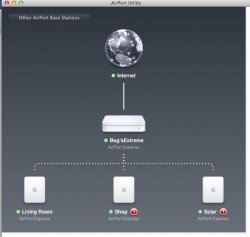
Just installed the new AirPort Utility v6.0. Two of my AirPort Express' have a small red ball with "1" in it.

What do these mean? I looked all over help, but can't find anything....

Thanks......
 

Attachments

  • Screen Shot 2012-02-03 at 7.58.59 AM copy.jpg
    Screen Shot 2012-02-03 at 7.58.59 AM copy.jpg
    59.8 KB · Views: 217
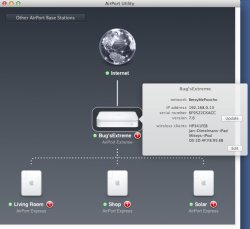
If you click on the device in AU, a little popup dialog will appear, telling you what is wrong.

Just so you can see, what I mean:
2012_02_03_pB1_AU_Lion-STATUS.png
 
Last edited:
AirPort Utilityv6.0

Hey Guys.... thanks for the suggestions. I tried them, but don't get the same results.....

Here is what I have now......
 

Attachments

  • Screen Shot 2012-02-03 at 10.40.00 AM copy.jpg
    Screen Shot 2012-02-03 at 10.40.00 AM copy.jpg
    78.7 KB · Views: 726
If you happen to have an iPhone, that little "red ball" with a number in it is very familiar. As Apple has made the latest Airport Utility more "app friendly", this is simply telling you (as has been suggested here), that updates are available. Click it and an "Update" button appears in addition to all the network information. Clicking on it performs the update and will then disappear -along with the little red ball (update indicator).
 
Register on MacRumors! This sidebar will go away, and you'll see fewer ads.