
Got a tip for us?
Let us know
Become a MacRumors Supporter for $50/year with no ads, ability to filter front page stories, and private forums.
New MacBook Owner - FileVault Yes/no?
- Thread starter ZebraDude
- Start date
- Sort by reaction score
You are using an out of date browser. It may not display this or other websites correctly.
You should upgrade or use an alternative browser.
You should upgrade or use an alternative browser.


shenan1982
macrumors 68040
I am very strong with iOS but a newbie with OS / X.
how bad is the performance hit on the new Base 1.1 / 256 and is the security worth it to enable it?
I currently have a mid 2010 iMac 21.5 that I'm not using it..
thoughts?
🙂
I don't use it.
well, mine isn't delivered yet (tomorrow), but i won't be using filevault.
first encryption does affect performance, disk speed or cpu, no matter how small (which you probably won't feel in real world application), there is affect.
and i think on this specific mac, login password + firmware password will do just fine. as to my understanding, file vault is to protect your hard drive, especially when it pulled out of a computer. in this event you won't need a login or firmware password to access the file on the hard drive, so you will need file vault. but for his specific mac, the hard drive cannot be pulled from logic board, which means you will always be protected by either firmware or log-in password.
first encryption does affect performance, disk speed or cpu, no matter how small (which you probably won't feel in real world application), there is affect.
and i think on this specific mac, login password + firmware password will do just fine. as to my understanding, file vault is to protect your hard drive, especially when it pulled out of a computer. in this event you won't need a login or firmware password to access the file on the hard drive, so you will need file vault. but for his specific mac, the hard drive cannot be pulled from logic board, which means you will always be protected by either firmware or log-in password.

3bs
macrumors 603
well, mine isn't delivered yet (tomorrow), but i won't be using filevault.
first encryption does affect performance, disk speed or cpu, no matter how small (which you probably won't feel in real world application), there is affect.
and i think on this specific mac, login password + firmware password will do just fine. as to my understanding, file vault is to protect your hard drive, especially when it pulled out of a computer. in this event you won't need a login or firmware password to access the file on the hard drive, so you will need file vault. but for his specific mac, the hard drive cannot be pulled from logic board, which means you will always be protected by either firmware or log-in password.
Why not? Can't someone theoretically still take it apart if they weren't worried about damaging the other components?
well, mine isn't delivered yet (tomorrow), but i won't be using filevault.
first encryption does affect performance, disk speed or cpu, no matter how small (which you probably won't feel in real world application), there is affect.
and i think on this specific mac, login password + firmware password will do just fine. as to my understanding, file vault is to protect your hard drive, especially when it pulled out of a computer. in this event you won't need a login or firmware password to access the file on the hard drive, so you will need file vault. but for his specific mac, the hard drive cannot be pulled from logic board, which means you will always be protected by either firmware or log-in password.
Without file vault on, if I stole your Macbook, it seems I'd be able to boot into recovery and run terminal, and mount your file system and get whatever I want.

dexterbell
macrumors 6502a
I am very strong with iOS but a newbie with OS / X.
how bad is the performance hit on the new Base 1.1 / 256 and is the security worth it to enable it?
I currently have a mid 2010 iMac 21.5 that I'm not using it..
thoughts?
🙂
I set it to the default with both boxes checked and was greeted with a spinning beachball for nearly 10 minutes. Had to shut it down and start over again not using FileVault which created a second admin I then had to delete. Frustrating start to a new laptop.
Why not? Can't someone theoretically still take it apart if they weren't worried about damaging the other components?
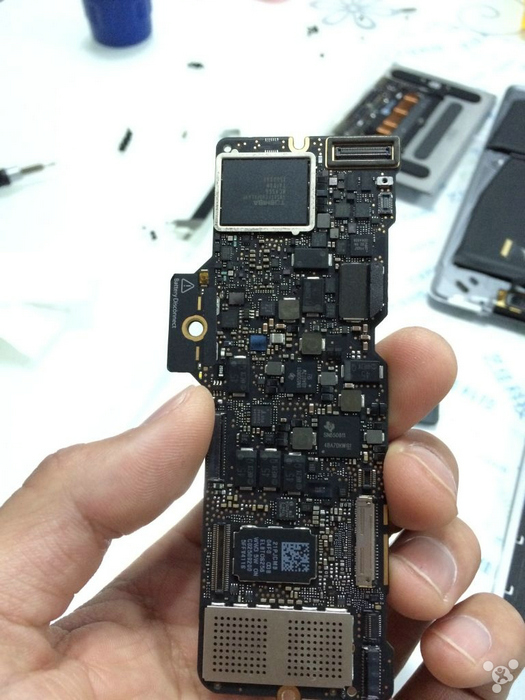
the rectangle on the upper left corner is the ssd. i doubt you can still read the data once it's pulled off the logic board.
btw, what's in your computer that others want so badly?
i mean, for most of us, encryption is just to protect some 'private' files, like photos, contacts, emails, not 'classified' file, right? it's not worth the time and money just to decrypt you family albums lol
well, if you do have like million dollar secrets in your computer, you don't need me to tell you to encrypt those files right?
----------
Without file vault on, if I stole your Macbook, it seems I'd be able to boot into recovery and run terminal, and mount your file system and get whatever I want.
not if i have firmware enabled. if i have that, you will have to pass that and then you can choose what boot option you want.
3bs
macrumors 603
Image
the rectangle on the upper left corner is the ssd. i doubt you can still read the data once it's pulled off the logic board.
btw, what's in your computer that others want so badly?
i mean, for most of us, encryption is just to protect some 'private' files, like photos, contacts, emails, not 'classified' file, right? it's not worth the time and money just to decrypt you family albums lol
well, if you do have like million dollar secrets in your computer, you don't need me to tell you to encrypt those files right?
I don't use or have ever used FireVault. I was just wondering if someone could take the SSD out and use it that way.
I don't use or have ever used FireVault. I was just wondering if someone could take the SSD out and use it that way.
yeah i just tried that lol pulled the 1tb from rmbp to use as external drive 🙂
if you have file vault enabled, once you connect as external drive, it will appear as a encrypted mac drive, you will need your login password (but not username) to unlock it, or you can erase it.
if not, it will just be a normal usb (or whatever) hard drive.

Queen6
macrumors G5
Realistically enabling File Vault will have no tangible effect on performance, outside of synthetic benchmarks.
Q-6
Q-6
3bs
macrumors 603
Realistically enabling File Vault will have no tangible effect on performance, outside of synthetic benchmarks.
Q-6
So what are the downsides to having it on? Do you? Other than losing your data if you forget the password.
Queen6
macrumors G5
So what are the downsides to having it on? Do you? Other than losing your data if you forget the password.
None in my opinion, if you forget your password, then you have bigger issues 😛
Q-6
Last edited:

and i think on this specific mac, login password + firmware password will do just fine. as to my understanding, file vault is to protect your hard drive, especially when it pulled out of a computer. in this event you won't need a login or firmware password to access the file on the hard drive, so you will need file vault. but for his specific mac, the hard drive cannot be pulled from logic board, which means you will always be protected by either firmware or log-in password.
There are ways around the EFI password, you can find different methods via Google. It's best to use EFI Password + FileVault. FV won't have any noticeable performance hit.
I don't know about anyone else, but my tax records are on my laptop and that's enough to concern me for a lost laptop. Having someone steal your identity is a nightmare worth guarding against.
Queen6
macrumors G5
well, mine locked up on the filevault yes/no question (i chose no) so i had to force-restart. now filevault is greyed out...
Seen a few other members with the same issue; initial MacBooks have a specialised build of 10.10.2, just use internet recovery and go directly to 10.10.3 I suspect your problems with FV will be solved.
Q-6
There are ways around the EFI password, you can find different methods via Google. It's best to use EFI Password + FileVault. FV won't have any noticeable performance hit.
I don't know about anyone else, but my tax records are on my laptop and that's enough to concern me for a lost laptop. Having someone steal your identity is a nightmare worth guarding against.
well, like i said, it's just how you think your data means to others.
and indeed, there are a few ways to bypass EFI password, but i think they all need to do something to the hardware, like replace a RAM or something. they are not possible on this specific compute because there is literately nothing you can modify.
when your computer is lost, say someone steel it, they most likely are just gonna sell it for money, not interested in your data. and they will probably not open it up, tear down, and see what's inside your computer, they don't know whether its your contract, tax records, or just porn on your computer. plus, you can always lock&erase your computer remotely
btw, is it really a good idea to bring all your tax records with you all the time?
----------
I don't use or have ever used FireVault. I was just wondering if someone could take the SSD out and use it that way.
i use on my macbook pro, but probably not planning to use it on rmb. it's slightly inconvenient when you want to wipe the hard drive and reinstall system with file vault enabled.
and i won't have any sensitive info on this computer, that is the biggest reason lol.
i've heard that file vault needs extra hard drive space to perform encryption and decryption, but that is like three years ago, and it was file vault. it's file vault 2 now i believe. don't know if that has changed
3bs
macrumors 603
i use on my macbook pro, but probably not planning to use it on rmb. it's slightly inconvenient when you want to wipe the hard drive and reinstall system with file vault enabled.
and i won't have any sensitive info on this computer, that is the biggest reason lol.
How is it inconvenient? I'm actually thinking about using FV on the rMB when it arrives since everyone is saying there's no performance hit.

pasadena
macrumors 6502a
I turned it on. It "froze" on the next screen (iCloud) for maybe 10 or 15 minutes, then continued. When I logged on for the first time, it told me encryption was suspended until I plugged the laptop in. At that point in time, it had already encrypted 35% of the 512Gb disk.
How is it inconvenient? I'm actually thinking about using FV on the rMB when it arrives since everyone is saying there's no performance hit.
technically, there is performance hit. but I'm on board with everyone else on this. you will not feel it, at all. even the benchmark score may not show this at all lol
when you are in recovery mode and want to wipe the hard drive, file vault will ask you to enter password to unlock the disk first. and sometimes this process will fail, couple times in a roll. but, i said this just to let you know, to be prepared for this situation when you reinstall the system. you should not take it into consideration when deciding whether to use file vault
when your computer is lost, say someone steel it, they most likely are just gonna sell it for money, not interested in your data. and they will probably not open it up, tear down, and see what's inside your computer, they don't know whether its your contract, tax records, or just porn on your computer. plus, you can always lock&erase your computer remotely
btw, is it really a good idea to bring all your tax records with you all the time?
They would need to crack the EFI password AND put the laptop on the Internet for you to remotely wipe it. If I stole a laptop I would never put it online. Granted most thieves are as you say, looking to make a buck off the device itself. But not all are and identity thieves can be very intelligent.
It was just tax season so I did have that data. However even without taxes there is typically enough info in a laptop to steal the owners ID. Many people store stuff like CC numbers and other details in text files, calendar entries and other things for pulling up.
I see this all the time working in IT. So I take extra precautions with my own laptop and I always advise others to do the same. But I won't push it further. To each their own.
They would need to crack the EFI password AND put the laptop on the Internet for you to remotely wipe it. If I stole a laptop I would never put it online. Granted most thieves are as you say, looking to make a buck off the device itself. But not all are and identity thieves can be very intelligent.
It was just tax season so I did have that data. However even without taxes there is typically enough info in a laptop to steal the owners ID. Many people store stuff like CC numbers and other details in text files, calendar entries and other things for pulling up.
I see this all the time working in IT. So I take extra precautions with my own laptop and I always advise others to do the same. But I won't push it further. To each their own.
you put your CC info in text files?! god I'm coming to steel your computer lol
what i meant is, it completely depends on what you store on your computer. if it's like you who store a lot of sensitive info on it, definitely turn it on. if it's like me, it's just some lecture notes, and photos, it makes no big difference.