Having come from a windows world where directory structure is about everything, I am having a hard time on the mac to wrap my head around what seems to be the just put it anywhere attitude.
For instance, I bought VMware's Fusion program so that I can have a test bed and learn Linux and other OS's. Test apps and not destroy my new iMac install with junk.
I don't know if the software was just written bad, but the only option is to create the new VM in the predefined /Virtual Machines directory off /Documents that is located on my rather small 256gb SSD drive, OR in the root of my external hard drive OR in one of the apple pre-defined favourite's locations.
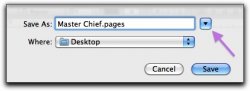
I would prefer for it to be on my external drive inside a folder I created called Virtual Machines.. But there is no browse function that I can tell to choose a better folder on any of the attached drives in the mac.. nor any method I have deduced on how to customise the favourites section to have locations that I use a lot rather than what Apple felt that I should use.
Any suggestions would be helpful..
For instance, I bought VMware's Fusion program so that I can have a test bed and learn Linux and other OS's. Test apps and not destroy my new iMac install with junk.
I don't know if the software was just written bad, but the only option is to create the new VM in the predefined /Virtual Machines directory off /Documents that is located on my rather small 256gb SSD drive, OR in the root of my external hard drive OR in one of the apple pre-defined favourite's locations.
I would prefer for it to be on my external drive inside a folder I created called Virtual Machines.. But there is no browse function that I can tell to choose a better folder on any of the attached drives in the mac.. nor any method I have deduced on how to customise the favourites section to have locations that I use a lot rather than what Apple felt that I should use.
Any suggestions would be helpful..