Become a MacRumors Supporter for $50/year with no ads, ability to filter front page stories, and private forums.

eyoungren

macrumors Nehalem
Original poster
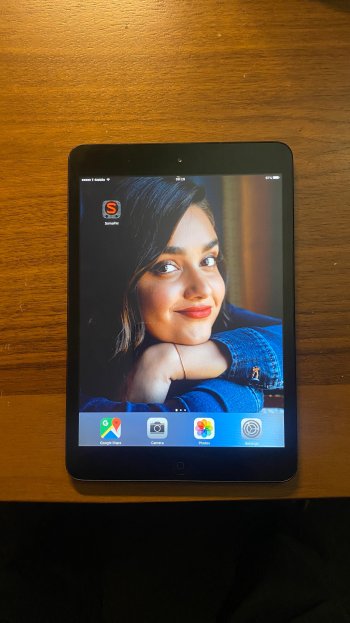
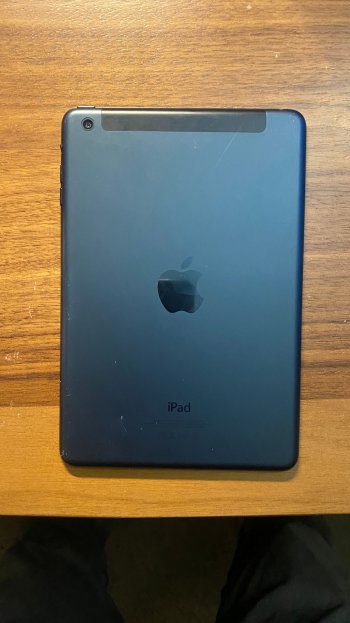
So, after a false start, I finally got an eBay vendor that delivered a Black/Slate WiFi+Cellular 32GB iPad Mini (1st Gen). Unlocked, and now on my carrier.

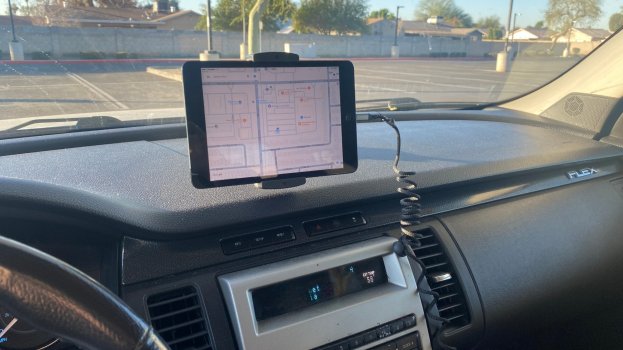
Sole purpose for this Mini is to serve on the dash of my car as GPS/NAV. It's an older version of Google Maps, but it works. Mini is on iOS 9.3.6.
2026-02-07 08.34.53.jpg2026-02-07 09.29.02.jpg2026-02-07 09.29.17.jpg

For those who might bring up security, there is/will be nothing sensitive done with this iPad. I can't even login to Google with it for nav. I have to use Google Maps with no account. Streaming music in the car is already handled by another device, which is good because trying to get some of my streaming apps to work yesterday wasn't working.
 
Last edited:
So, after a false start, I finally got an eBay vendor that delivered a Black/Slate WiFi+Cellular 32GB iPad Mini (1st Gen). Unlocked, and now on my carrier.

Sole purpose for this Mini is to serve on the dash of my car as GPS/NAV. It's an older version of Google Maps, but it works. Mini is on iOS 9.3.6.
View attachment 2602666

For those who might bring up security, there is/will be nothing sensitive done with this iPad. I can't even login to Google with it for nav. I have to use Google Maps with no account. Streaming music in the car is already handled by another device, which is good because trying to get some of my streaming apps to work yesterday wasn't working.
I reckon that for navigation purposes it’ll be fine, but that’s a painful iPad to use…

I’ve actually tried one on iOS 9. I have an iPod Touch 5G on native iOS 6, and the difference is ridiculous.

I’d call the A5 processor on iOS 9 unusable for everything… maybe except for a static use like yours.

Hopefully the app doesn’t repeatedly crash?
 
I reckon that for navigation purposes it’ll be fine, but that’s a painful iPad to use…

I’ve actually tried one on iOS 9. I have an iPod Touch 5G on native iOS 6, and the difference is ridiculous.

I’d call the A5 processor on iOS 9 unusable for everything… maybe except for a static use like yours.

Hopefully the app doesn’t repeatedly crash?
I just got back from a one hour round trip drive to take my wife to work. One stop (Starbucks) in between. Zero issues with Google Maps.

Quite literally, it will go in the car in the morning, unlocked, Google Maps opened, plugged in and then just stay on that app. In between, if I wish, I'll pull it out and stick it in a small backpack I have for it. At the end of the day it comes out and goes in the house. Phoenix, AZ summers will kill it, if I leave it in the car all the time.

I have a 6th gen iPad running iOS 17 that does everything I need an iPad for. I was using that iPad for this, but I wanted a Mini for the purpose that wasn't going to cost much.

Upshot, is that this version of Google Maps on the Mini seems to be much smoother than the version on my 6th gen iPad.

I may have some additional uses for the Mini at some point, provided it works out. But nothing sensitive.
 
I just got back from a one hour round trip drive to take my wife to work. One stop (Starbucks) in between. Zero issues with Google Maps.

Quite literally, it will go in the car in the morning, unlocked, Google Maps opened, plugged in and then just stay on that app. In between, if I wish, I'll pull it out and stick it in a small backpack I have for it. At the end of the day it comes out and goes in the house. Phoenix, AZ summers will kill it, if I leave it in the car all the time.

I have a 6th gen iPad running iOS 17 that does everything I need an iPad for. I was using that iPad for this, but I wanted a Mini for the purpose that wasn't going to cost much.

Upshot, is that this version of Google Maps on the Mini seems to be much smoother than the version on my 6th gen iPad.

I may have some additional uses for the Mini at some point, provided it works out. But nothing sensitive.
If it stays in the app and works, then it is honestly performing far better than I thought.

It’s great that it works, hopefully it works out fine for you!

Also, yeah, I wouldn’t leave it in the sun.
 
If it stays in the app and works, then it is honestly performing far better than I thought.

It’s great that it works, hopefully it works out fine for you!
Yeah, I mean, GMaps tracked right along with the speed of the car. Smooth scrolling.

I have maybe one other app installed but aside from that everything is stock at the moment. I have an iPhone 4s so I know how this can go, but the entire device is basically there to run just ONE app.
 
Yeah, I mean, GMaps tracked right along with the speed of the car. Smooth scrolling.

I have maybe one other app installed but aside from that everything is stock at the moment. I have an iPhone 4s so I know how this can go, but the entire device is basically there to run just ONE app.
You mentioned streaming, Apple Music should work right? At least it does for me on iOS 10. And it did last I used iOS 9.
 
You mentioned streaming, Apple Music should work right? At least it does for me on iOS 10. And it did last I used iOS 9.
Probably. Only thing is, I don't use Apple Music - either for streaming or anything else. I do have an older version of SOMA FM installed (the other app I mentioned earlier), but it's not picking up stations from SOMA FM.

It's quite literally, not important though. Mainly just a curiousity of how I might solve it, if it doesn't take up much of my time. My 6s+ handles streaming in the car, and when I finally replace my 11 Pro Max with a newer iPhone, then the 11PM will become the streaming device.
 
Probably. Only thing is, I don't use Apple Music - either for streaming or anything else. I do have an older version of SOMA FM installed (the other app I mentioned earlier), but it's not picking up stations from SOMA FM.

It's quite literally, not important though. Mainly just a curiousity of how I might solve it, if it doesn't take up much of my time. My 6s+ handles streaming in the car, and when I finally replace my 11 Pro Max with a newer iPhone, then the 11PM will become the streaming device.
Yeah, radio is tough with these quite old iOS versions. If navigation works fine though (I was honestly quite skeptical immediately after reading, so it’s cool that it works fine), then you’re all set.

Using older iPhones as music devices is great, I do the same. I don’t even use my main iPhone for music.

And I like to use home button iPhones for that, so I use an iPhone 6s and an iPhone 8, even though I could use the Xʀ for that too (with probably 2-3 times more battery life, than the iPhone 8 and 5+ vs the 6s).
 
  • Like
Reactions: eyoungren
Yeah, radio is tough with these quite old iOS versions. If navigation works fine though (I was honestly quite skeptical immediately after reading, so it’s cool that it works fine), then you’re all set.

Using older iPhones as music devices is great, I do the same. I don’t even use my main iPhone for music.

And I like to use home button iPhones for that, so I use an iPhone 6s and an iPhone 8, even though I could use the Xʀ for that too (with probably 2-3 times more battery life, than the iPhone 8 and 5+ vs the 6s).
I will just mention that the car itself is four years older than the iPad Mini. Ford SYNC 2nd Gen works great with my 6s+ though.
 
  • Like
Reactions: FeliApple
Seeing that Google Maps app was installed, I believe you are still able to log in to iCloud or log in your Apple ID/Account. I can still log in to iOS 10.3.3 on an iPhone 5c and iOS 9.3.5 on an iPod touch 5
 
  • Like
Reactions: eyoungren
Seeing that Google Maps app was installed, I believe you are still able to log in to iCloud or log in your Apple ID/Account. I can still log in to iOS 10.3.3 on an iPhone 5c and iOS 9.3.5 on an iPod touch 5
Yes, I am logged in. iCloud was the first thing I set up. But I'm not using it very much at the moment. It looks as if I will have to make backups to my Mac though as it seems to fail when I try to backup to iCloud.
 
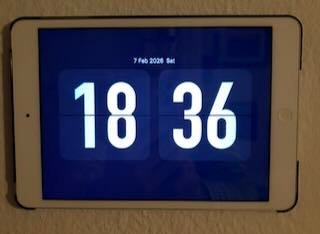
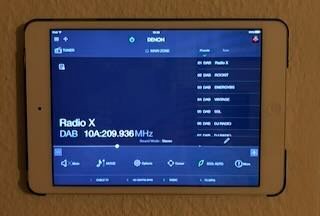
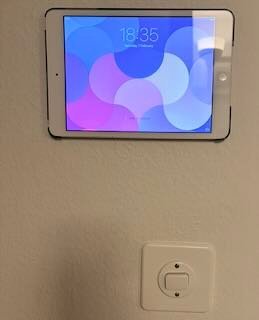
I still have mine - the only iPad I ever bought.

I haven't found much use for it; luckily the existing Logitech Harmony remote app, and my Denon AVR app are still on it and work fine.

I sometimes use it to display photos as a slideshow.

I bought a plastic rear case with it, which I nailed to a wall and clip the iPad into. It has its uses, but if it one day stopped working I wouldn't really miss it. Many iCloud things no longer work, including email (I haver another IMAP provider which works fine) due to the very old iOS version.

I can stream music using Bluetooth, but it has no Airplay, so I don't bother.

About the only app I could find recently which still loads onto iOS 9 was a flip clock.


IMG_0444.jpegIMG_0443.jpegIMG_0442.jpeg
 
I thought about doing this myself but I ended up getting a wireless CarPlay display for $75 on amazon. Just be careful you don’t mount it on an airbag, you don’t want to launch an iPad at a passenger’s face in addition to regular accident injury.
 
So, after a false start, I finally got an eBay vendor that delivered a Black/Slate WiFi+Cellular 32GB iPad Mini (1st Gen). Unlocked, and now on my carrier.

Sole purpose for this Mini is to serve on the dash of my car as GPS/NAV. It's an older version of Google Maps, but it works. Mini is on iOS 9.3.6.

View attachment 2602666View attachment 2602675View attachment 2602674

For those who might bring up security, there is/will be nothing sensitive done with this iPad. I can't even login to Google with it for nav. I have to use Google Maps with no account. Streaming music in the car is already handled by another device, which is good because trying to get some of my streaming apps to work yesterday wasn't working.

I didn’t realize this had LTE. I thought it was 2G/3G like the iPad 2.
 
  • Like
Reactions: eyoungren
I thought about doing this myself but I ended up getting a wireless CarPlay display for $75 on amazon. Just be careful you don’t mount it on an airbag, you don’t want to launch an iPad at a passenger’s face in addition to regular accident injury.
The actual mount itself is in the center of the dash. You can't see it from my original pic, but the iPad is attached to a short arm that goes back towards the center of the dash.
 
That’s actually a great use for a 1st-gen mini.
For a dedicated dash GPS, iOS 9.3.6 with offline-ish Google Maps makes a lot of sense, especially if nothing sensitive is tied to it. Curious how it holds up with heat on the dash over longer drives.
 
That’s actually a great use for a 1st-gen mini.
For a dedicated dash GPS, iOS 9.3.6 with offline-ish Google Maps makes a lot of sense, especially if nothing sensitive is tied to it. Curious how it holds up with heat on the dash over longer drives.
Yeah, heat's going to be something I'm watching quite soon. Right now, it's February in Phoenix, AZ with highs during the day of around 80º. It's going to look very different once May rolls around. By August it'll be ~110º out. I'd be lying if I said I didn't have some concern.
 
So, after a false start, I finally got an eBay vendor that delivered a Black/Slate WiFi+Cellular 32GB iPad Mini (1st Gen). Unlocked, and now on my carrier.

Sole purpose for this Mini is to serve on the dash of my car as GPS/NAV. It's an older version of Google Maps, but it works. Mini is on iOS 9.3.6.

View attachment 2602666View attachment 2602675View attachment 2602674

For those who might bring up security, there is/will be nothing sensitive done with this iPad. I can't even login to Google with it for nav. I have to use Google Maps with no account. Streaming music in the car is already handled by another device, which is good because trying to get some of my streaming apps to work yesterday wasn't working.
IMO any iOS device is likely to quickly fail due to overheating if left in direct summer sun with the a/c off in the dash position shown by the OP. It will be necessary to be routinely removing or shading it.

Yes I speak from experience. It took 24 hours for an overheated iPhone to recover, and probably voided the AppleCare forever. And I was in a temperate locale, not crazy-hot Phoenix
 
  • Like
Reactions: eyoungren
IMO any iOS device is likely to quickly fail due to overheating if left in direct summer sun with the a/c off in the dash position shown by the OP. It will be necessary to be routinely removing or shading it.

Yes I speak from experience. It took 24 hours for an overheated iPhone to recover, and probably voided the AppleCare forever. And I was in a temperate locale, not crazy-hot Phoenix
I'm just going to have to let people know how it goes. There was a span of about a year or so before COVID where I was driving a car with no A/C and the windows stuck in the up position. It was pretty bad around 2:30pm every day with 115º heat or so. A hour drive in traffic in that car. My iPhone 6s+ gave a few heat warnings once or twice but my Pixel 3a XL always shut down.

Now that wasn't direct sunlight so arguably this is different. With tax and shipping the iPad came out to $50, so I wouldn't be too broken up if it actually died. But I'm also not going to be leaving it in the car when not driving it either.
 
It's a shame you can't run a video recording app in the background... The position of the iPad is ideal for a Dashcam. 🙂
 
It's a shame you can't run a video recording app in the background... The position of the iPad is ideal for a Dashcam. 🙂
I looked in to that, but the suggestion of one reviewer was that if you're serious about using a dashcam it's better to get a dedicated cam with full features. According to that reviewer, most dash cam app features are not free and lack in some way, while free features aren't necessarily useful.

This could probably be argued. I'm sure there are plenty of decent dashcam apps that will do the job. But my desire to try and find one does not match my interest in having one. And now that I'm using this iPad and not my 6th gen iPad I am confident that the Mini couldn't handle a dash cam app on its own, much less that plus Google Maps.

All speculation on my part of course, I haven't done it so there's no personal experience on my part to say one way or the other.
 
I looked in to that, but the suggestion of one reviewer was that if you're serious about using a dashcam it's better to get a dedicated cam with full features. According to that reviewer, most dash cam app features are not free and lack in some way, while free features aren't necessarily useful.

This could probably be argued. I'm sure there are plenty of decent dashcam apps that will do the job. But my desire to try and find one does not match my interest in having one. And now that I'm using this iPad and not my 6th gen iPad I am confident that the Mini couldn't handle a dash cam app on its own, much less that plus Google Maps.

All speculation on my part of course, I haven't done it so there's no personal experience on my part to say one way or the other.
A cheap Android tablet with external memory card could be excellent dash cam.
 
  • Like
Reactions: eyoungren
Register on MacRumors! This sidebar will go away, and you'll see fewer ads.