hi,
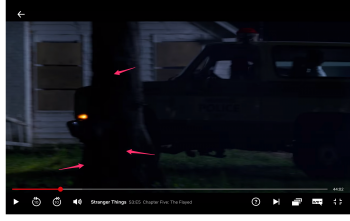
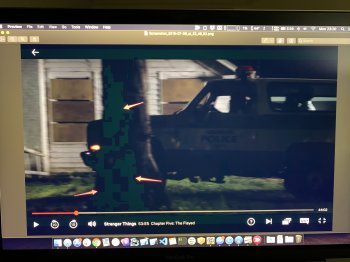
Whenever I'm streaming some movies from Netflix or HBO (Premium Ultra HD account, 1000Mbps stable connection), all the movies have big green pixelized squares . I took a screenshot and I wanted to complain to Netflix but then I realised that when I open the same screenshot on another computer or on my iPhone, I do not see those green squares anymore.
In attachment is the original screenshot and the a photo of my screen showing the screenshot.
I see this only when streaming some movies. I have a 2018 15" macbook pro with a Radeon Pro 560X 4 GB
Any idea what that could be?
[doublepost=1562621793][/doublepost]oh well mystery solved ... it's caused by NightShift
When it's enabled those green squares pop up ...
I tested it on my other macbooks pros and the behaviour is the same.
Whenever I'm streaming some movies from Netflix or HBO (Premium Ultra HD account, 1000Mbps stable connection), all the movies have big green pixelized squares . I took a screenshot and I wanted to complain to Netflix but then I realised that when I open the same screenshot on another computer or on my iPhone, I do not see those green squares anymore.
In attachment is the original screenshot and the a photo of my screen showing the screenshot.
I see this only when streaming some movies. I have a 2018 15" macbook pro with a Radeon Pro 560X 4 GB
Any idea what that could be?
[doublepost=1562621793][/doublepost]oh well mystery solved ... it's caused by NightShift
When it's enabled those green squares pop up ...
I tested it on my other macbooks pros and the behaviour is the same.