
Become a MacRumors Supporter for $50/year with no ads, ability to filter front page stories, and private forums.

chanoh

macrumors newbie
Original poster
Even I turn off one monitor, the mouse cursor go into that. And "displays" in "System Preference" shows two monitors.

Is there any way to use just one monitor with dual monitor setting without disconnecting cable? What I want to do is that the mouse cursor stays away from the monitor which is turned off.
 
Even I turn off one monitor, the mouse cursor go into that. And "displays" in "System Preference" shows two monitors.

Is there any way to use just one monitor with dual monitor setting without disconnecting cable? What I want to do is that the mouse cursor stays away from the monitor which is turned off.

You can use the miror function. I am not sure how it is called in english, but it`s a box to tick in the system preferences, monitors, qnd it just displays the exact same picture on both screen. SO your mouse does not go to the next screen since it displays only one.

hope I qm clear ...
 
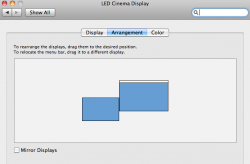
Down at the bottom. System prefs > Displays > Arrangement
 

Attachments

  • Screen shot 2010-08-16 at 5.01.04 PM.png
    Screen shot 2010-08-16 at 5.01.04 PM.png
    34.2 KB · Views: 111
You can use the miror function. I am not sure how it is called in english, but it`s a box to tick in the system preferences, monitors, qnd it just displays the exact same picture on both screen. SO your mouse does not go to the next screen since it displays only one.

hope I qm clear ...

The problem of this approach is that the mirroring follows lower resolution. The resolution of my main monitor is 1920X1200 and the second one is 1440X900. When I put the "mirror displays" option, the screen displays on the second monitor with weird resolution. If I put the menu bar on smaller monitor and enable the mirroring option, it shows native 1440X900 resolution.

The perfect solution is disconnecting the DVI cable from second monitor, but it's annoying job to do every time.
 
Down at the bottom. System prefs > Displays > Arrangement

Wow!! That's good idea.

I'll try it when I play Starcraft 2. 🙂

BTW, don't you guys have this problem when you play SC 2? I play full screen mode, but the mouse moves over second monitor. I think it's SC 2's bug.
 
Wow!! That's good idea.

I'll try it when I play Starcraft 2. 🙂

BTW, don't you guys have this problem when you play SC 2? I play full screen mode, but the mouse moves over second monitor. I think it's SC 2's bug.

I know exactly what you mean. It does the same thing with any Steam game. I play this other game called Nexuiz every now and then and its full screen too, but it doesnt have that problem. If you use hot corners and noticed that they are activated during game play, check out lava corners.
 
Wow!! That's good idea.

I'll try it when I play Starcraft 2. 🙂

BTW, don't you guys have this problem when you play SC 2? I play full screen mode, but the mouse moves over second monitor. I think it's SC 2's bug.

in Mac, my mouse stays in the main monitor in SC2...
 
Wow!! That's good idea.

I'll try it when I play Starcraft 2. 🙂

BTW, don't you guys have this problem when you play SC 2? I play full screen mode, but the mouse moves over second monitor. I think it's SC 2's bug.

I don't have that problem. Check your SC2 settings - there are three options off the top of my head, Windowed, Windowed (Maximised) and Full Screen or something like that. The maximised windowed version would have the problem that you've got but the full screen version shouldn't.
 
I don't have that problem. Check your SC2 settings - there are three options off the top of my head, Windowed, Windowed (Maximised) and Full Screen or something like that. The maximised windowed version would have the problem that you've got but the full screen version shouldn't.

Is there an option for this on Steam games?
 
Is there an option for this on Steam games?

I'm not sure but it would probably be a per-game setting inside the game. I just fired up Portal quickly though and the only time the mouse could move to another screen was when the menus were open. In normal game mode it didn't happen.
 
I'm not sure but it would probably be a per-game setting inside the game. I just fired up Portal quickly though and the only time the mouse could move to another screen was when the menus were open. In normal game mode it didn't happen.

Thats weird. When I played portal the mouse didn't show up on the other screen, but when I clicked when I knew the mouse would normally be on the other screen, then it showed the mouse. Like it doesn't show the mouse on another screen until you click off screen, it was weird. And same with hot corners, which is why I use Lava Corners.
 
Register on MacRumors! This sidebar will go away, and you'll see fewer ads.