

Become a MacRumors Supporter for $50/year with no ads, ability to filter front page stories, and private forums.

MacRumors

macrumors bot
Original poster


The popular Notepad++ coding editor is now available as a native macOS app, following a successful open-source community port of the original Windows codebase. The Notepad replacement runs as a universal binary, so it works on both Apple silicon and Intel Macs.
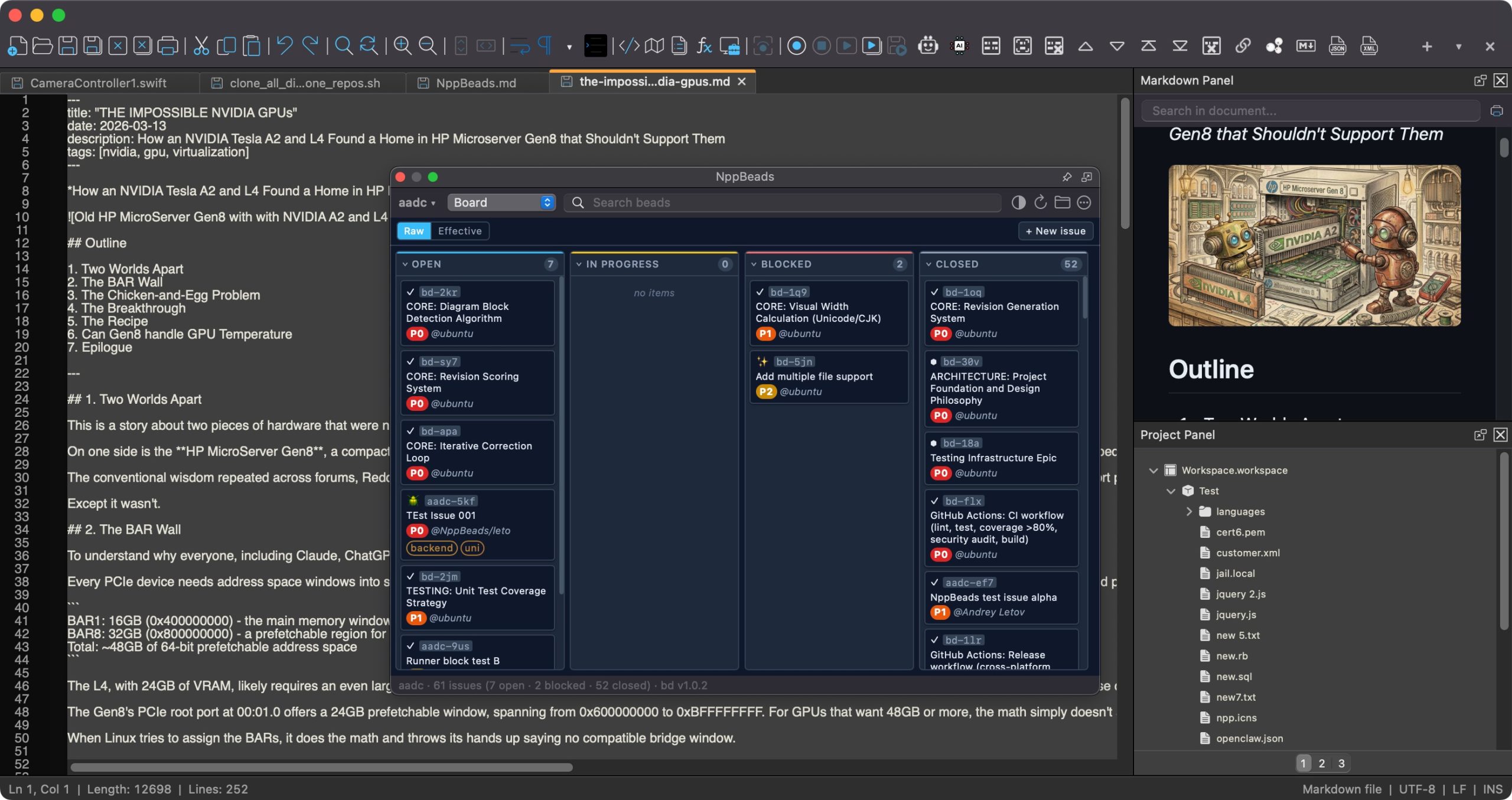
notepad-plus-plus-scaled.jpg

Notepad++ has been one of the most popular text editors on Windows for more than 20 years. Until now, Mac users who switched from Windows, or who worked across both platforms, had to choose between giving up the editor and running it through a Wine or CrossOver compatibility layer. Now those users have no such dilemma.

The editing experience is identical to the Windows version, right down to the Scintilla engine, tabbed editing, syntax highlighting for 80+ languages, search and replace, macro recording, and plugin support. The only difference is that the menus, dialogs, file pickers, keyboard shortcuts, and windowing all use native macOS Cocoa APIs.

Notepad++ for macOS is maintained by Andrey Letov, who wrote the Objective-C++ Cocoa UI that replaces Notepad++'s Win32 front-end. The app is available to download from the Notepad++ website. It's completely free and released under the GNU General Public License, so there are no ads, subs, or hidden costs.

(Thanks, Mike!)

Article Link: Notepad++ Code Editor Comes to Mac After 20-Year Wait
 
  • Like
  • Wow
Reactions: dimon2242 and xyz01
Notepad++ for macOS is maintained by Andrey Letov
and a team of AI agents.

Andrey started the Notepad++ for Mac project in March 2026 to close a twenty-year gap: Mac users who loved Notepad++ on Windows had never had a native equivalent. The port is written in Objective-C++ on top of Scintilla and Cocoa (the "right way" instead of a Wine wrapper), and multi-agent AI development workflows are what make a one-person project at this scale practical.
 
Last edited:
Downloaded it and gave it a quick whirl. The GUI feels totally off on MacOS in my opinion. Even the settings for the app is in a Settings menu in the menu bar and not under the application menu next to the Apple menu as per usual.

I really like CotEditor which feels right at home to use in MacOS.

But maybe I'm in the minority who thinks about how apps looks and ”feels”, and I'm sure there are many good features unique to Notepad++ that are useful. 🙂
 
Last edited:
I use BBEdit and Coderunner. BBEdit is a more powerful text manipulator, and great with HTML; CodeRunner has syntax checking and is great for testing code.
 
I was super excited, but then I installed it and... it is nothing like Windows version I remember from few years back. But this is the first native mac version so probably fixes and improvements will come soon. For now, the UI looks bad.
 
It's all about what you are used to using. On a terminal it's Emacs for me. On a Mac it's Xcode.
I downloaded and tried NotePad++ but it's just one more thing to learn that I can do without.
Notepad++ has probably been ported now due to AI aided ports being quick and easy.
Editors are probably less important these days due to AI taking on more and more of the developer rolls and tasks.
I personally spend so much less time editing code today than at any time in my 30+ developer career.
The bottle neck now is typing in my explanation to an AI what I want, or where it went wrong or how to refine what it has just done. That's the important editor now.
 
  • Like
Reactions: Canyonrider
It's all about what you are used to using. On a terminal it's Emacs for me. On a Mac it's Xcode.
I downloaded and tried NotePad++ but it's just one more thing to learn that I can do without.
Notepad++ has probably been ported now due to AI aided ports being quick and easy.
Editors are probably less important these days due to AI taking on more and more of the developer rolls and tasks.
I personally spend so much less time editing code today than at any time in my 30+ developer career.
The bottle neck now is typing in my explanation to an AI what I want, or where it went wrong or how to refine what it has just done. That's the important editor now.
We need a new IDE just for writing AI prompts with a full extension ecosystem and AI integration so I can type in prompts so it can write the prompts for me! 😂
 
Downloaded it and gave it a quick whirl. The GUI feels totally of on MacOS in my opinion. Even the settings for the app is in a Settings menu in the menu bar and not under the application menu next to the Apple menu as per usual.

I really like CotEditor which feels right at home to use in MacOS.
Yeah, I'll have to take a look. I used Notepad++ for over 15 years before finishing dumping Windows at home a year ago - it's not pretty but it works.

CotEditor has been a reasonable replacement (they key feature being that I can open & close the editor without losing unsaved files) but it's not 100% what I'm used to. My "memory" at work is stored in 100+ unsaved tabs of N++ at all times 😳
 
Register on MacRumors! This sidebar will go away, and you'll see fewer ads.