
Become a MacRumors Supporter for $50/year with no ads, ability to filter front page stories, and private forums.

LegendKillerUK

macrumors 6502
Original poster
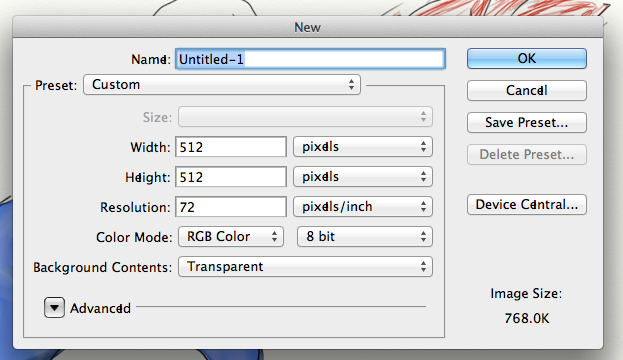
Not sure what's going on here but it only happened today.

Notice the vertical line in some instances of e in this dialogue.

I've not seen it in the Finder but it has shown up in some other apps, e.g. TextEdit.

Anyone know what's going on?
JaZxJ.png
 
For openers, I suspect a corrupt/damaged or duplicate font file.

To validate your fonts:
1. Open Font Book
2. From the left column, select “All Fonts” and then highlight them all.
3. In the Menu Bar, go to File>Validate Fonts.

What are your results?

BTW, does this always happen with all fonts, or just when you're using a particular font?
 
It tells me there are 25 minor problems.

24 are for duplicate fonts and the last one is a 'kern' table structure and contents error on the font Bauhaus 93.

I don't see this problem on all fonts. Like typing this message has no issues.
 
It does indeed seem as though a duplicate font is causing the problem. Have you installed any fonts of late?

Here is Apple's solution:http://docs.info.apple.com/article.html?path=FontBook/2.2/en/5285.html

But apparently this approach/fix is not without its shortcomings, so let's wait until a real font expert (for sure not moi) chimes in and ensures no irreparable harm is done.

And, FWIW, before mucking about, it is always a good idea to have a verified backup. Just in case...
 
Register on MacRumors! This sidebar will go away, and you'll see fewer ads.