
I think I've done something which I don't know how to reverse.
A little while ago I followed some instructions on how to network with a windows PC, which was all well and good and successful(I can't find these instructions now). However, when I now try to connect to other Macs (via the network icon in the sidebar in Finder) instead of listing the available machines on the network, I get two folders that I don't think were there before - 'My Network' and 'Work Group'. (see pic). Can someone brighter than me suggest how to revert this to the 'normal' behaviour of clicking on the Network icon, and being presented with the available machines in the finder? 😕
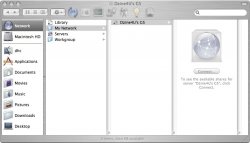
Also, when I do try to connect, I get a slightly different 'log in' screen (see below pic) - what have I done wrong/what should I do to correct this?

Thanks for your advice.
A little while ago I followed some instructions on how to network with a windows PC, which was all well and good and successful(I can't find these instructions now). However, when I now try to connect to other Macs (via the network icon in the sidebar in Finder) instead of listing the available machines on the network, I get two folders that I don't think were there before - 'My Network' and 'Work Group'. (see pic). Can someone brighter than me suggest how to revert this to the 'normal' behaviour of clicking on the Network icon, and being presented with the available machines in the finder? 😕
Also, when I do try to connect, I get a slightly different 'log in' screen (see below pic) - what have I done wrong/what should I do to correct this?
Thanks for your advice.
