
Become a MacRumors Supporter for $50/year with no ads, ability to filter front page stories, and private forums.

iHeartTheApple

macrumors 6502
Original poster
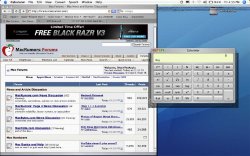
So, this is what I'm seeing now on my MacBook. It was perfectly fine until I used CoreDuoTemp 0.8. That was the first time I saw weird black streaks windowing the application. When I opened some other apps it did the same thing...like with addressbook and calculator. I restarted, repaired permissions, verified the disk, and went on with no issues.

Then, I used FrontRow to play some music and when I exited front row this is what I saw😱 😱 😱 :
Picture 1.jpg

There are weird black and other color streaks now along the top menu bar and around my safari and calculator windows!

Any ideas? Is it a hardware issue? Software? Has anyone else seen this on a MB or other Apple computer? Also, now that I'm on issues...I have noticed, just recently, that ever so often, the speakers (I have it connected to external speakers) make a quick "blip" as if the speaker cable is being uplugged from the MB. 😕 😱

Any help would be greatly appreciated...🙁
 
It could be a Software issue, but you'll have to Safe Boot (hold shift key on restart) the machine to see if it is a SW problem -- takes a long time to boot (maybe 10 minutes.)

Also, create a new user and see if that user is also corrupted -- sometimes people do stupid things that corrupt a User's Folder.
 
Is secure virtual memory turned on? If so, turn it off.

I had this on two MacBooks with low RAM and secure virtual memory turned on. If you do searches on apple's forums you'll see that it's been encountered by lot of people using MacBooks and Mac Minis.

For me, turning off secure virtual memory "fixed" it, although I wouldn't call needing to turn off a normal OS X feature a "fix." Apparently adding RAM will also make it go away.

http://discussions.apple.com/thread.jspa?threadID=489831&tstart=15
http://discussions.apple.com/thread.jspa?messageID=2191465#2191465
http://discussions.apple.com/thread.jspa?threadID=400981&tstart=45
http://episteme.arstechnica.com/groupee/forums/a/tpc/f/8300945231/m/473001408731

among others...
 
dialo said:
Is secure virtual memory turned on? If so, turn it off.

I had this on two MacBooks with low RAM and secure virtual memory turned on. If you do searches on apple's forums you'll see that it's been encountered by lot of people using MacBooks and Mac Minis.

For me, turning off secure virtual memory fixed it. Apparently adding RAM will also make it go away.

Wow! I *do* have "Use Secure Virtual Memory" turned on right now. I'm going to turn it off and see what happens. I just ran an extended hardware test and it said there were no problems found. The thing is I can't just reproduce the problem when I want to. It just seems to happen.

Question for you Dialo: Did this happen to you (and the others on Apple's forums) with both symptoms? Just the screen streaks? Just the speaker "blip"?

Thanks for the help!
 
iHeartTheApple said:
Question for you Dialo: Did this happen to you (and the others on Apple's forums) with both symptoms? Just the screen streaks? Just the speaker "blip"?
Just the video issues.
Thanks for the help!
No problem. Hope it works! 🙂
 
Register on MacRumors! This sidebar will go away, and you'll see fewer ads.