

Hi guys,
I have two old local photo libraries (a1.photoslibrary and b2.photoslibrary) that I created some time ago. After organizing my photos, creating a new photo library (new1.photoslibrary), and setting it as the “System Photo Library,” I emptied and deleted the two old ones (a1 and b2).
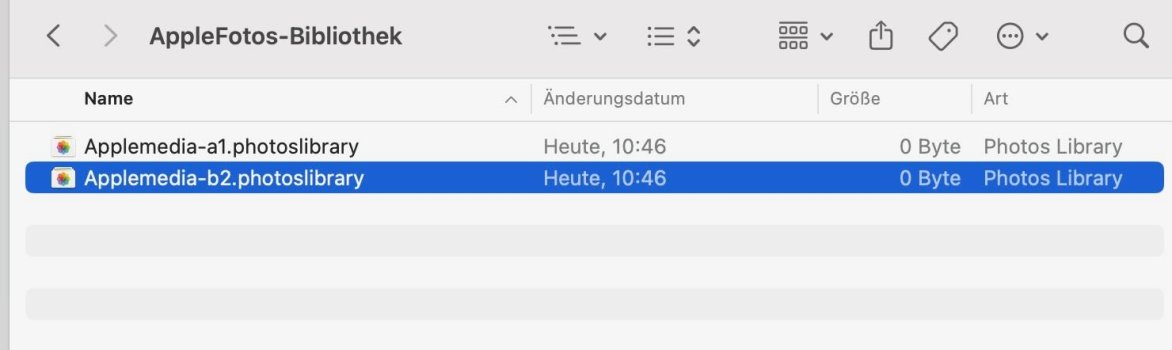
However, every time I start up the system (even without opening Photos.app), the two libraries reappear in their original path. Their size is now 0 KB.
Even if I rename/unzip/compress the two files (all of which can be done without any errors) and then delete them, they reappear in their original location.
At first, I tried to find a solution online, but unfortunately I only came across the following scattered ideas.
I tried (first as a user/owner and then as an administrator/sudo) some commands to delete them in the terminal:
I thought I might be able to find a configuration file where these two files are stored so I could delete them there, but I couldn't find anything.
Every tip on deleting a photolibrary assumes that the file is either not stored locally or that you need to change its “use as system library” status (by designating a new file as the system library), but neither of those applies to me.
Now, when I try to open these old libraries, I get error code 4301, which hasn’t helped me either (Ok, they are 0 kb).
So I also disabled TimeMachine, deleted my TimeMachine-drive, created a new one and did a new TimeMachine backup and excluded the path and the two files, deleted the local files again - but these files occurs again.
EDIT: I have forgot to say that I have even excluded these files from Spotlight search.
Who can tell me how to delete these two libraries and in which configuration file they are stored, causing them to keep reappearing?
Thx and regards, Macioso
I have two old local photo libraries (a1.photoslibrary and b2.photoslibrary) that I created some time ago. After organizing my photos, creating a new photo library (new1.photoslibrary), and setting it as the “System Photo Library,” I emptied and deleted the two old ones (a1 and b2).
However, every time I start up the system (even without opening Photos.app), the two libraries reappear in their original path. Their size is now 0 KB.
Even if I rename/unzip/compress the two files (all of which can be done without any errors) and then delete them, they reappear in their original location.
At first, I tried to find a solution online, but unfortunately I only came across the following scattered ideas.
I tried (first as a user/owner and then as an administrator/sudo) some commands to delete them in the terminal:
Code:
sudo killall -v -c photolibraryd
sudo chown -v -R $(stat -f "%Su:%Sg" ~) //Users/me/Pictures/AppleFotos-Bibliothek ##this is the location of the two files
sudo rm -Rf AppleFotos-Bibliothek
I thought I might be able to find a configuration file where these two files are stored so I could delete them there, but I couldn't find anything.
Every tip on deleting a photolibrary assumes that the file is either not stored locally or that you need to change its “use as system library” status (by designating a new file as the system library), but neither of those applies to me.
Now, when I try to open these old libraries, I get error code 4301, which hasn’t helped me either (Ok, they are 0 kb).
So I also disabled TimeMachine, deleted my TimeMachine-drive, created a new one and did a new TimeMachine backup and excluded the path and the two files, deleted the local files again - but these files occurs again.
EDIT: I have forgot to say that I have even excluded these files from Spotlight search.
Who can tell me how to delete these two libraries and in which configuration file they are stored, causing them to keep reappearing?
Thx and regards, Macioso
Attachments
Last edited:

