Become a MacRumors Supporter for $50/year with no ads, ability to filter front page stories, and private forums.

heartstrings

macrumors newbie
Original poster
Dear community,

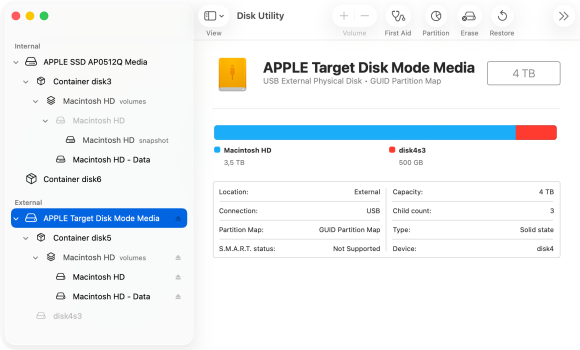
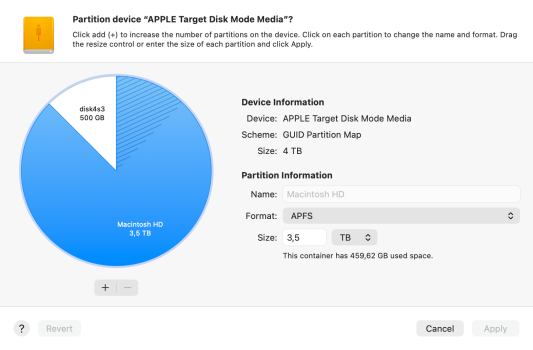
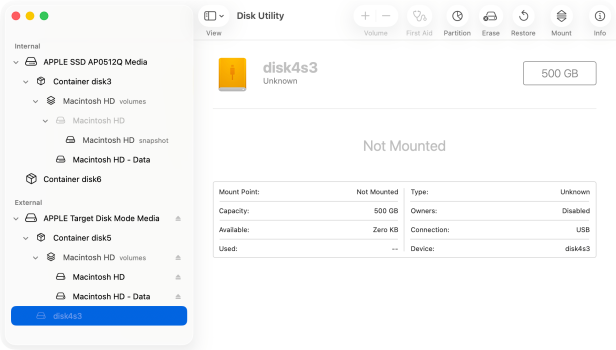
I have a very perculiar issue with Open Core Legacy which I hope there might be a solution. On my iMac 2017 21.5, I recently replaced the internal hard drive (1tb) with a 4TB SSD. It was slow and running an older version of MacOS Venturand half full (aprox. 500gb). Due to its thunderbolt ports, I was able to work comfortably for several years by installing MacOS on an external 500gb SSD as my main volume while using the slower internal harddrive mainly for extra storage. When I finally upgraded to the 4TB internal SSD, I decided to partition the 4TB (3.5TB / 500GB) whereby the contents of the 500gb external SSD was cloned into the 3.5TB partition and the internal hard disk into the smaller 500GB partition. Having done that I decided to apply Open Core Legacy on the bigger 3.5TB partition to be able to run the latest unsupported MacOS Sequoia. Everything went well except that the smaller 500gb partition is no longer mountable. It shows up as disk4s3 on my disk utility. I'm able to retrieve individual files like pictures and documents using 3rd party recovery softwares but I'm wondering if it's still possible to restore the full working partition because my iMovie library was stored in that partition. I hope there's someone in the community who may have experienced the same issue and found a solution.
 

Attachments

  • screenshot_04.png
    screenshot_04.png
    279.9 KB · Views: 73
  • screenshot_02.png
    screenshot_02.png
    308.5 KB · Views: 63
  • screenshot_03.png
    screenshot_03.png
    268.8 KB · Views: 53
Have you tried running First Aid?
"For each device that you're repairing, start by selecting the last volume on that device.
...
After Disk Utility is done checking the volume, select the next item above it in the sidebar, then run First Aid again. Keep moving up the list, running First Aid for each volume on the device, then each container, then finally the device itself."
https://support.apple.com/en-us/102611
 
Everything went well except that the smaller 500gb partition is no longer mountable. It shows up as disk4s3 on my disk utility.
How are you attaching your 'use-to-be-internal' drive to your Mac now that it has a 'new-internal' drive? A USB enclosure? Hardware model/specs of USB enclosure? You say you "cloned" the 'use-to-be-internal' drive to the 'new-internal' drive? What software did you use to accomplish this? I ask because your screenshots indicate your 'use-to-be-internal' drive is being accessed in "Target Disk Mode".
 
Have you tried running First Aid?
"For each device that you're repairing, start by selecting the last volume on that device.
...
After Disk Utility is done checking the volume, select the next item above it in the sidebar, then run First Aid again. Keep moving up the list, running First Aid for each volume on the device, then each container, then finally the device itself."
https://support.apple.com/en-us/102611
Thanks for the tip, I've done all the steps going through all the different containers however when selecting the last partition (disk5s3) the First Aid button is greyed out. I'm only given the remaining option to either partition or erase. What baffles me is that there were 2 bootable/mountable partitions (3.5TB/500GB) before I installed open core legacy to the main partition. Was these a quirk the developers didn't foresee? Can't imagine that it doesn't support multiple partitions....
 

Attachments

  • screenshot_08.png
    screenshot_08.png
    164.8 KB · Views: 44
  • screenshot_07.png
    screenshot_07.png
    378.2 KB · Views: 59
How are you attaching your 'use-to-be-internal' drive to your Mac now that it has a 'new-internal' drive? A USB enclosure? Hardware model/specs of USB enclosure? You say you "cloned" the 'use-to-be-internal' drive to the 'new-internal' drive? What software did you use to accomplish this? I ask because your screenshots indicate your 'use-to-be-internal' drive is being accessed in "Target Disk Mode".
That's a good question, before I swapped out the 1tb internal with the 4tb ssd, I placed the 4TB SSD into an enclosure and cloned it with carbon copy cloner. I made 2 partitions (3.5TB / 500gb). I was able to boot up both partitions externally just to be sure they were both working. After swapping the 4TB into the iMac, I reformatted the 1tb harddisk to create macOS sequoia installer with open core legacy. In hindsight I shouldn't have done that because now there's only the cloned copy on the SSD which is corrupted. I'm currently using target disk mode by connecting my MacBook Air to my iMac.
 
That's a good question, before I swapped out the 1tb internal with the 4tb ssd, I placed the 4TB SSD into an enclosure and cloned it with carbon copy cloner. I made 2 partitions (3.5TB / 500gb). I was able to boot up both partitions externally just to be sure they were both working.
I don’t follow. You were “able to boot up both partitions externally”… I don’t know what this means. You have macOS installed on each partition of the 4.5TB drive?
After swapping the 4TB into the iMac, I reformatted the 1tb harddisk to create macOS sequoia installer with open core legacy.
Is the 1TB drive a “harddisk” or a SSD? Either way, you have OCLP Sequoia on the external disk in the enclosure…
In hindsight I shouldn't have done that because now there's only the cloned copy on the SSD which is corrupted.
The 500GB partition on the 4.5TB internal in the iMac is the “cloned copy”, correct?
I'm currently using target disk mode by connecting my MacBook Air to my iMac.
Why? What does this have to do with the partition that won’t mount?
 
Register on MacRumors! This sidebar will go away, and you'll see fewer ads.