Become a MacRumors Supporter for $50/year with no ads, ability to filter front page stories, and private forums.

J InTech82

macrumors 6502
Original poster
So I am buying a new external mechanical hard drive to use as a media storage drive to use on my M1 Mac mini. I have no use for Time Machine, it will purely be used for video files. Should I go with HFS or APFS? In this specific situation, what are the benefits and the disadvantages of both and which option would you choose? I have done research and I am not getting a clear answer.
 
If the drive is platter-based, I recommend HFS+ as "the better way to go".
APFS seriously fragments platter-based drives, and in my experience, one gets a lot of "disk thrashing" as well.
Very good to know, thank you for that information! HFS+ it is!
 
If the drive is platter-based, I recommend HFS+ as "the better way to go".
APFS seriously fragments platter-based drives, and in my experience, one gets a lot of "disk thrashing" as well.

I agree. I've been experimenting with APFS on platter drives, and while I know APFS is supposed to have defragmentation feature built into it, in practice it does not seem to work very well and performance seriously degrades as the drives get fuller.
 
I agree. I've been experimenting with APFS on platter drives, and while I know APFS is supposed to have defragmentation feature built into it, in practice it does not seem to work very well and performance seriously degrades as the drives get fuller.
That's interesting. I appreciate your insight as well! I will give my experience on Saturday evening after I am done transferring files. I don't want to jinx myself! haha
 
Performance degrades immediately. APFS is the WORST file system to put on a mechanical drive, period.

You want to make your drive perform like a slug, use APFS. A lot of people got SSD drives purely because of the effect APFS has on mechanical drives when in reality, all they really needed to do was not use APFS. Mechanical drives at 7200rpm are just fine for streaming videos and certainly ideal for storage only. And you can get huge drives for pennies on the dollar compared to equivalent sized drives that are SSD.
 
Okay so now, next question, if I have several TBs of files on this old hard drive with AFPS, how slow should I be at moving over the files? I don't want to corrupt the drive in the process!
 
APFS is the future of filesystems on the Mac. For the use case in question; large video files that are not going to change very much, APFS offers a slight advantage with regard to file consistency over time. Performance is not going to be an issue for this type of usecase. I would go with APFS (and have).
 
  • Like
Reactions: avz
I will reiterate this for visibility. NEVER EVER USE APFS ON A MECHANICAL HARD DRIVE.

There is zero positives for using APFS on a mechanical hard drive. It was never created for mechanical hard drives.

Mechanical hard drives are considered legacy devices by Apple, as such, they are not developing their OS with them in mind. Apple even warned users not to convert to APFS with mechanical hard drives all the way back to High Sierra. It was, and never will be, the filesystem to use on a mechanical hard drive. You want to use APFS, get an SSD. You have a mechanical hard drive, use HFS+ (MacOS Extended).

Can you use it? Sure, but why would you when performance improves 100% without it?
 
There is no evidence to support this.
Believe what you will.

I know it to be true because I have personally experienced it. If you like running like a slug, so be it. Some people like slower machines. I can assure you your APFS drive formatted as HFS+ will perform better than it is now. If you don't notice it, you rarely use the drive. In which case, it doesn't matter whether the drive is even running at all.
 
  • Like
Reactions: sydneysider88
Believe what you will.

I know it to be true because I have personally experienced it. If you like running like a slug, so be it. Some people like slower machines. I can assure you your APFS drive formatted as HFS+ will perform better than it is now. If you don't notice it, you rarely use the drive. In which case, it doesn't matter whether the drive is even running at all.
There are many more factors (amount of RAM etc) and use cases involved.
Writing once and reading multiple (this seems to be the OP’s intention) will have little impact on fragmentation of the drive.
 
The OP has long since formatted his drive... to HFS+ I might add. There is absolutely NO REASON to format a mechanical hard drive to APFS except if you are running Mojave or later on a system drive... and ONLY because you are forced to do it by the OS.

The whole notion of formatting a drive and assuming that well, I'm only going to access it once, as a reason to use APFS is absurd.
 
Well, I arrive this forum, don't know who can comment something, but I have a 2tb drives that was working right. A time ago, I forgot to erase a folder and the drive arrive to almost 99 percent.

So the disc fail, I needed to format. Thanks God, I have all in Time Machine.

I reformat the drive again in APFS. I spend 1 week recovering all, and tonight, apparently the energy fails, as usual in Venezuela, and the drive FAILS. And I needed to format again and I nee to recovery all AGAIN.
I've been talking with gemini, to discover the error, since first aid say is ok.

So, I recover almost 200gb and it's suggesting to go back to hfps because that HD is mechanical. The error was the writing, something is write here and there. So it fails.

I have other two SSD and they are in APFS, but I'm thinking to get another hard drive, which one I could buy to get an exact copy of it.
 
For a platter-based HDD...

Unless it MUST be in APFS to operate (examples: time machine backup, CarbonCopyCloner backup, SuperDuper backup)...

... the best course of action is HFS+.

With HFS+, you will still have access to defrag utilities, disk repair utilities (3rd party), and data recovery apps as well.
 
Will be mostly for media files, it's not my principal HDD, since I have another ssd for it.

In any case. Till you chose case sensitive or no? Because I will do the format right now. when I got you message, I do it.
 
Why?
Doesn’t case insensitive mean THAT and tHaT are the same?
For people raised on DOS filename handling, case insensitive makes life easier (MacOS when set to case insensitive is still case preserving). For folks raised on UNIX case insensitive can be annoying at times - as an example "cc" calls the C compiler while "CC" calls the C++ compiler.
 
For people raised on DOS filename handling, case insensitive makes life easier (MacOS when set to case insensitive is still case preserving). For folks raised on UNIX case insensitive can be annoying at times - as an example "cc" calls the C compiler while "CC" calls the C++ compiler.
So it only impacts how the Terminal treats file names? I never put much thought into it.
 
So it only impacts how the Terminal treats file names? I never put much thought into it.
No - it affects all file names.

Case insensitive (default for Mac and Windows filesystems): MyDocument and mydocument refer to the same file, you can't have both names in the same folder.

Case sensitive (default for Unix/Linux filesystems): MyDocument and mydocument refer to different files and you can have both names in the same folder.

The only reason I can think of for using "case sensitive" on a Mac is if you're regularly exchanging files with Unix/Linux systems. I'm guessing that the option is included because MacOS is a licensed implementation of Unix.

Example: If you copy a bunch of files over from a Linux system and you have both MyDocument and mydocument in a folder then either one will get overwritten, or the copy will stop with an error or prompt.

Example: if you have a file called "MyDocument" on disk but then refer to "mydocument" on a script or web page, it will work fine on a case-insensitive MacOS file system, but then fail if you copy everything over to a server running Linux.

I have a case-sensitive volume just for web development, so if I make a mistake like that it will show up when I test things on a Mac, not when I upload to the server. One advantage of APFS is that if you do need something like that it's dead easy to add and remove "volumes" without messing about with disc partitions etc.
 
Very well put!

Case preserving means that if I name a file "MyDocument.txt", the document will be listed as MyDocument.txt as opposed to being converted to all uppercase with DOS.

The reason DOS converted filenames to uppercase was that CP/M did the same thing and DOS was specifically designed by Tim Paterson to make it easy to translate CP/M Z-80 assembler code to SCP's 8086 assembler and then run on DOS. CP/M used all uppercase filenames as the design was strongly influenced by DEC OS's which used 6 bit characters and had no provision for upper/lower case. In addition, most Teletypes did not have provision for case.
 

If the drive is platter-based, I recommend HFS+ as "the better way to go".
APFS seriously fragments platter-based drives, and in my experience, one gets a lot of "disk thrashing" as well.
I agree. I've been experimenting with APFS on platter drives, and while I know APFS is supposed to have defragmentation feature built into it, in practice it does not seem to work very well and performance seriously degrades as the drives get fuller.
Performance degrades immediately. APFS is the WORST file system to put on a mechanical drive, period.

You want to make your drive perform like a slug, use APFS. A lot of people got SSD drives purely because of the effect APFS has on mechanical drives when in reality, all they really needed to do was not use APFS. Mechanical drives at 7200rpm are just fine for streaming videos and certainly ideal for storage only. And you can get huge drives for pennies on the dollar compared to equivalent sized drives that are SSD.
In reality, HFS+ drives are typically just as fragmented. Even HFS+ only automatically defrags small(er) files:

For those with HFS+ formatted drives, look for yourself:
(Page 10 - How can I tell if my disk needs defragmenting?)

As for performance… Well… An excerpt from the other article linked in the post I referenced in the beginning:
However, when the order of partitioning and testing was reversed on one of the hard disks, that also reversed the advantage in transfer rates:

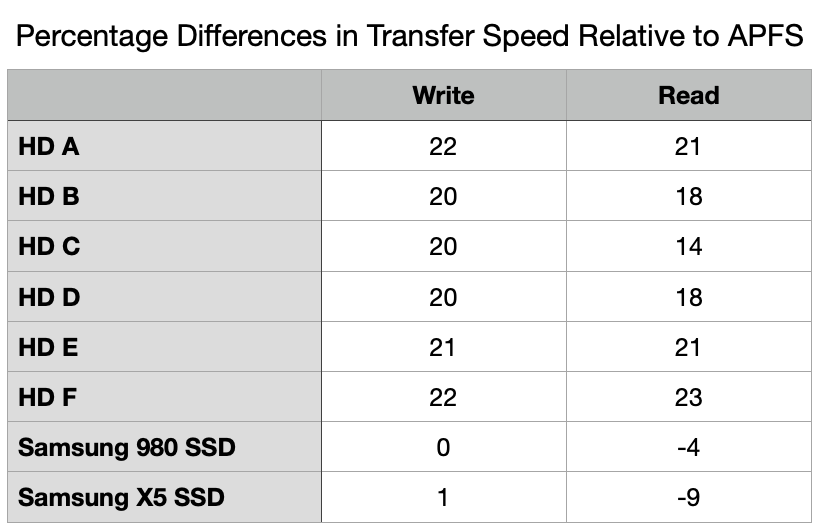
  • APFS write rate fell from 148 to 116 MB/s, HFS+ rose from 116 to 148 MB/s.
  • APFS read rate fell from 149 to 124 MB/s, HFS+ rose from 118 to 149 MB/s.
That demonstrates that the differences seen between HFS+ and APFS on hard disks was the result of the physical location of the partitions on the hard disk platter, rather than anything inherent in the file systems themselves.
Conclusions
  • When tested with initially empty file systems, there is no evidence of any inherent difference in read or write rates for hard disks formatted in HFS+ or APFS. The only significant difference between measurements is accounted for by differences in the physical location of partitions on the hard disk.
  • As a disk fills with files and their data, their performance is expected to fall faster when using APFS. When used for more static storage, this may not result in significant degradation.
  • APFS may thus remain acceptable for use for more static storage on rotating hard disks.
  • Differences in write performance on SSDs don’t appear significant.
  • HFS+ may have a small performance benefit when reading SSDs, but this is unlikely to be noticeable.
  • HFS+ should only be considered for retention as the format of active working hard disks, where APFS features aren’t required. For all other storage, APFS should be preferred.
 
Wow.

I didn't notice all those massages. I'm glad of this.

At the end, I'm in Venezuela, and light it's extremely unstable. I have an UPS to the machine.
Now I unmount the discs every night, and prevented the power nap option, and discovered WhatsApp prevent the machine to sleep. So now I will close it by default

I can see that the machine wake up severals time in the night, but maybe that makes me confortable.

I didn't came to much, because has been a week very stressful with all the data, and all that. Having all in Time Machine, let me to recover it. The WD HDD it's not wrong, it's working, but lost the data 2 times in less than a month, makes me really scare, and beign in Venezuela, goin out and buy another disc it's a little bit hard. but well, I did it, I got a new ssd, because the electrical issues here in my country drives me crazy. I can't believe an external rotating disc can be damaged with the electrical things.

So, ssd are delicated, but are more stables as I discovered, correct me if I'm wrong.

So all the week I've been moving the data. The new ssd, got the data from other ssd, the work data. And that ssd, that have less than a year, got all the multimedia (which was on the WD HDD)

I've been all the week on that, going out, search options, came in, format, move, I got my mind in another place. The HDD that got the error (WD HDD), I will format this weekend as HFS+NO case sensitive. The SSD are in APFS but encrypted. That's is a common practice in me since years ago, and well.

Recover that first part, really was a thunderbolt. Quick. The ssd work better of course. I never use them as external drives for their prices.

The WD, the first error, came because I forgot to erase a folder, and the drive went to 99.6% of use (bad, I know); later of a week dropping all from Time Machine, an electrical use, got an error in the format.

So now, I will use that WD to replace a HDD, and the disc it replace will be the backup of it.
Like: I was A, and there were B. Now I'm B, and B it's a copy of me.
Don't know if Time Machine can do a backup of just one disc, To not try CCC right now, Ive been spending to much this week.

The other thing I don't know if open a new threat it's the hard drive that do the backups in time machine, it's not complete full. Almost, always is cleaning, but never reach an equal.
But the hard drives it was backing up, almost no one exist. Just the machine, and other disc. All others were reformatted So don't know what to do. Exactly I'm afraid to wipe it right now.

 
Sorry, I got confused by another threat that I open, were I was asking something. Here I talked about the reformat of another. But yeah, the HDD I will format as hfs+ insensitive.

Pass al the data from and HDD in apfs, later reformat that to hfs+ and copy the data, and use it as a backup.
 
Register on MacRumors! This sidebar will go away, and you'll see fewer ads.