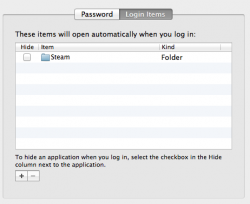
So I'm new to posting here and new to apple computers (this is my first one!). I used snow leopard for about a month and was comfortable with it so I do know what I'm doing for the most part. Yesterday I upgraded to Lion and I like it so far but there is one small thing annoying me. When I go to my log in screen, log in, and go to my desktop upon initial startup, a finder window automatically comes up titled "MacOS" with a bunch of files showing. How can I change this so this window does not keep opening every time I start my computer up. The finder is not open when I shut down and I even choose the option to not reopen windows when logging back in.
Thanks for the help.
Thanks for the help.