Become a MacRumors Supporter for $50/year with no ads, ability to filter front page stories, and private forums.

interfuse

macrumors member
Original poster
Dec 18, 2006
33
0
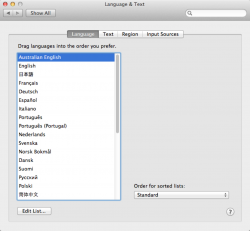
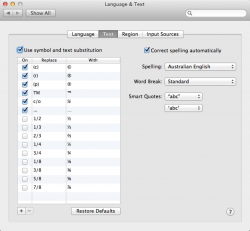
The system wide spell checker for my OS X 10.8.3 install spell checks everything based on American English. How ever, in System Preferences I have it all set to Australian English.

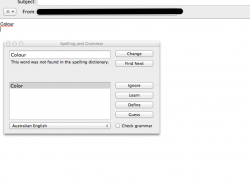
As you can see with the attached screenshot, system applications such as Mail are doing spell checking based on American English.

Is this a bug? Am i missing something? I have changed to Aus English in System Preferences> Language & Text > Language bar & Text bar.
 

Attachments

  • Image 27-03-13 at 10.56 AM.png
    Image 27-03-13 at 10.56 AM.png
    138.6 KB · Views: 231
System Preferences:
 

Attachments

  • Image 27-03-13 at 11.03 AM.png
    Image 27-03-13 at 11.03 AM.png
    283.3 KB · Views: 157
  • Image 27-03-13 at 11.04 AM.png
    Image 27-03-13 at 11.04 AM.png
    317.3 KB · Views: 140
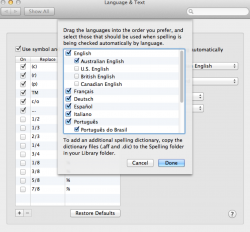
Stupidly, choosing a non-US English in System Prefs won't actually fix the spellchecker. Instead of choosing Australian English, choose Set Up and then turn off US.
 
Last edited:
Stupidly, choosing a non-US English in System Prefs won't actually fix the spellchecker. Instead of choosing Australian English, choose Set Up and then turn off US.

I went to Set Up... and only Australian English was ticked already.
 

Attachments

  • Image 27-03-13 at 3.34 PM.png
    Image 27-03-13 at 3.34 PM.png
    456.4 KB · Views: 117
I went to Set Up... and only Australian English was ticked already.

Huh. In that case, I don't know what to suggest. I just tried Australian (I usually have mine set to British) and "colour" was detected as correct (and "color" as incorrect) so I don't know why it's not working for you.
 
Huh. In that case, I don't know what to suggest. I just tried Australian (I usually have mine set to British) and "colour" was detected as correct (and "color" as incorrect) so I don't know why it's not working for you.

No worries, thanks anyway.

I might try the good ol' Apple Discussion forums lol.
 
Americanlish

Just a passing thought, have you shut down and re-started?
Mine is in Aust. English and works OK.
Also, what word processor are you using ? Some have a setting in the preferences about using system language etc. etc.

Good luck
 
i reset P-RAM, repaired privileges, and also checked the .GlobalPrefernces file where it saves what language etc are selected..

still no good!

Apple's solution is to re-install the OS!

surely there's a file somewhere that's getting in the way. i'm determined to keep looking.

Thanks for all ya'll help anyway.
 
Reinstalling won't do anything for a preference setting. Nor will PRAM or Repairing Permissions.

I use the following defaults command to set British, which you will need to adapt for Strine. :p
Code:
defaults write -g NSPreferredSpellServerLanguage "en_GB"
 
I have this problem also since I upgraded to Mtn Lion, all apps are in US & A language :mad:
 
Register on MacRumors! This sidebar will go away, and you'll see fewer ads.