Become a MacRumors Supporter for $50/year with no ads, ability to filter front page stories, and private forums.

collectivesoul

macrumors newbie
Original poster
Apr 25, 2014
1
0
Hi, in our Enterprise environment, we have a new mac with Mavericks version 10.9.2 and Office for Mac 14.4.1. When setting up outlook, we are trying to connect to a mailbox on exchange server 2007. We put in the EWS details in the server field since our autodiscover function is not functioning. But still it doesn't work. There are no errors, no popups. We turned on the logging and in the logs, it says a error of -3259. We are stuck and Any help will be really appreciated.

 
AFAIK, Error Code -3259 is the result of EWS's "Outlook Exchange Auto Configure" not working as intended or at all. There are likely issues between the server and the client, but you guy knew that already! If you're positive all of your entered settings are correct, there's one more item to check that's been a bug in Outlook for a couple of years. I'm not clear on whether "autodiscover" on your end is disabled or just not functioning as intended, but read on...

On a related matter, there were layout bugs in Excel 2008 that I found that existed for some time until a bug fix was finally issued - they called the bug fix "Excel 2011" and it wasn't a free bug fix. :mad: My point here is that I know that there was an autodiscovery bug in Outlook 14.1.3 when connecting to Exchange 2007, and I doubt it's been fixed given MS's sloth-like history for non-security bug fixes in Mac Office apps.
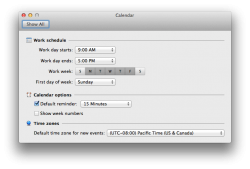
The workaround: Open up the Mac's Date & Time System Preference. Open up Outlook and open up it's Preferences Pane (see the image). Change the Mac's Time Zone (uncheck "Set date and time automatically") to the same Default time zone as that found in Outlook - ideally, to the same time zone you're in at the time. I had to deal with this some 3 years ago.

Once the time zone in the Mac's System Preferences matched that in Outlook, autodiscover was able to pull the settings correctly for our mailboxes and connect to download mail/calendars/contacts and access our GAL.
 

Attachments

  • Date and Time.png
    Date and Time.png
    79.7 KB · Views: 246
There are problems where my mail on iPhone will come faster than my Outlook, how to resolve this issue?
 
Microsoft’s Exchange Server Remote Connectivity Analyzer is a free web-based tool that assists Exchange administrators with the testing and configuration of their external Exchange-based services. For example, it can assist in troubleshooting Autodiscover settings used by Entourage, Web Services Edition, or Outlook for Mac, which use the Exchange Web Services protocol.

http://www.officeformachelp.com/outlook/exchange/exchange-server-remote-connectivity-analyzer/

Exchange Autodiscover workaround for Advanced Settings | OfficeforMacHelp.com

http://www.officeformachelp.com/2011/01/exchange-autodiscover-workaround-for-advanced-settings/
 
Register on MacRumors! This sidebar will go away, and you'll see fewer ads.
