I'm not sure if this is possible... but I'm sure someone here can think of a creative solution.
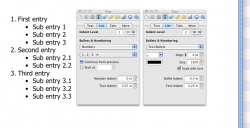
So, I need to have a numbered list, (1... 2... 3... etc.) - no issue there. But aside each number, I want to have bullets. So it would like something like this
1. - text
- text
- text
2. - text
- text
- text
Except it would look better than that because it would be bullets and not hyphens and they would line up. But hopefully you get the point.
Can this be done without headache?
So, I need to have a numbered list, (1... 2... 3... etc.) - no issue there. But aside each number, I want to have bullets. So it would like something like this
1. - text
- text
- text
2. - text
- text
- text
Except it would look better than that because it would be bullets and not hyphens and they would line up. But hopefully you get the point.
Can this be done without headache?