
Got a tip for us?
Let us know
Become a MacRumors Supporter for $50/year with no ads, ability to filter front page stories, and private forums.
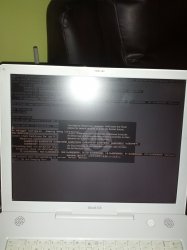
Panic: We are hanging here...
- Thread starter Windows&Apple
- Start date
- Sort by reaction score
You are using an out of date browser. It may not display this or other websites correctly.
You should upgrade or use an alternative browser.
You should upgrade or use an alternative browser.

Zotaccian
macrumors 6502a
If you have ram stick installed, try removing it. Instructions are easy to find if you need them, Google, YouTube etc.
If you have OS X disk, try booting from it and using Disk Utility to repair disk.
Just to make sure, reset Pram and Pmu, smu or whatever it was called on that era. Instructions from Apple website.
Do you know what model iBook G4 you have, year or processor/graphics card model? Different models had different issues, like GPU going bad or Airport connector going bad, from these two it could be the latter. Try booting in safe mode, power up and press Shift -key and keep pressed.
If you have OS X disk, try booting from it and using Disk Utility to repair disk.
Just to make sure, reset Pram and Pmu, smu or whatever it was called on that era. Instructions from Apple website.
Do you know what model iBook G4 you have, year or processor/graphics card model? Different models had different issues, like GPU going bad or Airport connector going bad, from these two it could be the latter. Try booting in safe mode, power up and press Shift -key and keep pressed.

rabidz7
macrumors 65816
Anyone know what's wrong and what the solution would be?
Have you changed any settings? Or hardware? Has this computer ever worked?
All I know is that it's a 14 inch iBook G4 from 2003. I haven't used it in a while so I can't quite remember the CPU/GPU or amount of RAM I installed.

seveej
macrumors 6502a
Anyone know what's wrong and what the solution would be?
Given that you flood us with information (you are having kernel panics on a 14" iBook G4), I'd recommend going through one of the many how-to's / faq out there.
I use this as reference:
http://thexlab.com/faqs/kernelpanics.html
RGDS,
rabidz7
macrumors 65816
All I know is that it's a 14 inch iBook G4 from 2003. I haven't used it in a while so I can't quite remember the CPU/GPU or amount of RAM I installed.
Have you changed nothing? You can not remember anything about when it last worked?
I haven't changed anything, although I remember replacing the battery. Nothing else has been changed as far as I can remember.

skateny
macrumors 6502
Anyone know what's wrong and what the solution would be?
What are you doing before you get the kernel panic?

AlbertEinstein
macrumors regular

Southern Dad
macrumors 68000
What are you doing before you get the kernel panic?
I'm just hitting the power button to turn it on. I can't even get to the log-in screen
----------
It happens every time I turn it on. I don't have an opportunity to restart

GermanyChris
macrumors 601

rjcalifornia
macrumors 6502a
Anyone know what's wrong and what the solution would be?
It is time to get a new RAM. Don't worry, the OS and hard drive are fine. I've been there 🙁

MisterKeeks
macrumors 68000
It is time to get a new RAM. Don't worry, the OS and hard drive are fine. I've been there 🙁
Not necessarily. By latest count, there are ~5 gazillion other things that can cause a kernel panic. However, RAM is the most likely to cause it.

blesscheese
macrumors 6502a
Can you get it to boot up when you do a safe boot (i.e., hold down the shift key when starting, to disable extensions)?
seveej
macrumors 6502a
Not necessarily. By latest count, there are ~5 gazillion other things that can cause a kernel panic.
Agreed. I just had (in december) one week of tracking down a recurring kernel panic caused by Tiger freaking out over the WLAN my Time Capsule offered it.
https://discussions.apple.com/thread/2248347?start=0&tstart=0
OP, this is probably not the source of your problems as you do not even get as far as logging on.
In case you do not want to read the whole FAQ I linked, try these three steps:
1) Remove extra memory chip (use ifixit guides).
2) Boot in safe mode.
3) Boot from DVD
If none works then the chances of salvage are slim.
RGDS,