
Become a MacRumors Supporter for $50/year with no ads, ability to filter front page stories, and private forums.

kris5565

macrumors newbie
Original poster
I'm new to this forums game....

Could someone please tell me how embed a link into a word...

ex. www.mac.com Click here for Mac products

So the link in embedded in the HERE

also, How would I put a picture into my Signature. I'm not familiar with HTML

any help is greatly appreciated!

thx
 
I'm new to this forums game....

Could someone please tell me how embed a link into a word...

ex. www.mac.com Click here for Mac products

So the link in embedded in the HERE

also, How would I put a picture into my Signature. I'm not familiar with HTML

any help is greatly appreciated!

thx
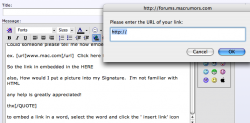
to embed a link in a word, select the word and click the ' insert link' icon.

you cannot have images in your signature, only the avatar when you qualify
 

Attachments

  • insertlink.png
    insertlink.png
    54.9 KB · Views: 97
I'm new to this forums game....

Could someone please tell me how embed a link into a word...

ex. www.mac.com Click here for Mac products

  1. Type some text into Word that you want to be a link
  2. Highlight the text you just typed
  3. Click on the INSERT > HYPERLINK menu
  4. In the LINK TO field type in the URL you want the text to go to when clicked on.

SCR

Whoops...sorry...I read this as adding a link in Microsoft Word. My bad. Doh!
 
To embed a link in the text, highlight the word(s) and press the button with the globe and chain. Then enter the desired link location.

No pictures are allowed in signatures.
 
Use square brackets to tag your text. []
In my examples, I will use angle brackets <> so you can see what I'm talking about and next to it, I'll use the square brackets so you can see its result in the posting.

<b>Bold text</b> Bold text
<url=http://www.apple.com>Apple's Website</url> Apple's Website
<img>http://images.macrumors.com/vb/images/smilies/blackapple.gif</img>
blackapple.gif


A few examples to start you off...
 
you cannot have images in your signature, only the avatar when you qualify

The key post count events are: 100 to post in the Political, Religious, Social sub-forum; 500 to have an avatar.

Trying valiantly for my avatar, but it's taking a while.

BTW, thanks for the opportunity to make another post. 😉
 
and on a similar note, how do you strike through words, ie say something and then delete it allowing others to see what you said? I can't see the option.
 
The key post count events are: 100 to post in the Political, Religious, Social sub-forum; 500 to have an avatar.

Trying valiantly for my avatar, but it's taking a while.

BTW, thanks for the opportunity to make another post. 😉

As long as you realize that your posts in the PRSI forum don't count...

If you're posting there hoping it'll help you get the avatar, then you're going to take a really long time to get one.
 
and on a similar note, how do you strike through words, ie say something and then delete it allowing others to see what you said? I can't see the option.

Try [ ST]blah[/ST ], without the spaces.

Let's see if it works in MacRumors Forums 3.5 style?

[ST]Test, test, and test yet again.[/ST]
[st]Test, test, and test yet again.[/st]
Test, test, and test yet again.

It would appear the answer is "No.". 🙂
 
As long as you realize that your posts in the PRSI forum don't count...

If you're posting there hoping it'll help you get the avatar, then you're going to take a really long time to get one.

What a revoltin' development this is! (Life With Riley.)

BTW, thanks for the opportunity to make another post, outside of PRSI. 😀
 
and on a similar note, how do you strike through words, ie say something and then delete it allowing others to see what you said? I can't see the option.
Try [ ST]blah[/ST ], without the spaces.

Let's see if it works in MacRumors Forums 3.5 style?

[ST]Test, test, and test yet again.[/ST]
[st]Test, test, and test yet again.[/st]
Test, test, and test yet again.

It would appear the answer is "No.". 🙂
[s t r i k e]no spaces[/s t r i k e]no spaces
 
You mean colour? 😛

No, but that does work too. A shorter command was what I had in mind. Something like
blah to highlight in red. Some boards do have this, but perhaps it's a hack??
 
You mean colour? 😛

No, but that does work too. A shorter command was what I had in mind. Something like
blah to highlight in red. Some boards do have this, but perhaps it's a hack??
Nope nothing like that here. You can always make a request.
 
Try [ ST]blah[/ST ], without the spaces.

Let's see if it works in MacRumors Forums 3.5 style?

[ST]Test, test, and test yet again.[/ST]
[st]Test, test, and test yet again.[/st]
Test, test, and test yet again.

It would appear the answer is "No.". 🙂

You can do it as follows: [s]Test[/s]

Which comes out as:

Test


Note I'm not using any special tricks to show you the command as the first time the 'strike' command is put inside a [plain] [/plain] block.*

* And the noparse is displayed here as its inside another noparse block 😛

EDIT: I've been massively beaten by MacNut, I shouldn't reply without reading the whole thread 😛, but still I think showing the [plain] block in action is worth keeping the post 😉
 
You can do it as follows:Note I'm not using any special tricks to show you the command as the first time the 'strike' command is put inside a [plain] [/plain] block.*

* And the noparse is displayed here as its inside another noparse block 😛
I never knew that.

EDIT: I've been massively beaten by MacNut, I shouldn't reply without reading the whole thread 😛, but still I think showing the [plain] block in action is worth keeping the post 😉
box.gif
😛
 
The key post count events are: 100 to post in the Political, Religious, Social sub-forum; 500 to have an avatar.

Trying valiantly for my avatar, but it's taking a while.

BTW, thanks for the opportunity to make another post. 😉

Took me almost 4 years to hit 500 posts...I lurk a lot more than I post. 🙄
 
Wirelessly posted (Mozilla/5.0 (iPod; U; CPU like Mac OS X; en) AppleWebKit/420.1 (KHTML, like Gecko) Version/3.0 Mobile/4A93 Safari/419.3)

iJohnHenry said:
As long as you realize that your posts in the PRSI forum don't count...

If you're posting there hoping it'll help you get the avatar, then you're going to take a really long time to get one.

What a revoltin' development this is! (Life With Riley.)

BTW, thanks for the opportunity to make another post, outside of PRSI. 😀

forgive my ignorance, but what is the prsi?
 
Register on MacRumors! This sidebar will go away, and you'll see fewer ads.