
Got a tip for us?
Let us know
Become a MacRumors Supporter for $50/year with no ads, ability to filter front page stories, and private forums.
iPhone 6(S)/Plus Photos set to go to icloud yet it says 9gb storage used for photos.
- Thread starter misskryss
- Start date
- Sort by reaction score
You are using an out of date browser. It may not display this or other websites correctly.
You should upgrade or use an alternative browser.
You should upgrade or use an alternative browser.

FreddyKrueger
macrumors newbie
- Go to Settings / at top tap on your name / iCloud
- Under "Apps using iCloud", tap on "Photos", disable "iCloud Photos" and "My Photo Stream"
- Go back and tap on "Manage Storage" / "Backups" then tap on your iphone backup and disable every app you don't want to store on icloud
- Finally I suggest to install Google Photos
- Under "Apps using iCloud", tap on "Photos", disable "iCloud Photos" and "My Photo Stream"
- Go back and tap on "Manage Storage" / "Backups" then tap on your iphone backup and disable every app you don't want to store on icloud
- Finally I suggest to install Google Photos

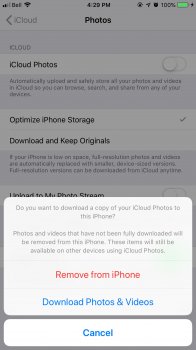
Thank you Freddy. I've gotten part way through your steps. Do I say "remove from iphone"? Thanks for helping me.- Go to Settings / at top tap on your name / iCloud
- Under "Apps using iCloud", tap on "Photos", disable "iCloud Photos" and "My Photo Stream"
- Go back and tap on "Manage Storage" / "Backups" then tap on your iphone backup and disable every app you don't want to store on icloud
[doublepost=1544402723][/doublepost]Okay so I decided to click on remove photos. Now it says are you sure you want to remove 48,700 photos from your phone! lol Wow I have a lot of photos. I'm scared to click yes but it see
- Go to Settings / at top tap on your name / iCloud
- Under "Apps using iCloud", tap on "Photos", disable "iCloud Photos" and "My Photo Stream"
- Go back and tap on "Manage Storage" / "Backups" then tap on your iphone backup and disable every app you don't want to store on icloud
- Finally I suggest to install Google Photos
Okay so I decided to click on remove photos. Now it says are you sure you want to remove 48,700 photos from your phone! lol Wow I have a lot of photos. I'm scared to click yes but it says they will remain in icloud photos. So I guess it's safe. I'm assuming you've solved my issue. Why would I need google photos if I'm paying for 2TB of icloud storage? Is it different than icloud?
Attachments

Apple_Robert
Contributor
If you have 2TB of iCloud, no need to use Google much less delete anything, unless you need to.Thank you Freddy. I've gotten part way through your steps. Do I say "remove from iphone"? Thanks for helping me.
[doublepost=1544402723][/doublepost]Okay so I decided to click on remove photos. Now it says are you sure you want to remove 48,700 photos from your phone! lol Wow I have a lot of photos. I'm scared to click yes but it see
Okay so I decided to click on remove photos. Now it says are you sure you want to remove 48,700 photos from your phone! lol Wow I have a lot of photos. I'm scared to click yes but it says they will remain in icloud photos. So I guess it's safe. I'm assuming you've solved my issue. Why would I need google photos if I'm paying for 2TB of icloud storage? Is it different than icloud?
I don't want to delete anything, but if I turn off icloud and then turn it back on will it clear up space or will it be the same as it is now? That's good that I don't need Google. Thanks for replying. 🙂If you have 2TB of iCloud, no need to use Google much less delete anything, unless you need to.

[doublepost=1544411378][/doublepost]Are you having a storage management issue? iCloud should automatically free up space on your device when needed by reducing the local copy to a thumbnail and storing the original with your 2 TB of storage.
Yes I am having storage issues. Everything is going to the iCloud because I looked on iCloud.com to confirm. However they are still taking up almost 10gb of space. Maybe this is normal. It does say that I’m using 400gb of iCloud storage for my photos. Perhaps that many thumb nails take up that much space. I have the 32gb phone so it doesn’t leave much space.

Five_Oh
macrumors 6502
How much space do you have left on your phone? It should make room as needed.[doublepost=1544411378][/doublepost]
Yes I am having storage issues. Everything is going to the iCloud because I looked on iCloud.com to confirm. However they are still taking up almost 10gb of space. Maybe this is normal. It does say that I’m using 400gb of iCloud storage for my photos. Perhaps that many thumb nails take up that much space. I have the 32gb phone so it doesn’t leave much space.
How much space do you have left on your phone? It should make room as needed.
I kept on getting the message pop up saying I didn’t have any more space to take photos. So I’m constantly deleting apps to take a few more pics. I ended up deleting all the photos from my phone (after I made sure they were in the cloud). So I cleared the space and now I’m wondering if I’ll just have the same issue if I turn iCloud back on for photos. Maybe I won’t turn in on again. Maybe I’ll just airdrop the pics to my computer when ever I’m home. Seems like I’d be deleting the whole purpose but I want the space on my phone.
Five_Oh
macrumors 6502
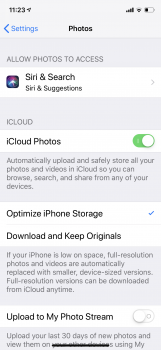
Do you have "Optimize Phone Storage" selected in settings? This is the setting that keeps a full resolution original in iCloud and only a space saving thumbnail on your phone.
For instance, I have about 120 GB of photos on iCloud, but they are only taking up 2.1 GB on my phone.
The setting location is right under photos.
For instance, I have about 120 GB of photos on iCloud, but they are only taking up 2.1 GB on my phone.
The setting location is right under photos.
I do have it set to optimize phone storage. With you saying that you have 120gb of photos and your phone storage is 2.1gb that makes me think they my thumbnails must have been taking up the space. I have just over 400gb in iCloud and I had almost 10gb on my phone. So perhaps I just need a bigger phone. Lol 🙂
Thank you for your help. I appreciate it.
Thank you for your help. I appreciate it.
Five_Oh
macrumors 6502
Yes, it does seem to be working as designed. But it has some limitations as far as how much it can compress your photo library.
If possible, I would recommend a phone with more storage rather than trying some other way to back up photos by transferring and deleting from the phone.
That would defeat most of the utility of iCloud, which, when working properly, is so seamless.
Good luck!
If possible, I would recommend a phone with more storage rather than trying some other way to back up photos by transferring and deleting from the phone.
That would defeat most of the utility of iCloud, which, when working properly, is so seamless.
Good luck!