Become a MacRumors Supporter for $50/year with no ads, ability to filter front page stories, and private forums.
Where'd you get that desk? My old desk completely fell apart (and was just too small anyway), so currently using a plastic table. It works, but definitely not that nice.
I ordered it online from: Vari.com. I initially got it so I could stand for part of the day for work and then bring it back to "regular" height. Very good quality and they shipped it overnight to me.
 
I ordered it online from: Vari.com. I initially got it so I could stand for part of the day for work and then bring it back to "regular" height. Very good quality and they shipped it overnight to me.
I am a fan of standing desks. I picked mine up at Costco in black 4 or so years ago. My wife's is in white. IIRC they were $300, so not too bad for a sturdy metal and glass, motorized desk with drawer and usb-a hub. My wifes is a couple years newer than mine so it came with usb-c.
 
Updated setup: new ASUS 2K 165Hz monitor, Ugreen Dual DP KVM switch, and replaced the PS5 with an i9 10900K/RTX 3080 PC I built this summer for around 800 bucks
I was really surprised to see that the Mac mini 2018 can actually handle a 2K 165Hz and a 2K 120Hz over DP
That being said, the poor UHD 630 can't push 165fps on the interface, I mean, on the desktop or dragging Finder windows, it's fine, but it can't achieve that when scrolling heavier webpages like YouTube on Safari. Not that I care that much tbh, I brought this monitor mainly for gaming on my Windows PC
tempImageDuWkEI.png

tempImageo4cZx2.png
 
Last edited:
Nice to see ham radio getting some love in here. 10m FT8?
Yep - I was playing with FT8 at the time I took the shot, My HF radio below the right monitor, it is a Yaesu FT-710. I have Another HF radio (kit), two SDRs, and some VHF / UHF radios as well. I am usually playing with the radios or AI (The Mac Studio is my AI server/Ollama/Perplecica/N8N/Comfirt UI).
 
  • Like
Reactions: MediaMark
Sort of a big update for my setup - in the quest to set up a central digital art setup for my drawing, I purchased a Wacom Cintiq 16. It doubles nicely as a 2nd monitor so even when I'm not drawing it still gets use.

I bought an ergonomic laptop stand which has tilt swivel and height adjustments. Not perfect but it's much better than the foldable feet the tablet comes with.

View attachment 2535977
Beautiful setup, but I have to ask: Is that a Cactuar on your monitor stand?
 
Yeah, it's at an angle. It has a second slot in the front for a phone/iPad also so I guess that's why.
nice. I don't use an external display due to how my desk is too small to accommodate a Studio Display, but these stands with MacBook Pro and iPad holders come in handy for a neat docking station.
 
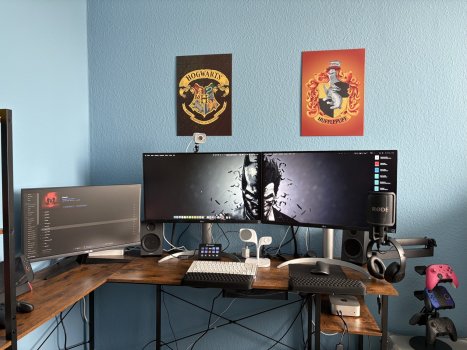
Mac Mini M4 Pro
2x LG 27“ 4K Displays at 60 Hz
1x ASUS 24“ 1080p Display at 120 Hz
Logitech MX Key Mechanical for Mac
Logitech MX Master 3S for Mac
Logitech Streamcam
Beats Studio3
Elgato HD60S+
Elgato Streamdeck MK.2
Elgato Microfophone arm
RØDE NT-USB+ microphone

not in the picture:

Samsung T7 2TB SSD
Crucial X9 2TB + Crucial X9 4TB
PowerMac G4 MDD Dual 1,25 GHz
MacBook Air M2
 

Attachments

  • hj.jpg
    hj.jpg
    599 KB · Views: 11
Still rocking my old 2013 27" iMac. I honestly just can't get rid of it since the design of it is so sexy and sleek, a far cry from the hideous ones Apple makes now.

View attachment 2585489
View attachment 2585490
Nice setup! I still have my 2013 iMac as well. But I don't really use it because I'm stuck on Catalina. Are you doing that or have you used a special installer to get a later OS on it?
 
Still rocking my old 2013 27" iMac. I honestly just can't get rid of it since the design of it is so sexy and sleek, a far cry from the hideous ones Apple makes now.
Yep, I agree, the design of that iMac is the best in my opinion. Made me sad when my iMac Pro had to go, but such is life.
 
Here's my setup: My M1 Max MacBook Pro 16" paired with a 27" Apple Studio Display, Magic Trackpad, Magic Keyboard, and Mighty Mouse. I have an Ikea Sigfinn Monitor Riser and hue strip lighting along the side of my desk facing my walls to create a soft backlight. My desk lamps are an Ikea Gronos table lamp and Ikea Modermoln task lamp, both fitted with hue bulbs to sync with my home setup. I have a twelve south wireless charger for my iPhone and an Ikea headphone stand for my AirPods Max.
Screenshot 2025-12-10 at 10.28.46 AM.png
 
My setup consists of - Left to right
Epson Print/scan/copy
Time Capsule 1TB ( not used now but still works )
Time Capsule 2TB ( vertical type )
Magic keyboard, touchpad and mouse
Mac Mini 2018 running Sequoia and 32GB memory runs Photoshop 2020 and used as everyday computer
On top is external 5 port USB and card reader
Mac Mini 2014 running ElCapitan ( kept as runs older Photoshop CS6 really well even though only 4GB memory ) - rarely used
Under this is external 4 port USB
There is an Intel NUC which I connect and use occasionally ( Windows 11 - urggggh!)
Underneath these is another Time Capsule 2TB - used as backup to the vertical Time Capsule
External DVD RW drive

Photography is my hobby, so Photoshop 2020 used almost daily. I also do a lot of research on my family tree, and use My Heritage software which is on the 2018 Mac Mini. The 2014 Mac Mini with photoshop CS6 was kept as I had a number of actions I had created and haven't reproduced them all on the newer machine as yet.

K5__6995.jpg
 
I forgot to add - there is an iPad and iPod in the desk drawer, and my wife and I use iPhones I also use a Macbook Pro.
Lots of 🖥️ macs do you rotate them every couple of weeks by unplugging them from the Thunderbolt Display and plugging it into a different Mac mini ?
 
Photography is my hobby, so Photoshop 2020 used almost daily. I also do a lot of research on my family tree, and use My Heritage software which is on the 2018 Mac Mini. The 2014 Mac Mini with photoshop CS6 was kept as I had a number of actions I had created and haven't reproduced them all on the newer machine as yet.

View attachment 2587807
Why don't we see you in the Photo of the Day thread hhmmmm? :D Would love to see your work!
 
Register on MacRumors! This sidebar will go away, and you'll see fewer ads.