
Become a MacRumors Supporter for $50/year with no ads, ability to filter front page stories, and private forums.

kasuja00

macrumors regular
Original poster
Hi,
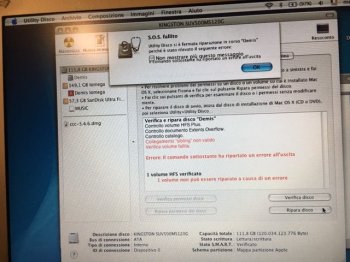
unfortunately it is already twice, in a month, that my new SSD that I mounted inside my Alu G4 Powerbook is corrupted.
This is the error:
IMG_1767.JPG
So I have now to format and reinstall everything and I'm saddened because I had already optimized all my applications and I have to redo the job.
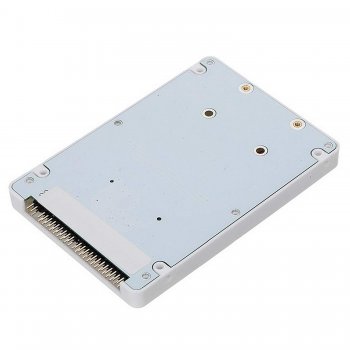
The drive is a 120GB kingston UV500 (half empty) with this adapter
61G8x0KO+0L._SL1500_.jpg
Could it be a heat problem or something else?
 
I had a similar experience with an iBook G4. It ran good for about a week then the drive (or adapter, still haven't found the courage to open that thing up again) simply stopped working. A reformat/reinstall fixed it for all but 20 minutes. Multiple attempts leads me to believe one of them is toast. I would say its either a faulty drive, or a faulty adapter. The best test would be to find another adapter and stick it in that to find out. At least AlBooks are super easy to open (assuming it isn't a 12")
 
I had a similar experience with an iBook G4. It ran good for about a week then the drive (or adapter, still haven't found the courage to open that thing up again) simply stopped working. A reformat/reinstall fixed it for all but 20 minutes. Multiple attempts leads me to believe one of them is toast. I would say its either a faulty drive, or a faulty adapter. The best test would be to find another adapter and stick it in that to find out. At least AlBooks are super easy to open (assuming it isn't a 12")

Unfortunately this is the 12" model
 
As above, this is likely either a faulty drive or adapter, the only way to work out which will be to swap one/other or try the components in another machine.

And for future... once you have a clean install with all your favourite apps and optimzations, take an image of it. This makes re-install recovery a LOT quicker as you can just boot it from an external dive (or another mac in TDM) and write the image to the drive.
 
As above, this is likely either a faulty drive or adapter, the only way to work out which will be to swap one/other or try the components in another machine.

And for future... once you have a clean install with all your favourite apps and optimzations, take an image of it. This makes re-install recovery a LOT quicker as you can just boot it from an external dive (or another mac in TDM) and write the image to the drive.
This^.
What I have personally done is bought a 2.5" FireWire SATA drive enclosure. Installed Tiger and Leopard to it with all updates, 2 more partitions with the installation DVDs for each of those, and a partition for random PPC apps/games and such (750GB drive) Depending on the mood I either clone one of the functioning installations or just boot from one of the install partitions and do a clean one. Saves a lot of time and is great for diagnosis since most PPC macs can boot from FireWire. This enclosure will NOT work though. I spent a lot of time getting it to be bootable, and it is just not worth it. It seems they put a block in its firmware. Any old ebay enclosure should do the trick though. Great storage drive if you aren't booting from PPC, though.
 
And for future... once you have a clean install with all your favourite apps and optimzations, take an image of it. This makes re-install recovery a LOT quicker as you can just boot it from an external dive (or another mac in TDM) and write the image to the drive.

That's very smart.

I had a similar experience with an iBook G4. It ran good for about a week then the drive (or adapter, still haven't found the courage to open that thing up again) simply stopped working.

I've had to open my iBook several times now, and I find this video damn near indispensable. I love this guy.

 
  • Like
Reactions: 1042686
That's very smart.

Another added bonus with this (especially if you do it regularly/automatically with script or an app) is that you always have snapshot of 'your' mac.

If you image to a spare FW or USB drive as mentioned by Project Alice above is that in the event of a hardware failure you can boot 'your' install up on another mac, either a friends, or a replacement etc. and be right back up and running with minimal delay or reconfiguration required, and it's a little more universal than Time Machine.

All my Macs (and Linux machines) are set to Image weekly (in addition to nightly rSyncs of user data) to a backup sever so any can be restored fairly easily if needed, and I also have an external drive with multiple partitions (well 2 actually, one for PPC macs, and one for Intel) and complete configured 'base' installs of Tiger, Leopard, Snow Leopard, El Cap and Sierra so if a new mac enters the fold it can have one of the base installs dumped onto it and be up and running in no time at all just the way I like it.
 
All my Macs (and Linux machines) are set to Image weekly (in addition to nightly rSyncs of user data) to a backup sever so any can be restored fairly easily if needed, and I also have an external drive with multiple partitions (well 2 actually, one for PPC macs, and one for Intel) and complete configured 'base' installs of Tiger, Leopard, Snow Leopard, El Cap and Sierra so if a new mac enters the fold it can have one of the base installs dumped onto it and be up and running in no time at all just the way I like it.

How do you back up your Linux machines?
 
How do you back up your Linux machines?

Custom scripts, using dd* , tar** and rsync*** to either do complete clone, mount an image and incrementally update, or simply to incrementally sync files directly.

NAS on the local network as a target, using either smb, NFS or direct rsync over ssh depending on the setup.

The NAS is also set up as a reverse SSH tunnel target as well which means all machines will 'phone home' to it whenever they are offsite as long as they have a working internet connection. This has the dual benefit of meaning backups still happen when offsite AND it means I can access the laptops from home even if they're behind a FW when at another location (ie: I can administer my wife's laptop if needs be, or access a laptop if have to leave it somewhere.) and circumvents most problems at sites where there are additional policies in place such as restricting VPN use etc.


*/**/*** which are also available on OS X and I make use of them there too.
 
  • Like
Reactions: bobesch and z970
I formatted the drive but soon returned to be unusable. So I tried formatting 'write zero' and then i loaded the clone i made with carbon copy cloner some time ago.
Now it seems to work, but I suspect that the error always happens when I switch from the power supply to the battery, maybe it's just a random coincidence.
The battery is not original, but it's an ICE memory.
 
Unfortunately after a few days the ssd disk now gives as an error:
invalid key lenght.
I'm thinking of going back to the old hitachi travelstar drive although SSD was very fast...
 
Unfortunately after a few days the ssd disk now gives as an error:
invalid key lenght.
I'm thinking of going back to the old hitachi travelstar drive although SSD was very fast...

It sounds like you definitely have either a dodgy drive or adapter. Are you able to test with another adapter or drive to work out which one?

Would be a shame to give up when it could be a quick fix!
 
  • Like
Reactions: Project Alice
Register on MacRumors! This sidebar will go away, and you'll see fewer ads.