
Got a tip for us?
Let us know
Become a MacRumors Supporter for $50/year with no ads, ability to filter front page stories, and private forums.
PowerFox Classic Web Browser - A brand new browser for PowerPC (Beta)
- Thread starter Jazzzny
- Start date
- Sort by reaction score
You are using an out of date browser. It may not display this or other websites correctly.
You should upgrade or use an alternative browser.
You should upgrade or use an alternative browser.


ervus
macrumors 6502
I had to disable and re-enable ublock in the settings to get it going. I also added its icon to the toolbar, and a browser restart might be part of the trick too.
I'm still getting the "refresh" popup. This bug seems to have a long history but I have not found a fix yet:
bugzilla.mozilla.org/show_bug.cgi?id=1054947
I'm still getting the "refresh" popup. This bug seems to have a long history but I have not found a fix yet:
bugzilla.mozilla.org/show_bug.cgi?id=1054947

Haemoglobin
macrumors regular
Was literally logging on to report I'm having this issue.I should note that the same extension works fine on InterwebPPC and it works fine on Pale Moon on a Windows 7 laptop. I'm pretty sure it also worked fine on the 26.2.1 build, but on 26.3.0 it isnt at all. It seems to be an issue with it not applying out of date filters and being completely unable to fetch new filter lists

Hello everyone, I'm proud to announce the release of PowerFox 26.4.0 for our PowerPC machines!
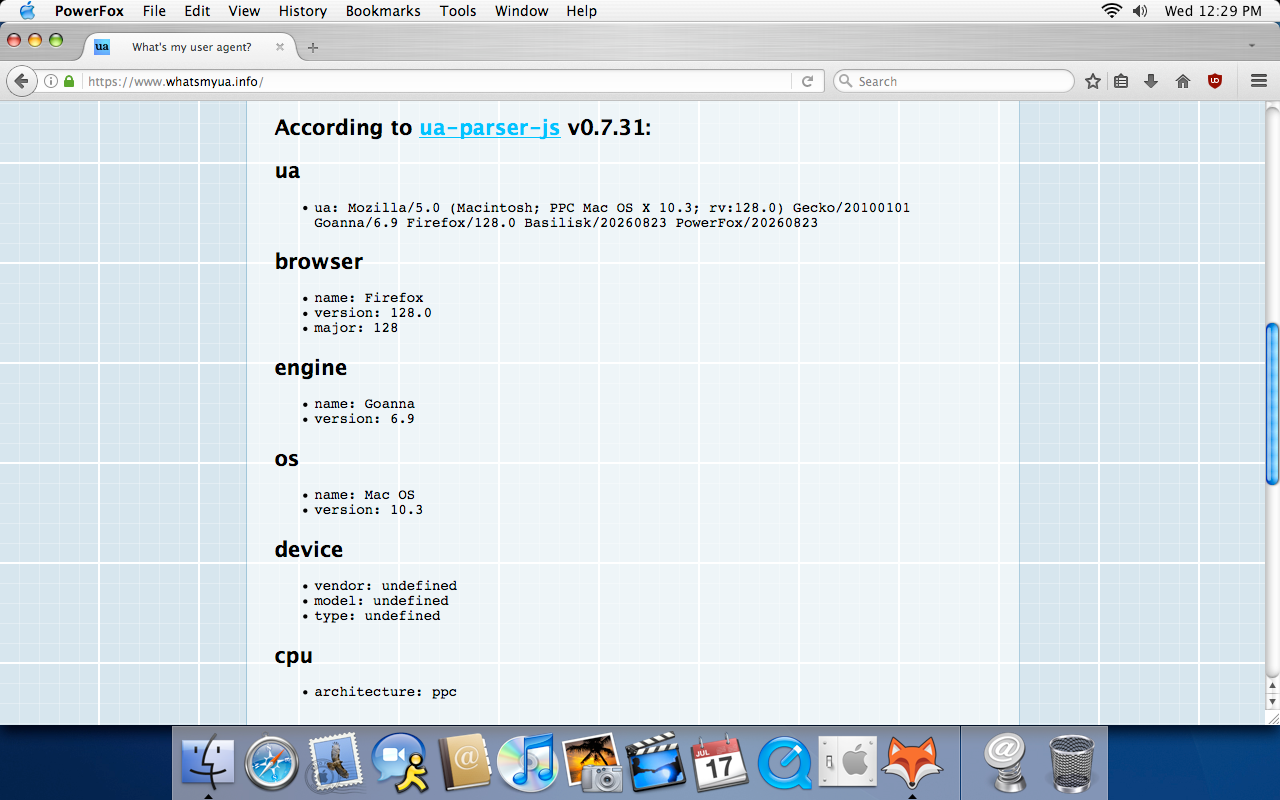
PowerFox 26.4.0 is a major release that includes security and bug fixes, performance improvements, web compatibility enhancements, and new features. Importantly, this release contains several fixes to the IonPower JIT, which resolves weird behaviour that was previously present in 26.3.0. Moreover, PowerFox is now the first modern web browser for Mac OS X 10.3 Panther since Firefox 2.0.0.20, which was released 18 years ago!
Implemented performance enhancements, correctness improvements, and crash fixes in the IonPower JavaScript JIT
Implemented OpenGL acceleration on 10.4 builds. Acceleration is available on GeForce FX series or newer and Radeon 9500 series or newer
Implemented 40+ AltiVec optimizations across the browser for improved performance on PowerPC builds
Implemented further SSE and AltiVec optimizations in H264, VP8, and VP9 decoders on all builds
Implemented font sanitizer in 10.4 and 10.5 builds to load previously unsupported fonts and prevent crashes
Implemented built-in uBlock Origin and h264ify extensions. Thank you to UCyborg, uBlock Origin developers, WindClan, and h264ify developers for their contributions
Implemented refreshed browser about page
Implemented KaiOS user agent option in PowerFox settings tab
Fixed OpenGL acceleration for GeForce FX series GPUs
Fixed various OpenGL rendering issues on 10.4 and 10.5 builds
Fixed keyboard shortcuts and other input issues on 10.4 builds
Fixed WebRTC issues on 10.5 builds
Fixed video playback issues on 10.4 builds
Fixed video playback issues on machines that do not support browser OpenGL acceleration
Fixed GitHub website issues through built-in Private Elements extension. Thank you to Private Elements developers for their contributions
Fixed various browser UI issues
Updated FFmpeg library to 7.1.5
Updated NSS security library to 3.90.13 (UXP)
Synced with UXP@ca36b1f452 for HTML, CSS, JavaScript engine improvements and security fixes
Addressed security vulnerabilities: CVE-2026-16353, CVE-2026-16408, CVE-2026-16389 and many others that do not have a CVE designation.
Regarding 10.3 builds, they should be functionally similar to the other builds, but there exist known issues that should not affect browsing (in particular, the traffic lights tend to flicker). As a special surprise, I was able to get builds spun for G3, G4 7400, G4 7450, and G5, so not a single architecture lacks an optimized build!
Thank you to everyone who has supported PowerFox's development! This browser would not have been possible without your help. If you would like to help with continued development, please consider supporting PowerFox, which lets me acquire hardware for development, research further improvements for the browser, and work on future projects.
You can download the latest release from powerfox.org or the GitHub. Enjoy!
PowerFox 26.4.0 is a major release that includes security and bug fixes, performance improvements, web compatibility enhancements, and new features. Importantly, this release contains several fixes to the IonPower JIT, which resolves weird behaviour that was previously present in 26.3.0. Moreover, PowerFox is now the first modern web browser for Mac OS X 10.3 Panther since Firefox 2.0.0.20, which was released 18 years ago!
Whats New
Implemented support for Mac OS X 10.3 Panther. Builds are available for PowerPC G3, G4 7400, G4 7450, and G5 processorsImplemented performance enhancements, correctness improvements, and crash fixes in the IonPower JavaScript JIT
Implemented OpenGL acceleration on 10.4 builds. Acceleration is available on GeForce FX series or newer and Radeon 9500 series or newer
Implemented 40+ AltiVec optimizations across the browser for improved performance on PowerPC builds
Implemented further SSE and AltiVec optimizations in H264, VP8, and VP9 decoders on all builds
Implemented font sanitizer in 10.4 and 10.5 builds to load previously unsupported fonts and prevent crashes
Implemented built-in uBlock Origin and h264ify extensions. Thank you to UCyborg, uBlock Origin developers, WindClan, and h264ify developers for their contributions
Implemented refreshed browser about page
Implemented KaiOS user agent option in PowerFox settings tab
Fixed OpenGL acceleration for GeForce FX series GPUs
Fixed various OpenGL rendering issues on 10.4 and 10.5 builds
Fixed keyboard shortcuts and other input issues on 10.4 builds
Fixed WebRTC issues on 10.5 builds
Fixed video playback issues on 10.4 builds
Fixed video playback issues on machines that do not support browser OpenGL acceleration
Fixed GitHub website issues through built-in Private Elements extension. Thank you to Private Elements developers for their contributions
Fixed various browser UI issues
Updated FFmpeg library to 7.1.5
Updated NSS security library to 3.90.13 (UXP)
Synced with UXP@ca36b1f452 for HTML, CSS, JavaScript engine improvements and security fixes
Addressed security vulnerabilities: CVE-2026-16353, CVE-2026-16408, CVE-2026-16389 and many others that do not have a CVE designation.
Note
PowerFox now includes bundled add-ons (uBlock Origin, h264ify, and Private Elements) that improve user experience and web compatibility. While they are purely beneficial, they can be removed/disabled through about:addons.Regarding 10.3 builds, they should be functionally similar to the other builds, but there exist known issues that should not affect browsing (in particular, the traffic lights tend to flicker). As a special surprise, I was able to get builds spun for G3, G4 7400, G4 7450, and G5, so not a single architecture lacks an optimized build!
Thank you to everyone who has supported PowerFox's development! This browser would not have been possible without your help. If you would like to help with continued development, please consider supporting PowerFox, which lets me acquire hardware for development, research further improvements for the browser, and work on future projects.
You can download the latest release from powerfox.org or the GitHub. Enjoy!

Andrew-R
macrumors 6502
Hello everyone, I'm proud to announce the release of PowerFox 26.4.0 for our PowerPC machines!
View attachment 2656074
PowerFox 26.4.0 is a major release that includes security and bug fixes, performance improvements, web compatibility enhancements, and new features. Importantly, this release contains several fixes to the IonPower JIT, which resolves weird behaviour that was previously present in 26.3.0. Moreover, PowerFox is now the first modern web browser for Mac OS X 10.3 Panther since Firefox 2.0.0.20, which was released 18 years ago!
Whats New
Implemented support for Mac OS X 10.3 Panther. Builds are available for PowerPC G3, G4 7400, G4 7450, and G5 processors
Implemented performance enhancements, correctness improvements, and crash fixes in the IonPower JavaScript JIT
Implemented OpenGL acceleration on 10.4 builds. Acceleration is available on GeForce FX series or newer and Radeon 9500 series or newer
Implemented 40+ AltiVec optimizations across the browser for improved performance on PowerPC builds
Implemented further SSE and AltiVec optimizations in H264, VP8, and VP9 decoders on all builds
Implemented font sanitizer in 10.4 and 10.5 builds to load previously unsupported fonts and prevent crashes
Implemented built-in uBlock Origin and h264ify extensions. Thank you to UCyborg, uBlock Origin developers, WindClan, and h264ify developers for their contributions
Implemented refreshed browser about page
Implemented KaiOS user agent option in PowerFox settings tab
Fixed OpenGL acceleration for GeForce FX series GPUs
Fixed various OpenGL rendering issues on 10.4 and 10.5 builds
Fixed keyboard shortcuts and other input issues on 10.4 builds
Fixed WebRTC issues on 10.5 builds
Fixed video playback issues on 10.4 builds
Fixed video playback issues on machines that do not support browser OpenGL acceleration
Fixed GitHub website issues through built-in Private Elements extension. Thank you to Private Elements developers for their contributions
Fixed various browser UI issues
Updated FFmpeg library to 7.1.5
Updated NSS security library to 3.90.13 (UXP)
Synced with UXP@ca36b1f452 for HTML, CSS, JavaScript engine improvements and security fixes
Addressed security vulnerabilities: CVE-2026-16353, CVE-2026-16408, CVE-2026-16389 and many others that do not have a CVE designation.
Note
PowerFox now includes bundled add-ons (uBlock Origin, h264ify, and Private Elements) that improve user experience and web compatibility. While they are purely beneficial, they can be removed/disabled through about:addons.
Regarding 10.3 builds, they should be functionally similar to the other builds, but there exist known issues that should not affect browsing (in particular, the traffic lights tend to flicker). As a special surprise, I was able to get builds spun for G3, G4 7400, G4 7450, and G5, so not a single architecture lacks an optimized build!
Thank you to everyone who has supported PowerFox's development! This browser would not have been possible without your help. If you would like to help with continued development, please consider supporting PowerFox, which lets me acquire hardware for development, research further improvements for the browser, and work on future projects.
You can download the latest release from powerfox.org or the GitHub. Enjoy!
Amazing work! Reddit does not crash anymore 😛 This forum scrolls notiecably faster.
Amazing! Thanks for the work you put into this!Hello everyone, I'm proud to announce the release of PowerFox 26.4.0 for our PowerPC machines!
View attachment 2656074
PowerFox 26.4.0 is a major release that includes security and bug fixes, performance improvements, web compatibility enhancements, and new features. Importantly, this release contains several fixes to the IonPower JIT, which resolves weird behaviour that was previously present in 26.3.0. Moreover, PowerFox is now the first modern web browser for Mac OS X 10.3 Panther since Firefox 2.0.0.20, which was released 18 years ago!
Whats New
Implemented support for Mac OS X 10.3 Panther. Builds are available for PowerPC G3, G4 7400, G4 7450, and G5 processors
Implemented performance enhancements, correctness improvements, and crash fixes in the IonPower JavaScript JIT
Implemented OpenGL acceleration on 10.4 builds. Acceleration is available on GeForce FX series or newer and Radeon 9500 series or newer
Implemented 40+ AltiVec optimizations across the browser for improved performance on PowerPC builds
Implemented further SSE and AltiVec optimizations in H264, VP8, and VP9 decoders on all builds
Implemented font sanitizer in 10.4 and 10.5 builds to load previously unsupported fonts and prevent crashes
Implemented built-in uBlock Origin and h264ify extensions. Thank you to UCyborg, uBlock Origin developers, WindClan, and h264ify developers for their contributions
Implemented refreshed browser about page
Implemented KaiOS user agent option in PowerFox settings tab
Fixed OpenGL acceleration for GeForce FX series GPUs
Fixed various OpenGL rendering issues on 10.4 and 10.5 builds
Fixed keyboard shortcuts and other input issues on 10.4 builds
Fixed WebRTC issues on 10.5 builds
Fixed video playback issues on 10.4 builds
Fixed video playback issues on machines that do not support browser OpenGL acceleration
Fixed GitHub website issues through built-in Private Elements extension. Thank you to Private Elements developers for their contributions
Fixed various browser UI issues
Updated FFmpeg library to 7.1.5
Updated NSS security library to 3.90.13 (UXP)
Synced with UXP@ca36b1f452 for HTML, CSS, JavaScript engine improvements and security fixes
Addressed security vulnerabilities: CVE-2026-16353, CVE-2026-16408, CVE-2026-16389 and many others that do not have a CVE designation.
Note
PowerFox now includes bundled add-ons (uBlock Origin, h264ify, and Private Elements) that improve user experience and web compatibility. While they are purely beneficial, they can be removed/disabled through about:addons.
Regarding 10.3 builds, they should be functionally similar to the other builds, but there exist known issues that should not affect browsing (in particular, the traffic lights tend to flicker). As a special surprise, I was able to get builds spun for G3, G4 7400, G4 7450, and G5, so not a single architecture lacks an optimized build!
Thank you to everyone who has supported PowerFox's development! This browser would not have been possible without your help. If you would like to help with continued development, please consider supporting PowerFox, which lets me acquire hardware for development, research further improvements for the browser, and work on future projects.
You can download the latest release from powerfox.org or the GitHub. Enjoy!
Andrew-R
macrumors 6502
You can download the latest release from powerfox.org or the GitHub. Enjoy!
github.com issues still strangely slow, I updated (hopefully) my webrtc crash bug but text input was _really_ slow, like waiting minute or two for each word!
Not sure why it behaves like this ....
Also using "back" button on this forum crashed Powerfox twice ... :/
Upload crash logs, otherwise I simply cannot do anything. Regarding GitHub, it was significantly broken due to incompatible changes that I have wallpapered over using an extension (mentioned in the changelog). This is not ideal and does not perform well, but a website that works slowly is better than a website that does not work at all. This is not helped by the performance of 20 year old machines. I hope to see this issue properly resolved upstream, which will restore some performance on GitHub.
Andrew-R
macrumors 6502
ok. So far I was unable to replicate "pressing Back crashes Powerfox here on forums", but if it will repeat I'll surely upload crash log.Upload crash logs, otherwise I simply cannot do anything. Regarding GitHub, it was significantly broken due to incompatible changes that I have wallpapered over using an extension (mentioned in the changelog). This is not ideal and does not perform well, but a website that works slowly is better than a website that does not work at all. This is not helped by the performance of 20 year old machines. I hope to see this issue properly resolved upstream, which will restore some performance on GitHub.
Modern browsers insanely complex, and web devs like to move fast and break things, so it already amazing that Powerfox work as good as it does.
Thank you so much for this new version!
Before I update: What happens if I already have these add-ons installed in a specific (older) version or with my private modifications? Will the present version be overwritten by the version that comes bundled with this release? Or will it be left untouched in this case?PowerFox now includes bundled add-ons (uBlock Origin, h264ify, and Private Elements) that improve user experience and web compatibility. While they are purely beneficial, they can be removed/disabled through about:addons.
I believe they should be left untouched, however I am not completely certain. However, you can remove them from the browser application by deleting them from the Resources -> distribution folder.Thank you so much for this new version!
Before I update: What happens if I already have these add-ons installed in a specific (older) version or with my private modifications? Will the present version be overwritten by the version that comes bundled with this release? Or will it be left untouched in this case?
The strangely slow GitHub-Pages I can confirm - even on Intel Core 2 Duo (Snow Leopard). When not touching the Computer, Powerfox calms down eventually to a low percentage of CPU usage. But as soon as I move the mouse pointer even just some pixels, it gains 100% CPU for a few seconds.
This very forum eats 70% while typing and 60% while letting the text-cursor blink. May be I'd rather post more results in the Intel-Powerfox-thread.
This very forum eats 70% while typing and 60% while letting the text-cursor blink. May be I'd rather post more results in the Intel-Powerfox-thread.

Dronecatcher
macrumors 603
Have you tried different user agents in Preferences? My 2.0Ghz Core Duo running Tiger doesn't have any problems with the forum.This very forum eats 70% while typing and 60% while letting the text-cursor blink.
Is there any way to have any of the user agents accept mobile websites like in Aquafox? Gmail and other websites only work in the mobile versions, but unfortunately, even in the kaiOS 4 user string, it still reverts the page to the desktop verson every time. My g3 233 Mhz bondi imac is just too slow for most sites.

Appleuser201
macrumors 6502a
Impressive you're using the original Bondi iMac from 1998 to get on the modern web with.. unfortunately if my 1.25ghz eMac struggles immensely with desktop sites, I don't think anything can fix the extremely slow browsing performance of that G3 even mobile rendering. That G3 was made to browse simple html image and text sites over dial up, so it's quite impressive that you're using it on the web today at all.Is there any way to have any of the user agents accept mobile websites like in Aquafox? Gmail and other websites only work in the mobile versions, but unfortunately, even in the kaiOS 4 user string, it still reverts the page to the desktop verson every time. My g3 233 Mhz bondi imac is just too slow for most sites.
In Aquafox, I have been able to use the mobile version of Gmail, and incredibly, it is very snappy and very usable, I can even open pdf’s in emails as well. Unfortunately those user strings are a carryover from the tenfourfox days, and they are working less and less. Mobile YouTube actually worked sort of, but that hasn’t worked in the last month. Unfortunately I have had no luck with Reddit on this machine either, but I don’t believe Reddit has a mobile versionImpressive you're using the original Bondi iMac from 1998 to get on the modern web with.. unfortunately if my 1.25ghz eMac struggles immensely with desktop sites, I don't think anything can fix the extremely slow browsing performance of that G3 even mobile rendering. That G3 was made to browse simple html image and text sites over dial up, so it's quite impressive that you're using it on the web today at all.
Appleuser201
macrumors 6502a
Well, videos play... up until the 1:00 or 1:01 mark so marginally better than before. And KaiOS does not load the mobile youtube/many websites as the person above me said. I'm using the G4e/Tiger version, not sure if anyone is having any luck with other variants.
Attachments


z970
macrumors 68040
Unfortunately I have had no luck with Reddit on this machine either, but I don’t believe Reddit has a mobile version
Change "www.reddit.com" to "old.reddit.com" in the address bar. It will return the much faster legacy interface. If you can log in and set the legacy interface as your preferred UI, it will then use it by default for every page visited. I haven't yet figured out a way to automatically redirect without logging in though...
Yet on a 233 MHz G3, you might just be better off with Aquafox (or AquaWeb Plus) as the Firefox 45 platform is moderately less resource intensive than the newer Firefox 52 / UXP platform that PowerFox uses. Fx45's inability to leverage GPU acceleration is mostly immaterial on anything less than an OpenGL 2.0 / Core Image card anyway, let alone the ATI Rage your system uses.
Gmail and other websites only work in the mobile versions, but unfortunately, even in the kaiOS 4 user string, it still reverts the page to the desktop verson every time.
Well, videos play... up until the 1:00 or 1:01 mark so marginally better than before. And KaiOS does not load the mobile youtube/many websites as the person above me said.
I have also been seeing YouTube routinely quit or stall past 1:00 on Firefox 115 ESR in macOS Mojave. I would hazard this is probably not a PowerFox or UXP-specific issue.
Regarding the mobile versions not working, UXP browsers come with site-specific user agents by default and annoyingly, the master general.useragent.override preferences do not seem to override them as advertised. In about:config, set general.useragent.site_specific_overrides to false and the YouTube / Gmail / others mobile interfaces should work then. But if they still don't work on either the iPad or KaiOS user agents, then more than likely it's because they just don't have a mobile interface at all.
@Jazzzny I was going to suggest placing a graphical toggle in the PowerFox preference pane connected to the general.useragent.site_specific_overrides switch as I've noticed that the user agent options offered there do not affect the default domains in the site-specific overrides. Seemingly a bug, even manually removing all of the entries preset in the "Site-specific..." button does not persist after changes have been saved (or at least in the Intel release).
On another note, I would further recommend including Decentraleyes in the next release. If you're not already aware, this will serve JS frameworks and other assets locally instead of having to download them from a third-party CDN server alongside the actual content. So if ads / trackers are blocked and JS frameworks with obese file sizes are locally hosted, then ideally only the requested content itself should need to be downloaded, in turn reducing load times. As a side effect, this also improves user privacy.
Otherwise, stellar work as always. Out of curiosity, is there anywhere available that documents those 40+ new AltiVec optimizations in greater detail? I'd love to learn more.
Last edited:
Dronecatcher
macrumors 603
Go to about:config, search useragent and you’ll see all the site specific user agents already in place - right click to add another (New>String) and use the same syntax:Is there any way to have any of the user agents accept mobile websites like in Aquafox?
general.useragent.override(followed by your chosen domain) and in the next field your user agent.
My 800Mhz G4 iMac just can’t cope with anything but the simplest of sites.I'm using the G4e/Tiger version, not sure if anyone is having any luck with other variants.
On Intel Tiger version, the KaiOS UA makes a huge difference to Youtube. Video tops out at 240P - but an iPhone UA playing 240P uses twice the CPU, so clearly Youtube is reading the user agents and adjusting resources accordingly.
Also I've found when tinkering with settings it's necessary to delete history and restart the browser to be on the safe side.
No, not yet.Have you tried different user agents in Preferences? My 2.0Ghz Core Duo running Tiger doesn't have any problems with the forum.
But further tests I will do later, each with fresh installs.
Regarding the mobile versions not working, UXP browsers come with site-specific user agents by default and annoyingly, the master general.useragent.override preferences do not seem to override them as advertised.
general.useragent.override has been doing nothing in UXP browsers for at least four years. Use network.http.useragent.global_override if you must, but I don't recommend it, it destroys compatibility modes and site-specific overrides which are there for a reason.Caleb Hauge
macrumors member
Just out of curiosity, what would it take to bring PowerFox to 10.2? What dependencies are missing from 10.2 that are available in 10.3?
I do not own hardware capable of running 10.2, and as such, there will not be an effort to port down to 10.2. The 10.3 port has already been very difficult and has shown fundamental limitations in the operating system, I would only expect a 10.2 port to be even more challenging and compromised.

jktwice
macrumors regular
10.2 afaik was still at a point where significant work needed to be done to port UNIX/Linux programs. 10.3 was when you started to get POSIX compliance in places and was a much friendlier OS for ports, requiring less Mac specific code to work.Just out of curiosity, what would it take to bring PowerFox to 10.2? What dependencies are missing from 10.2 that are available in 10.3?
If you are running 10.2 I would highly recommend you make the jump to 10.4 instead. If you have a machine that is only officially supported until 10.2, then use XPostFacto to upgrade those machines.