You can mix ECC and non-ECC ram in G5's. My own G5 is running a strange mash up of ram with about a third of it being ECC. It's all seen and running at the same speed. Sawtooth's cannot accept ECC ram in an fashion with any mixture. Be it all ECC or some of both, it won't work. If it does work, it'll be the mix of both with it only being able to use the non-ECC ram and possibly ignoring the ECC or only showing it but not using it. No G3 or G4 can see or use ECC ram.
Then, my G4 was showing it, but not using it, I'd say. Sorry, for spreading false info, then. ouups.
Edit: just tested it for you. I did deeply dig in my RAMs and found the ECC SDRAM again.
Test 1 (ECC-only):
one slot occupied. Only RAM I put in Kingston KFJ-C150/512 SDRAM PC-133, ECC.
Boot succeeded (only that one ECC RAM in it!). Under OS 10.4 and 10.5
System Profiler shows it as ECC-RAM.
Test 2 (mixed):
two slots occupied.
Slot 1 ECC
Slot 2 non-ECC (Kingston KVR133X64C3/512)
Boot succeeded.
Shown as ECC and on non-ECC
Test 3 (mixed):
Slot 1: non-ECC
Slot 2: ECC
Boot takes longer.
Boot succeeded.
RAM displayed as installed.
Opening multiple DV-files in QT (some playing at same time), to make filling the RAM easier, I use one 256MB non-ECC stick (512MB-ECC in slot one, 256MB in slot 2, should have done it the other way round
🙄):
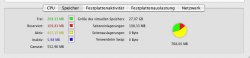
activity monitor shows over 512MB used. See attachment. But I might not interpret it right (see virtual memory?).
I have a Sawtooth with UNI-N Bridge Revision 0007 (maybe very early models couldn't do that?)