Become a MacRumors Supporter for $50/year with no ads, ability to filter front page stories, and private forums.

SubaruNation555

macrumors 6502
Original poster
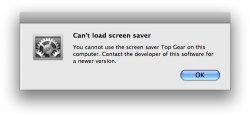
This may sound like a silly and trivial problem but I have a screensaver (.saver file) that is PowerPC and will not work on my Intel-based Mac. Is there anything I should try before I move on? Thanks.
 

Attachments

  • Picture 1.JPEG
    Picture 1.JPEG
    27.6 KB · Views: 139
I'd noticed the same thing, and I'm fairly certain that you'd need to run the screensaver subsystem in Rosetta to get this to work. Which is probably possible, but there's no easy way to do it.

I just gave up on the old ones, personally.
 
is there a "run in rosetta" option in the get info window for the power pc screensaver in ~/Library/Screen Savers?
 
Screen savers (.saver bundles) are not executable which is why there is no "Run in Rosetta" option. They are loadable bundles (basically plugins) which get loaded into the screen saver engine. To get one PPC screen saver to run you'd have to run the entire screen saver engine in Rosetta including any other screen savers until you change it back.

Unfortunately I don't think this is possible.
 
Unfortunately I don't think this is possible.
I was thinking maybe that the screen saver engine is an easily accessible application (like, say, Finder or Disk Mounter), in which case you'd be able to Rosetta it, but on a cursory search, I didn't see it with the rest of such system bits.
 
I think it's a private framework or something similar that runs under a fairly low level (and important) process. If you preview a screen saver in System Preferences no new executable gets launched and all the CPU used by the saver gets assigned to System Preferences.
 
Register on MacRumors! This sidebar will go away, and you'll see fewer ads.