

I should declare an interest before anything else: I wrote this. So read it as a developer saying a thing exists, rather than a recommendation from someone neutral.
The bit that surprised me, and that I don't think is widely known: DYMO has never shipped an Apple Silicon build of either DYMO Label v8 or the current DYMO Connect. Both are Intel-only, and have been running under Rosetta 2 this whole time. So the usual advice – "upgrade to DYMO Connect" – moves the problem rather than solving it, and macOS 27 uninstalls Rosetta during the upgrade.
The printers are fine. The LabelWriter driver has been universal for years and runs natively. It was only ever the application that was stuck, which is why replacing perfectly good hardware always felt like the wrong answer.
I print address labels most days, and need the security of being able to continue printing once Rosetta apps are no longer supported on Apple silicon, so I spent the summer writing a native replacement.
What it does
Cost
Free and fully unlocked until 1 March 2027. After that, printing your existing labels stays free permanently, and the design side becomes a £9.99 one-off. No subscription, no account, no server – it phones nowhere.
https://zeboose.github.io/prlabeller/
It's a beta and labelled as one. I'd genuinely rather hear what's broken than what's good – there's a diagnostics report built into Settings that you can read before sending, which takes the guesswork out of "it doesn't work on my machine".
Not affiliated with, endorsed by, or connected to Sanford, L.P.
The bit that surprised me, and that I don't think is widely known: DYMO has never shipped an Apple Silicon build of either DYMO Label v8 or the current DYMO Connect. Both are Intel-only, and have been running under Rosetta 2 this whole time. So the usual advice – "upgrade to DYMO Connect" – moves the problem rather than solving it, and macOS 27 uninstalls Rosetta during the upgrade.
The printers are fine. The LabelWriter driver has been universal for years and runs natively. It was only ever the application that was stuck, which is why replacing perfectly good hardware always felt like the wrong answer.
I print address labels most days, and need the security of being able to continue printing once Rosetta apps are no longer supported on Apple silicon, so I spent the summer writing a native replacement.
What it does
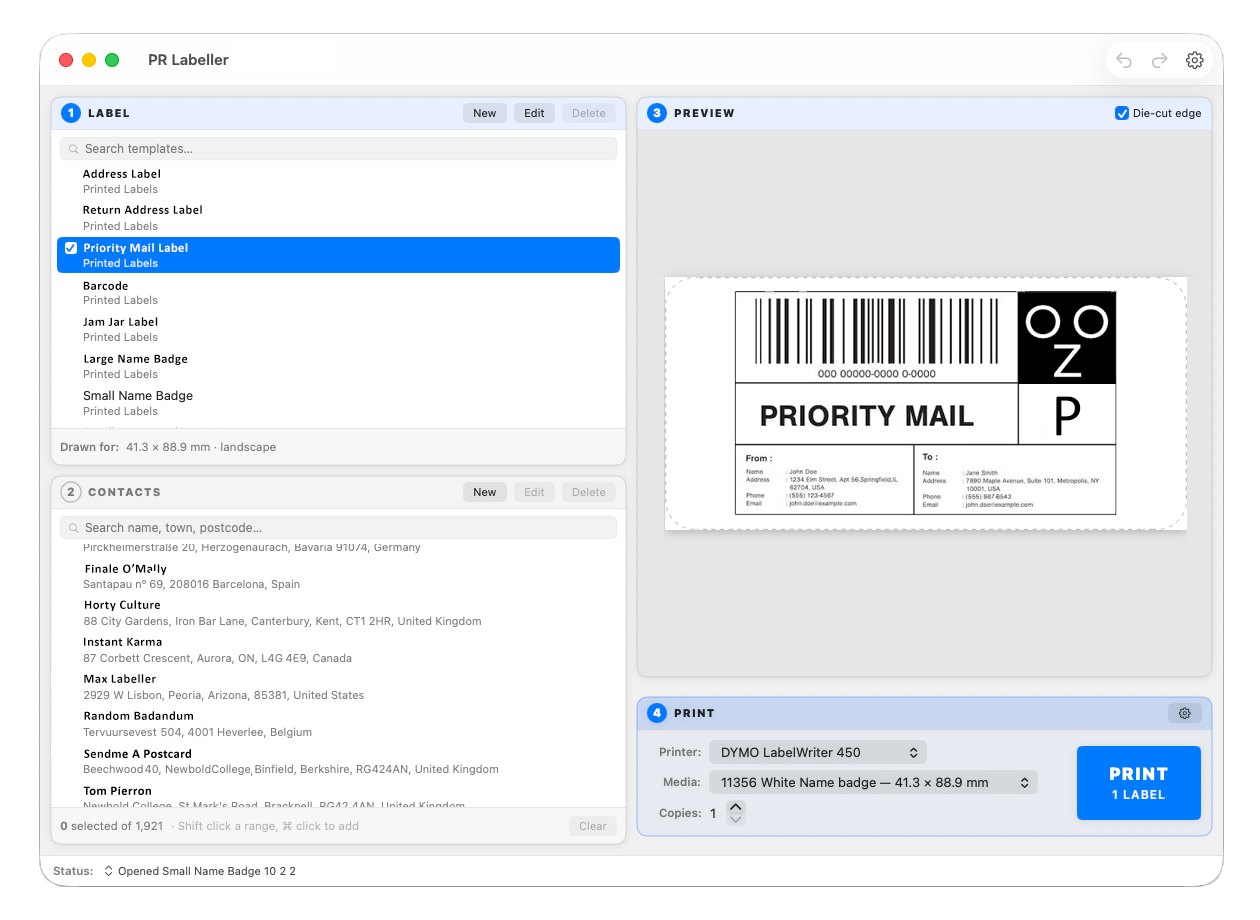
- Opens and writes the same .label files. The templates I developed against render pixel-identically to their reference, and saving one back produces a byte-identical file – other people's templates are working assets, and software that quietly reformats them is losing their work rather than tidying up.
- Reads DYMO address books (.abx) and CSVs.
- Keeps a dated copy of the address book before every change, and a command to put an earlier one back. It never converts or moves your existing files.
- Prints through the driver already installed, so neither the printer nor the label stock changes.
- Editor: text, addresses, pictures, barcodes, shapes, alignment, snapping, layering, unlimited undo, and rotation at any angle rather than only the four right angles DYMO's format can store.
- A print alignment test with sub-millimetre offsets, because every machine grips the stock slightly differently.
- A one-click tidy for addresses pasted out of marketplace orders – commas become line breaks, the case is fixed, and titles and order codes come off.
Cost
Free and fully unlocked until 1 March 2027. After that, printing your existing labels stays free permanently, and the design side becomes a £9.99 one-off. No subscription, no account, no server – it phones nowhere.
https://zeboose.github.io/prlabeller/
It's a beta and labelled as one. I'd genuinely rather hear what's broken than what's good – there's a diagnostics report built into Settings that you can read before sending, which takes the guesswork out of "it doesn't work on my machine".
Not affiliated with, endorsed by, or connected to Sanford, L.P.