Not sure if this is Lion specific or not, but the desktop background on my primary display has changed to solid gray and I can't change it. I can bring up the preference panel for it, and click on different backgrounds, but nothing changes. I can even change the background on my secondary display... Any thoughts?

Got a tip for us?
Let us know
Become a MacRumors Supporter for $50/year with no ads, ability to filter front page stories, and private forums.
Primary desktop background won't change
- Thread starter mongorama
- Start date
- Sort by reaction score
You are using an out of date browser. It may not display this or other websites correctly.
You should upgrade or use an alternative browser.
You should upgrade or use an alternative browser.
Not sure if this is Lion specific or not, but the desktop background on my primary display has changed to solid gray and I can't change it. I can bring up the preference panel for it, and click on different backgrounds, but nothing changes. I can even change the background on my secondary display... Any thoughts?
same here. my second screen changes, but my primary desktop seems to be a washed out solid gray.
Glenny2lappies
macrumors 6502a
Mine's the other way around: the primary has a background, the secondary doesn't - just solid grey.
BTW I'm using an external monitor on a MBP which is the primary, i.e. the MacBook is the secondary.
This happened the other day where a reboot (ooh, just like Windows) fixed it. I use the machine in different offices on different monitors. Seems to be related to changing monitors.
Getting bored with all the Lion bugs and 'features'.
BTW I'm using an external monitor on a MBP which is the primary, i.e. the MacBook is the secondary.
This happened the other day where a reboot (ooh, just like Windows) fixed it. I use the machine in different offices on different monitors. Seems to be related to changing monitors.
Getting bored with all the Lion bugs and 'features'.
I'm having the exact same problemThe other day I added monitor to my Mac Pro through HDMI (a dongle from MiniDisplay), and then changed my desktops. Today, they've reset to the default Lion one. They won't change, even though the preview display in System Settings says the background is something else. 😕
I had the same problem and called Apple Support.
This is how we fixed it:
1: Click "Go" at the top of the finder.
2: Hold down the "Option" key and click "Library"
3: Open the "Preferences" folder.
4: Find the file "com.apple.desktop.plist"
5: Rename it to "com.apple.desktop.plist.old"
6: Reboot your computer.
If this fixed the problem for you, follow steps 1 - 4 again and delete the ".old" file
This is how we fixed it:
1: Click "Go" at the top of the finder.
2: Hold down the "Option" key and click "Library"
3: Open the "Preferences" folder.
4: Find the file "com.apple.desktop.plist"
5: Rename it to "com.apple.desktop.plist.old"
6: Reboot your computer.
If this fixed the problem for you, follow steps 1 - 4 again and delete the ".old" file
TechnoUniverse
macrumors newbie
I had the same problem and called Apple Support.
This is how we fixed it:
1: Click "Go" at the top of the finder.
2: Hold down the "Option" key and click "Library"
3: Open the "Preferences" folder.
4: Find the file "com.apple.desktop.plist"
5: Rename it to "com.apple.desktop.plist.old"
6: Reboot your computer.
If this fixed the problem for you, follow steps 1 - 4 again and delete the ".old" file
Dude, you are my god. Thank you so much
zippyprincess
macrumors newbie
changing background on first or second monitor
To change the background wallpaper on the screen of your choice, make sure the screen you are trying to change is set as the primary screen ie. the one with the menu bar across the top. I have a Macbook Air 11" and here's how I am able to set my primary screen.
Go to Preferences>Displays>Arrangement
One of the displayed screens will have a white horizontal strip along its top edge. You can drag the white strip to the other screen. Whichever screen has the white strip will be the primary screen.
Hope that works for you!
To change the background wallpaper on the screen of your choice, make sure the screen you are trying to change is set as the primary screen ie. the one with the menu bar across the top. I have a Macbook Air 11" and here's how I am able to set my primary screen.
Go to Preferences>Displays>Arrangement
One of the displayed screens will have a white horizontal strip along its top edge. You can drag the white strip to the other screen. Whichever screen has the white strip will be the primary screen.
Hope that works for you!
Kill the Dock to fix
I had this same problem today after disconnecting and reconnecting two chained Thunderbolt displays.
The solution is to open a Terminal and run:
This will restart the Dock, which also controls the desktop background.
Credit to Jay Thompson, per this Stack Exchange answer.
I had this same problem today after disconnecting and reconnecting two chained Thunderbolt displays.
The solution is to open a Terminal and run:
Code:
killall DockThis will restart the Dock, which also controls the desktop background.
Credit to Jay Thompson, per this Stack Exchange answer.
brethansen
macrumors newbie
Easiest fix I have found
If you have the "Show fast user switching" turned on, click the menu bar icon and choose "Login Window".
Login as the same user and the background is back. No need to logout or reboot!
To enable fast user switching menu bar, go to System Preferences -> Users & Groups -> Login Options
If you have the "Show fast user switching" turned on, click the menu bar icon and choose "Login Window".
Login as the same user and the background is back. No need to logout or reboot!
To enable fast user switching menu bar, go to System Preferences -> Users & Groups -> Login Options
juanarcamacho
macrumors newbie
I had the same problem and called Apple Support.
This is how we fixed it:
1: Click "Go" at the top of the finder.
2: Hold down the "Option" key and click "Library"
3: Open the "Preferences" folder.
4: Find the file "com.apple.desktop.plist"
5: Rename it to "com.apple.desktop.plist.old"
6: Reboot your computer.
If this fixed the problem for you, follow steps 1 - 4 again and delete the ".old" file
The file "com.apple.desktop.plist" is not appearing in my preferences folder. Any clue why?

Gregg2
macrumors 604
Yeah, you're in the wrong folder. Follow the path given above. There are several Library folders on your Mac.The file "com.apple.desktop.plist" is not appearing in my preferences folder. Any clue why?
juanarcamacho
macrumors newbie
Yeah, you're in the wrong folder. Follow the path given above. There are several Library folders on your Mac.
I double checked in the right folder but the file still doesn't appear. Any other suggestion?Yeah, you're in the wrong folder. Follow the path given above. There are several Library folders on your Mac.

DeltaMac
macrumors G5
You are likely still in the wrong Library folder.
The correct Preferences folder will usually have more than 500 files, often more than a thousand files. If yours has only about 50 or less, you are still in the wrong Library.
Follow the directions to go to the Go menu, then press and release the Option key. You will see the correct Library folder appear in the list, then disappear when you release the Option key. Click on that Library while holding the Option key, and then open the Preferences folder that you find now.
If you have restarted your Mac, and are in the correct ~/Library/Preferences folder, there WILL be a com.apple.desktop.plist file (guaranteed 😀 )
The correct Preferences folder will usually have more than 500 files, often more than a thousand files. If yours has only about 50 or less, you are still in the wrong Library.
Follow the directions to go to the Go menu, then press and release the Option key. You will see the correct Library folder appear in the list, then disappear when you release the Option key. Click on that Library while holding the Option key, and then open the Preferences folder that you find now.
If you have restarted your Mac, and are in the correct ~/Library/Preferences folder, there WILL be a com.apple.desktop.plist file (guaranteed 😀 )
juanarcamacho
macrumors newbie
You are likely still in the wrong Library folder.
The correct Preferences folder will usually have more than 500 files, often more than a thousand files. If yours has only about 50 or less, you are still in the wrong Library.
Follow the directions to go to the Go menu, then press and release the Option key. You will see the correct Library folder appear in the list, then disappear when you release the Option key. Click on that Library while holding the Option key, and then open the Preferences folder that you find now.
If you have restarted your Mac, and are in the correct ~/Library/Preferences folder, there WILL be a com.apple.desktop.plist file (guaranteed 😀 )
I'm starting to hate myself for how stubborn and maybe stupid I sound but I swear I am looking in the right folder(I checked again). I have a MacBook Pro 13. Does this make any difference?You are likely still in the wrong Library folder.
The correct Preferences folder will usually have more than 500 files, often more than a thousand files. If yours has only about 50 or less, you are still in the wrong Library.
Follow the directions to go to the Go menu, then press and release the Option key. You will see the correct Library folder appear in the list, then disappear when you release the Option key. Click on that Library while holding the Option key, and then open the Preferences folder that you find now.
If you have restarted your Mac, and are in the correct ~/Library/Preferences folder, there WILL be a com.apple.desktop.plist file (guaranteed 😀 )
DeltaMac
macrumors G5
(One more attempt 😀 ) Just as a double-check, if you are in the preferences folder - right-click on the window name. It will show you a list with the folder path to that folder. You'll see the folder name at the top (Preferences), then Library, then your user name, then Users, then the name of your hard drive. The folder Users is probably the most important, as you would be inside the Users folder (and at least a couple of folders in 😀 ) If the right-click name says only Preferences, then Library, then your hard drive name, then, yes, you are still in the wrong Library folder.
No, the Mac model makes no difference in the makeup of the folders in your system.
No, the Mac model makes no difference in the makeup of the folders in your system.
Gregg2
macrumors 604
If you are not finding that file, you cannot be in the correct folder. The file has to exist. If it gets deleted, the next time you open the app (Finder), a new one gets created. That's how it "just works". Maybe, just maybe you need to Restart. If you deleted the file (no, it cannot delete itself) and have not restarted since, that might be an explanation for what you're not seeing. (??)

NLISA
macrumors newbie
(One more attempt 😀 ) Just as a double-check, if you are in the preferences folder - right-click on the window name. It will show you a list with the folder path to that folder. You'll see the folder name at the top (Preferences), then Library, then your user name, then Users, then the name of your hard drive. The folder Users is probably the most important, as you would be inside the Users folder (and at least a couple of folders in 😀 ) If the right-click name says only Preferences, then Library, then your hard drive name, then, yes, you are still in the wrong Library folder.
No, the Mac model makes no difference in the makeup of the folders in your system.
Also Not showing up for me.
DeltaMac
macrumors G5
Also Not showing up for me.
What's not showing?
If you mean the "com.apple.desktop.plist" file? That file will be there, unless you are in the wrong Library folder.
Follow the steps in the posts above to make sure you are in your user/Library folder.
Easiest check is to right-click on the folder name in the title bar when you are in the Library folder. Should show the path through the Users folder. If a different path, such as MyiMac/Macintosh HD/Library (notice that "Users" is not listed) - then you are not in the correct Library folder.
The Library folder that you want is easy to find. Go to the "Go" menu in the finder.
Press your Option key while that menu is open. Click on the Library that appears when you press Option.
That's the correct Library folder. The Preferences folder is inside that Library.
iteachwithmac
macrumors newbie
What's not showing?
If you mean the "com.apple.desktop.plist" file? That file will be there, unless you are in the wrong Library folder.
Follow the steps in the posts above to make sure you are in your user/Library folder.
Easiest check is to right-click on the folder name in the title bar when you are in the Library folder. Should show the path through the Users folder. If a different path, such as MyiMac/Macintosh HD/Library (notice that "Users" is not listed) - then you are not in the correct Library folder.
The Library folder that you want is easy to find. Go to the "Go" menu in the finder.
Press your Option key while that menu is open. Click on the Library that appears when you press Option.
That's the correct Library folder. The Preferences folder is inside that Library.
I am also having this same problem. I read through the thread above and tried the items listed.
I found the "com.apple.desktop.plist" file and renamed it per the instructions above. Then rebooted the computer...nothing changed. Backgrounds still won't change. Went ahead and deleted the file altogether to see if it recreates it after a reboot...nope. File is no longer there...but the backgrounds still won't change. I was running OSX Yosemite when the issue started. I am now running Mojave and still having the issue. What would be a recommended next course of action?

RickyHunter
macrumors member
I am also having this same problem. I read through the thread above and tried the items listed.
I found the "com.apple.desktop.plist" file and renamed it per the instructions above. Then rebooted the computer...nothing changed. Backgrounds still won't change. Went ahead and deleted the file altogether to see if it recreates it after a reboot...nope. File is no longer there...but the backgrounds still won't change. I was running OSX Yosemite when the issue started. I am now running Mojave and still having the issue. What would be a recommended next course of action?
Same here.
I was in the preferences folder (the correct one), deleted the apple.desktop.plist file, deleted also the systempreferences file and rebooted. Now there is no com.apple.desktop.plist file anymore.
I tried also with onyx to delete preferences, to verify permissions, to delete the cache and to do the system maintenance actions. Nothing changes.
Any other idea?
iteachwithmac
macrumors newbie
Same here.
I was in the preferences folder (the correct one), deleted the apple.desktop.plist file, deleted also the systempreferences file and rebooted. Now there is no com.apple.desktop.plist file anymore.
I tried also with onyx to delete preferences, to verify permissions, to delete the cache and to do the system maintenance actions. Nothing changes.
Any other idea?
I solved it by realizing that the MDM profile that was installed on my computer, managing it, was limiting the background options. Once I removed the profile, I was able to change the background like normal.
RickyHunter
macrumors member
I solved it by realizing that the MDM profile that was installed on my computer, managing it, was limiting the background options. Once I removed the profile, I was able to change the background like normal.
Could u explain a little better how u did it? I don’t know what’s that. Thank u
iteachwithmac
macrumors newbie
It would only apply to you if your computer is managed by a Mobile Device Management (MDM) host. This is usually the case when you are apart of an educational institution or business that distributes devices or wants to have more control over what takes place on the devices, mainly for security reasons.
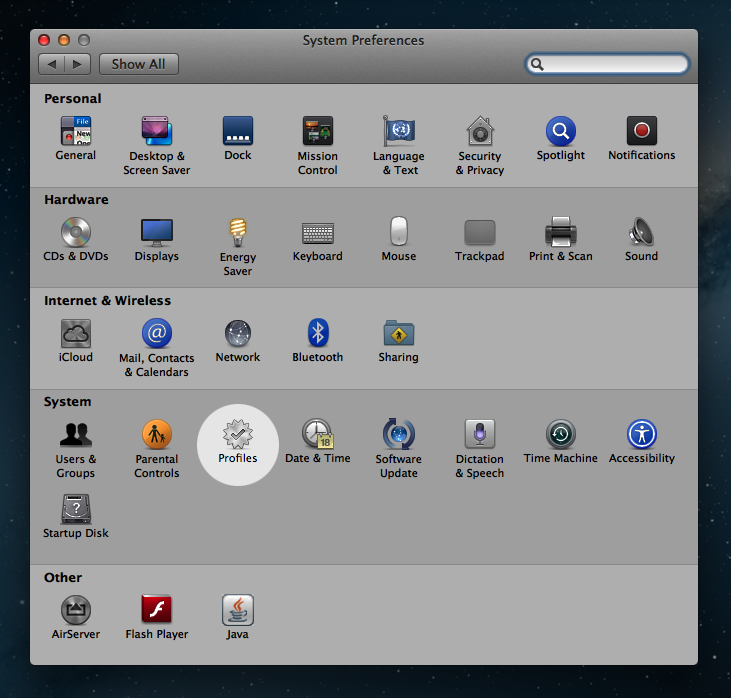
My school utilizes an MDM. I went into System Preferences, and there was a profile icon that I could open. Once in there, I just removed the profile. (It helps that I am the tech administrator here, therefore I have the privileges to perform such an action.) If you do not have this "Profiles" icon, then you don't have a profile installed on your computer and this would not resolve your problem. If you do have the icon, you need to talk with your tech admin about changing the profile to give you privileges to modify the backgrounds of your desktop.
Hopefully that explains it a little better.
Here is an image of what that profile icon would look like. (Credit to Meraki/Cisco for posting it.)
My school utilizes an MDM. I went into System Preferences, and there was a profile icon that I could open. Once in there, I just removed the profile. (It helps that I am the tech administrator here, therefore I have the privileges to perform such an action.) If you do not have this "Profiles" icon, then you don't have a profile installed on your computer and this would not resolve your problem. If you do have the icon, you need to talk with your tech admin about changing the profile to give you privileges to modify the backgrounds of your desktop.
Hopefully that explains it a little better.
Here is an image of what that profile icon would look like. (Credit to Meraki/Cisco for posting it.)
RickyHunter
macrumors member
It would only apply to you if your computer is managed by a Mobile Device Management (MDM) host. This is usually the case when you are apart of an educational institution or business that distributes devices or wants to have more control over what takes place on the devices, mainly for security reasons.
My school utilizes an MDM. I went into System Preferences, and there was a profile icon that I could open. Once in there, I just removed the profile. (It helps that I am the tech administrator here, therefore I have the privileges to perform such an action.) If you do not have this "Profiles" icon, then you don't have a profile installed on your computer and this would not resolve your problem. If you do have the icon, you need to talk with your tech admin about changing the profile to give you privileges to modify the backgrounds of your desktop.
Hopefully that explains it a little better.
Here is an image of what that profile icon would look like. (Credit to Meraki/Cisco for posting it.)
Great explanation Sir!
Unfortunately I don't have the Mobile Device Management, so no "Profiles" there.
I already tried all the solutions I was able to find and also the ones that came to my mind.
The only one I didn't do yet is to reinstall the os... ;(