Hello everyone
I'm trying to print through my university's Windows Print Server. I can add each printer manually by looking at their IP address and look them up using a Windows computer or BootCamp. However, I was troubleshooting another person's Mac and saw that that we could connect to the print server (Print and Scan -> Add a Printer -> Windows) and see the list of the printers available with the student credentials. She was using 10.7.x.
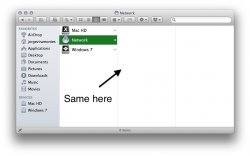
I didn't know that before when i was using Lion as well, and since then have upgraded to Mountain Lion. I tried doing the same thing but the options were all greyed out, i couldn't add any text or choose anything, not that there was something to choose. I can't go to the IT department for 2 reasons: 1) Mac support is extremely limited. 2) I'm working in the IT dept and have been unable to figure it out. In Finder as well, I can no longer see any computers under the same same network. It might be a setting I might have changed, but at this point, i don't remember them all!
Any help would be appreciated!
I'm trying to print through my university's Windows Print Server. I can add each printer manually by looking at their IP address and look them up using a Windows computer or BootCamp. However, I was troubleshooting another person's Mac and saw that that we could connect to the print server (Print and Scan -> Add a Printer -> Windows) and see the list of the printers available with the student credentials. She was using 10.7.x.
I didn't know that before when i was using Lion as well, and since then have upgraded to Mountain Lion. I tried doing the same thing but the options were all greyed out, i couldn't add any text or choose anything, not that there was something to choose. I can't go to the IT department for 2 reasons: 1) Mac support is extremely limited. 2) I'm working in the IT dept and have been unable to figure it out. In Finder as well, I can no longer see any computers under the same same network. It might be a setting I might have changed, but at this point, i don't remember them all!
Any help would be appreciated!