Become a MacRumors Supporter for $50/year with no ads, ability to filter front page stories, and private forums.
Yes. 5K resolution, PPI is the same as 4K actually, I have decided matte is what I want, it is what I have now, I can see reflections in my MB Pro screen. And it is meant to be curved slightly at that size otherwise you wouldn’t see the full screen in your peripheral vision.
I have the Dell U4025QW in my office and am glad I don't have to sit in front of it. And the Dell (soon to be two years old) is very similar to the LG, except for TB5.
 
I have the Dell U4025QW in my office and am glad I don't have to sit in front of it. And the Dell (soon to be two years old) is very similar to the LG, except for TB5.

That has slightly different backlighting, why do you not like it?
 
Especially when using a Mac, the resolution of the Mac does not match the resolution of the display at all (again, please don't misunderstand: you can always read text, but it is not as “sharp” as with 218 or 109 PPI).

Secondly, the matte coating in combination with the curved panel is the worst-case scenario for me, because you always have a nice wide gray haze strip on the screen when viewing dark content... I prefer flat displays in matte, but of course I would otherwise always prefer glossy. This type of monitor is slightly more suitable for Windows than for macOS.
 
I think the PPI will be fine for me, at the end of the day PPI is the same on this LG widescreen monitor as it is on a 32” 4K monitor and no one really complains about the text on those. It is about 24 PPI less then my current monitor, not sure if I will notice that? I want more screen real estate, I have two ways to do it, get a 6K screen and reduce the scaling to fit more windows on screen, but have smaller sharper text, get a bigger screen and just have more screen real estate and lower text sharpness. My current monitor 28” screen height as a 32”, I can get a 32” screen sure but whilst I get some more space, it won’t be a massive amount.
 
Last edited:
Especially when using a Mac, the resolution of the Mac does not match the resolution of the display at all (again, please don't misunderstand: you can always read text, but it is not as “sharp” as with 218 or 109 PPI).

Secondly, the matte coating in combination with the curved panel is the worst-case scenario for me, because you always have a nice wide gray haze strip on the screen when viewing dark content... I prefer flat displays in matte, but of course I would otherwise always prefer glossy. This type of monitor is slightly more suitable for Windows than for macOS.


I do some more checking today and it IS possible my works laptop may only support 4K 60 anyway. If that is the case I’ll look at the BenQ Mini LED or Pro range of monitors.
 
I have the BenQ MOBIUZ EX321UX and its a great monitor, it works well on my work laptop and Mac Studio.

That is great to hear, if I have to go 4K I would like something different like a Mini LED, close to an OLED then without the burn in. I did check it out and saw it has lots of ports, sadly no speakers so I’ll have to get some. But I have to admit I am thinking of a future setup of Mac (eventually Studio), Works Laptop and a Steam Machine. So one good monitor to handle that and try to hide the works laptop and use an external webcam plugged into the monitor. Trouble with all these high end IPS panels is they do produce great images, but they are rubbish for gaming and HDR media.

Is the text nice and clear on your BenQ? I would need to go on an arm for me as the stand is too big for my riser, the legs would stick out behind the front.
 
That is great to hear, if I have to go 4K I would like something different like a Mini LED, close to an OLED then without the burn in.
Yep, and that was my motivation. I figured that I could either buy a higher end 4k with lots of features, or a low end 5k with corners being cut. I was lucky because I had checked amazon, and the price was discounted for a period of time and so I paid around 750, not the advertised 1,000 price.

Is the text nice and clear on your BenQ?
Yes, razor sharp. I use BetterDisplay to dial in some of the settings for optimum benefit as well.
 
  • Like
Reactions: Pezimak
Yep, and that was my motivation. I figured that I could either buy a higher end 4k with lots of features, or a low end 5k with corners being cut. I was lucky because I had checked amazon, and the price was discounted for a period of time and so I paid around 750, not the advertised 1,000 price.


Yes, razor sharp. I use BetterDisplay to dial in some of the settings for optimum benefit as well.

Thanks, sounds good to me, looking at EugW’s desktop setup that LG 6K does have some small text, so not sure with the scaling I would have to use if I would benefit anyway? I think 4K may be better, I will look into the monitor, have something this week but if it costs as I think, it should leave some free funds from my savings for the monitor, speakers arm etc. I have next week off so it would be a great time to get it all sorted, then I can work on saving for a Mac Studio.

Does the monitor have a standard display port or a mini one?
 
Well I have ordered the BenQ Mini LED 32” 4K monitor, also got the BenQ arm in white, I know what keyboard I am getting, speaker shelf’s, speakers, and working on all the other bits I want even going to get some new drinks mats. I am thinking I will hide my works laptop under the riser, then eventually all that will be seen is the Mac Studio and Steam Machine. Going to cost a bit but I will hopefully have a clutter free space then, with three computers centred around a 32” gaming monitor. Sadly some of the things are on 3 to 4 week lead time, or like the speakers not out till December.

I thank everyone for their help with my monitor choices, very informed and certainly helped me. I do not think my works laptop will actually work with LG’s ThunderBolt 5 monitors anyway, they state you need DP 2.1 over USB C, looking at it that spec came out after Dell released my laptop, so chanced are it is DP 1.4 which is not compatible.
 
  • Love
Reactions: maflynn
My monitor was delivered today along with lots of other bits. I made a rough workout of hoe much my setup will be worth with everything, I won’t share it as it is rather embarrassing! Waiting for the speakers to be available to buy. I did get Cable Matters cables though for the monitor to avoid any potential issues, hopefully.
 
Setup my monitor, bit of a faff to get it right with the arm but I got there. Looks nice especially in HDR! Really packs a punch with that, and I am running it at native 4K resolution? And to me on the Mac it looks perfectly fine? Once I have all my bits and pieces in and it finished I’ll post a photo. Got lots of bits coming to ties it all together, hide cables. I have cabled tied my mains multi plug under the desk as plugs stay in it upside down, the tray I have for the cables can then have all the adapters and cables in it. It isn’t a big desk as I say, 67CM by 1 meter 40 ish. But it feels more open already changing it as I have. I have managed to hide the works laptop under the riser out the way, going to see if work will enable wake from sleep mode using my mouse or keyboard on it, I doubt they will enable power on by a keyboard.

Thanks @maflynn on the monitor advice, it is really nice and I have not seen any blooming yet. It looks better than my old Huawei which I wanted. Think it was the better choice for me over a pro level 4K display as I won’t used it for photo or video editing, but I will use it for some games.

If anyone needs a single arm for a monitor too I recommend the Ben Q one, it is universals for VESA, it is really good quality and has options for gromit, desk or even glass or fragile desk mount. Comes in black or white. It has a gas strut for the top arm movement too and you can adjust the tension on all the joints.
 
Last edited:
  • Love
Reactions: maflynn
If anyone needs a single arm for a monitor too I recommend the Ben Q one
Which model, they seem to have a number of them.

Is this the one you're talking about?
1763824734206.png
 
  • Like
Reactions: Pezimak
Sadly I noticed last night my new monitor has a stuck pixel on red, on black backgrounds it sticks out like a sore thumb. I have completed the Ben Q online form for a free replacement or full refund if that is not possible. They already shipped the monitor with the wrong UK power cable, so let's see how good their customer service is. If they claim the faulty pixel isn't valid for a free replacement then under UK law I am entitled to send the monitor back for a full refund anyway.

A bit gutted as the monitor is great otherwise, last night I was playing Starcraft 2 maxed out at 144FPS on it on my Mac! At 4K.
 
Last edited:
Oh man, that's horrible, so sorry to hear that.

Yeah, let's see how they act. Riding on REDDIT it seems they don't replace all monitors for faulty pixels. But as I said I will send it back for a refund then. Need a quick turnaround as I wanted to get everything set up this week. Still have my old monitor though.
 
  • Like
Reactions: maflynn
Well I have ordered the BenQ Mini LED 32” 4K monitor, also got the BenQ arm in white, I know what keyboard I am getting, speaker shelf’s, speakers, and working on all the other bits I want even going to get some new drinks mats. I am thinking I will hide my works laptop under the riser, then eventually all that will be seen is the Mac Studio and Steam Machine. Going to cost a bit but I will hopefully have a clutter free space then, with three computers centred around a 32” gaming monitor. Sadly some of the things are on 3 to 4 week lead time, or like the speakers not out till December.
What do you think about the text quality? I had a 32" LED 4K Asus and didn't think the text was good enough for daily usage at my ~22" seating distance.

I do not think my works laptop will actually work with LG’s ThunderBolt 5 monitors anyway, they state you need DP 2.1 over USB C, looking at it that spec came out after Dell released my laptop, so chanced are it is DP 1.4 which is not compatible.
Last I checked, LG doesn't say TB 5 / DP 2.1 is required for 6144x3456. It's been a while, but when I read it, it was just saying to get all the feature set, you want TB 5, but that was referring to TB 5 performance.

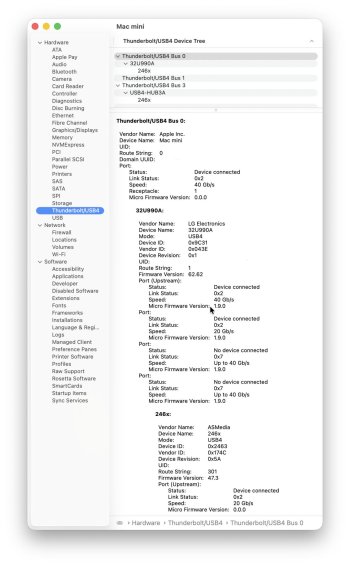
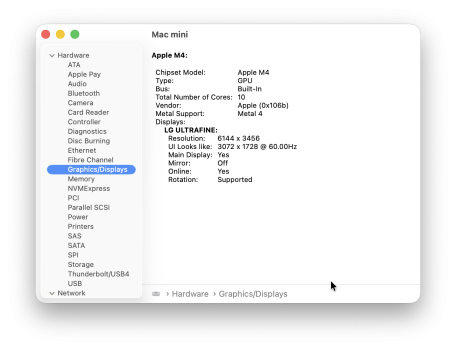
In fact, as mentioned in the LG thread, I am using DP 1.4 with my LG 6K, and I get full 6K 4:4:4 10-bit 60 Hz. I do not have a DP 2.1 Mac. It works fine with TB 4 / DP 1.4, USB-C to DP 1.4, and HDMI 2.1.

LG 6K System Report - Noserial.jpgLG UltraFine System Report.png
 
  • Like
Reactions: Pezimak
What do you think about the text quality? I had a 32" LED 4K Asus and didn't think the text was good enough for daily usage at my ~22" seating distance.


Last I checked, LG doesn't say TB 5 / DP 2.1 is required for 6144x3456. It's been a while, but when I read it, it was just saying to get all the feature set, you want TB 5, but that was referring to TB 5 performance.

In fact, as mentioned in the LG thread, I am using DP 1.4 with my LG 6K, and I get full 6K 4:4:4 10-bit 60 Hz. I do not have a DP 2.1 Mac. It works fine with TB 4 / DP 1.4, USB-C to DP 1.4, and HDMI 2.1.

View attachment 2581823View attachment 2581825

I havn’t used it for work as such but to me the text is fine. I can read it, and it was in the LG specs about requiring display port 1.4 but reading it again I see it is actually ‘recommended’:

To access all features including 96W charging and 5120×2160 @120Hz output, it is recommended that your device support Thunderbolt 5 or DisplayPort 2.1

That is for the widescreen 5K display by LG, but it was the same for the 6K 32” as they are both TB5. Hmm I want the KVM to be able to work with my works laptop really. It is working with the Ben Q for the mouse and keyboard, not the webcam I got but I can plug that directly into my laptop anyway.
 
That is for the widescreen 5K display by LG, but it was the same for the 6K 32” as they are both TB5. Hmm I want the KVM to be able to work with my works laptop really. It is working with the Ben Q for the mouse and keyboard, not the webcam I got but I can plug that directly into my laptop anyway.
I don't use a laptop much, but I have the LG 6K set up to support both an M4 MacBook Air and my M4 Mac mini.

There is a Thunderbolt 5 input and output. The input is for both TB 4 / USB 4 data and for video.
There is a separate USB-C 3.2 10 Gbps input and two outputs. These are only for USB data.

The way I have it set up is that the Mac mini connected to the Thunderbolt input is the only one that can access the drive on the Thunderbolt output.

However, all the inputs share the peripherals attached to the USB-C 3.2 outputs. See here:

 
I have had some more issues with the monitor now, namely the KVM, really odd like my mouse was working fine, a Logitech MX4, rebooted my Mac and suddenly it refused to work, connected over Bluetooth fine though. I have asked to return it now. But where do I go from here?

Looking at my setup with the mounting arm I 'could' fit 2 27" screens on if I wanted, but I would have to remove my desk lamp then and I don't really want to do that as I do use it daily and it wouldn't give as clean a look as I want. So I think 1 32" screen is my best option, I can scale things to work for me. the Ben Q is a bit too matte I am thinking though? Comparing the screen to my MacBook Pro just highlights how good Apple displays are.

So I am a bit stuck again, maybe I should give the LG 32" 6K a go? See if it will work. I could wait to see what Apple comes out with but..... most likely it will be 27" Studio or a 32" Pro Display for 5 grand, plus both will have only ONE input because Apple believes you only own one computer ever...

Or perhaps I should wait for Tandem OLED 4K 32" screens to come out? In theory they should reduce burn in a lot for static images right?

An Apple Studio Display with 5K at 32" 120hz mini LED would do me, with more then one input too and actual buttons on it to change inputs. Ditch the webcam and speakers too.
 
Last edited:
Register on MacRumors! This sidebar will go away, and you'll see fewer ads.