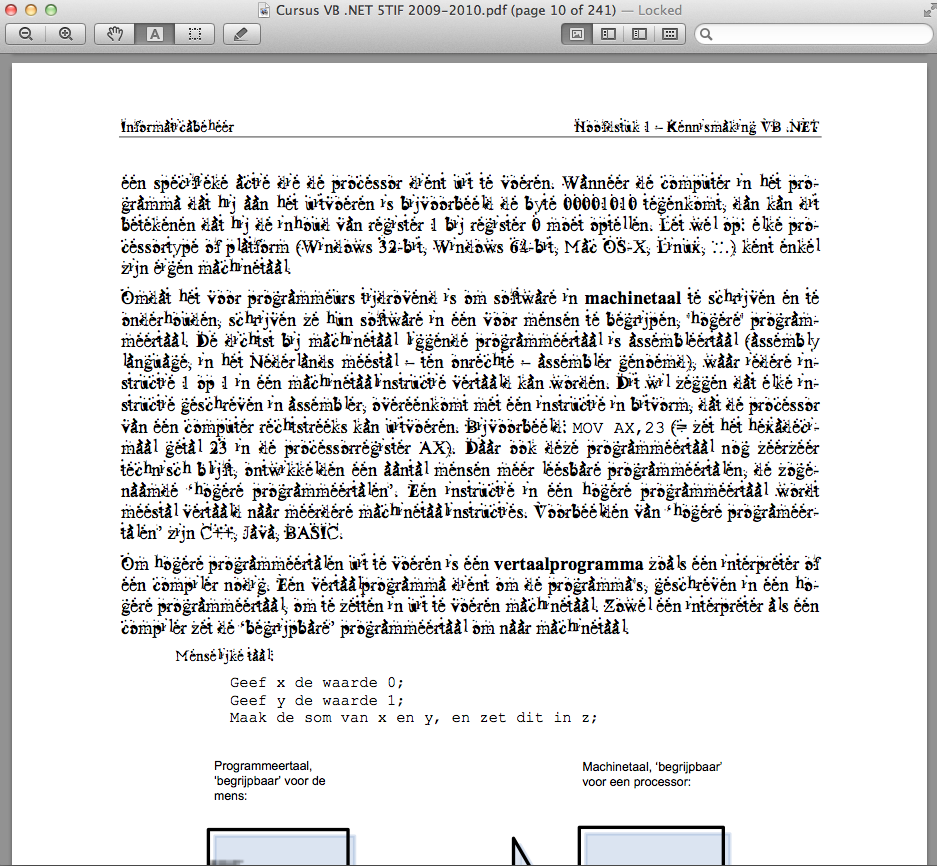
V vipii macrumors newbie Original poster Aug 10, 2011 #1 Hi, Recently I installed some fonts on my MacBook-Pro. (Mac OS X Lion - 10.7) And since a few days my PDF's are having other fonts. (I use Preview to view my PDF's) How can I get back the normal Font for my Preview? A screenshot of the problem:
Hi, Recently I installed some fonts on my MacBook-Pro. (Mac OS X Lion - 10.7) And since a few days my PDF's are having other fonts. (I use Preview to view my PDF's) How can I get back the normal Font for my Preview? A screenshot of the problem:
V vipii macrumors newbie Original poster Aug 10, 2011 #2 Sorry for repost. Pressed Refresh and he posted the topic again...
DewGuy1999 macrumors 68040 Aug 10, 2011 #3 You could try the steps outlined in this article: Safari in OS X Lion replacing text with 'block A' characters I realize that the article addresses a different problem, but I believe your problem is font related and should be addressed in the same manner.
You could try the steps outlined in this article: Safari in OS X Lion replacing text with 'block A' characters I realize that the article addresses a different problem, but I believe your problem is font related and should be addressed in the same manner.