Become a MacRumors Supporter for $50/year with no ads, ability to filter front page stories, and private forums.

jcdx

macrumors newbie
Original poster
Jun 2, 2010
1
0
Hi All,

I am very new to Apple and Mac.
I tried to change the application icons in the dock. I did it as I read it in the net.
Right klick the application folder (Finder) -> Get info -> copied the desired icon from somewhere -> cmd+v to change the icon
That actually worked out.
But now the strange part. When I drag the icon into the dock it automatically changes into the "Address Book" icon. What could have happend? All other icons I changed work.
To have the "Address Book" icon for the application folder in the dock is really annoying. Also deleting the icon completely did not work out.

I am grateful for all suggestions.
 
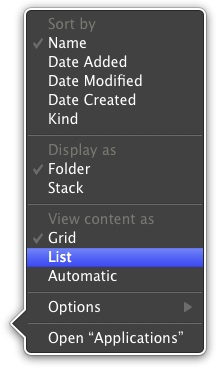
If I'm getting you correctly, you are looking for this:

Right click on the Address Book icon (or the Application Stack) and select 'Display as' 'Folder'.
 
Right click on the Applications folder icon in the Dock and select DISPLAY AS FOLDER, maybe that changes the icon in the Dock to your chosen icon.

4655534685_c385a6f2f1.jpg


Also have a look at the following links, as the information presented there might be helpful in your future endeavours into Mac OS X and could clear up initial confusion and may even prevent harm to your system or your files.


Mac OS X Basics


Switch 101 - guide with articles made by Apple on how to accustom yourself, after you switched to Mac OS X from Windows​


Mac 101 - How to get started with Mac OS X​


Find out how - tutorial videos made by Apple on how to do certain thing in Mac OS X​


Pro tips - tips made available by Apple for easier ways of doing certain tasks​


Mac OS X Keyboard Shortcuts - Learn about common Mac OS X keyboard shortcuts.​


Mac OS X Beginner's Guide by MacRumors - learn about software, media players, shortcuts and some useful tips, tricks and hints​


Mac Guides - tutorials, product guides and more​


MRoogle - a very effective tool to search these fora using Google and made available by edesignuk, introductory threads: 1, 2 and 3
 
Right click on the Address Book icon (or the Application Stack) and select 'Display as' 'Folder'.

...because you now have it set to 'Stack'. The way it interprets that, the first item in the actual folder will appear in the Dock. A Stack is just a representation of a Folder in the Dock. Thus, the Display As Stack option is rather clumsily named. It should say Display > First Item or > As Folder.
 
Register on MacRumors! This sidebar will go away, and you'll see fewer ads.