Become a MacRumors Supporter for $50/year with no ads, ability to filter front page stories, and private forums.

Nashville_Todd

macrumors member
Original poster
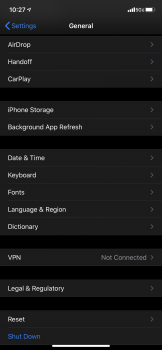
I want to remove the beta profile off my iPhone 11 and the tab is missing. Any ideas what to do?
 

Attachments

  • 06C3952E-4CD1-4ACA-8D95-81C5F6665F22.png
    06C3952E-4CD1-4ACA-8D95-81C5F6665F22.png
    294.3 KB · Views: 3,141
That usually means there are no profiles. How did you set your phone up? The iOS13 that it came with would have been installed without needing a beta profile.
 
I set it up by restoring from recent iCloud back up from my iPhone X which had a beta profile.
[automerge]1569082203[/automerge]
The store rep told me I had to do that since I had a beta OS on my watch too otherwise the watch wouldn’t sync.
 
So, you didn't install the beta profile or any newer beta (iOS 13.1) on your 11. So your 11 is correct - there'll be no beta profile installed (and hence no option) as it's running the factory installed iOS 13.

I've no idea about the watch, as I don't own one, sorry.
 
wait I just realized I’m on 13.1 which isn’t out yet so I have to be on beta.
If you are positive you are on 13.1, then you will need to wipe and install 13 GM. If you don’t have a profile installed, you won’t get beta but, you need to remove the beta version so that you can get proper standard updates.
 
I had to set up my Pro as new and install 13.1 before restoring from my backup and I have no profile on mine either.

Something’s definitely not right here.

Edit: Maybe beta 4 is designed as a “GM” (yes I know .x updates don’t have GMs) and installs without a profile since it’s coming out on Tuesday?
 
Register on MacRumors! This sidebar will go away, and you'll see fewer ads.