Become a MacRumors Supporter for $50/year with no ads, ability to filter front page stories, and private forums.

liamski

macrumors regular
Original poster
Hey guys

I have a few random questions if you don't mind. I've had my MBP C2D for a week or so now, and am lovin it. I do need to 'reprogramme' my brain though... I still think like a Windows user 😀

-- Is there a quick way in Safari or Firefox to set a web image as your wallpaper? Rather than having to save it, then go into System prefs etc...?

-- I find it a bit annoying that I can't have my Firefox, safari, Word etc... windows take up the WHOLE screen, and not just float as 75% of the screen space. Is there a standard OSX option to fill out the screen with a particular app?

-- Can anyone recommend a decent audio capture / editing application? I used to use Wavelab on my PC, and Streambox ripper to save realplayer streams direct from servers.

As always, thanks very much

L
 
-- Is there a quick way in Safari or Firefox to set a web image as your wallpaper? Rather than having to save it, then go into System prefs etc...?
Nope.

-- I find it a bit annoying that I can't have my Firefox, safari, Word etc... windows take up the WHOLE screen, and not just float as 75% of the screen space. Is there a standard OSX option to fill out the screen with a particular app?

A PC user friend coined it "Macimize".

Get used to it 🙂


-- Can anyone recommend a decent audio capture / editing application? I used to use Wavelab on my PC, and Streambox ripper to save realplayer streams direct from servers.

Audacity
 
-- I find it a bit annoying that I can't have my Firefox, safari, Word etc... windows take up the WHOLE screen, and not just float as 75% of the screen space. Is there a standard OSX option to fill out the screen with a particular app?
That is the Mac way, but there is a workaround:

Make a new bookmark in your Bookmarks bar, name it appropriately (mine is called [F], then paste this into location (Firefox)/address (Safari):

javascript:self.moveTo(0,0);self.resizeTo(screen.availWidth,screen.availHeight);

Voilà, you got yourself a full screen button...
 
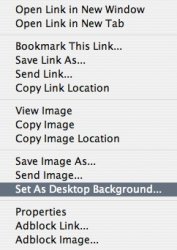
If you CTRL - Click (or right Click) on the image in Firefox, isn't there a "set as desktop" option?

I'm sure I did that the other day...
 
If you CTRL - Click (or right Click) on the image in Firefox, isn't there a "set as desktop" option?
Indeed there is:

Picture 3.jpg

[Nevermind: brainfart]

🙂
 
The Safari bit was a bit premature... It's Firefox only.... 😱

(Though you can save the image directly to iPhoto from Safari, and there it's just one click away from becoming your desktop image... 🙂)
 
-- I find it a bit annoying that I can't have my Firefox, safari, Word etc... windows take up the WHOLE screen, and not just float as 75% of the screen space. Is there a standard OSX option to fill out the screen with a particular app?

Windows does this because it's descended from a single user system which doesn't do much with things like Drag & Drop. Wanting it to do this is how we know you're a Windows émigré. When you start exploring things like Drag & Drop and clicking on windows to bring them front the light bulb will go on.

Until then, if you manually drag out the Safari window it will remember it. Some other applications do too. Word doesn't for reasons that are obvious if you ever work on more than one document at a time. Good luck. It will all come together eventually.
 
-- Can anyone recommend a decent audio capture / editing application? I used to use Wavelab on my PC, and Streambox ripper to save realplayer streams direct from servers.

I use Audion - i can't compare with any others since this is the only one i've used, but it works well, has quite a lot of features, and is now FREE!
 
Tried Stoplight?

-- I find it a bit annoying that I can't have my Firefox, safari, Word etc... windows take up the WHOLE screen, and not just float as 75% of the screen space. Is there a standard OSX option to fill out the screen with a particular app?

As for maximizing windows, a lot of Switchers see this behavior as an annoyance in OS X (I personally think it's a better paradigm, but to each his own). One application I have heard of that will allow you customize how applications "Maximize" is called Stoplight.

You might check it out; here's a thread on it:
http://forum.insanelymac.com/index.php?showtopic=26597
 
I can't stand it when I see someone with a Mac and they have each program filling the whole screen. That is a very one dimensional way of working, it is counter productive. It is much more productive to have windows only as big as they need to be, it allows you to see other information on the screen at the same time without switching programs.

I've never understood why some people like to make browser windows take up the whole screen, all that happens is that there are huge white bars on the side of the window that never fill up, seems like a waste of screen space to me.

Even now, I am at work with a PC using a 20" screen. It would look ridiculous to have this window take up the whole screen. I tend to have it fill about half of the screen, that way I can see if I have new emails or IM windows next to it. I think I am the only here who doesn't have every program fill the screen, guess it is my Apple background.
 
I'm currently a windows user (yeah, still) and I can completely understand the need to go "full screen" in some programs or on some pages. I'm not saying this is always the best way, but I can understand it.

This may be related or unrelated, but I can't stand it when windows users choose the "auto hide the taskbar" option. For me, THAT is where I look for all of my information, not at the actual window, and when it's gone I feel blind. I would liken it to a Mac user going "full screen" and not being able to see everything else open behind the top window. 😛
 
Regarding the full screen open window in your browser (Safari or Firefox), as has been mentioned, all you need to do is manually stretch the window (lower right corner) until it fills the screen... you do it ONCE and from now on, your browser will remember how you like your window set up, so every time you launch, it'll launch as full screen.

Personally, since I'm on a 12" iBook, I do like to have my browsers take up the full screen when I'm surfing, otherwise it's too small.

On other applications, it varies. Some word-processing apps specifically have a full-screen option, because many writers like the feeling of no distractions, only the open page to write. And if you have one of those apps, you're set as far as that goes (Ulysses, CopyWrite etc.).

With other apps, the Mac way of not going full screen is better, because you can multitask a lot easier when you can see other windows at the same time.

I like the Mac way, since it allows me full screen when I want (browsers), but gives me the option of multitasking when I need that. Choices. Always good.
 
That is the Mac way, but there is a workaround:

Make a new bookmark in your Bookmarks bar, name it appropriately (mine is called [F], then paste this into location (Firefox)/address (Safari):

javascript:self.moveTo(0,0);self.resizeTo(screen.availWidth,screen.availHeight);

Voilà, you got yourself a full screen button...

Wow, great tip - thanks!
 
Register on MacRumors! This sidebar will go away, and you'll see fewer ads.