I'm essentially stuck on Mojave for this exact reason. Since QT7 Pro was so ingrained in my workflow, I was certain that within a year or so of Catalina (or whatever the first 64bit only OS was) an alternative would show up in short order. Guess I underestimated how many users rely on it 🙁 - like the OP I couldn't believe I had to explain to folks why I missed it! ...everyone who says, "just use iMovie (FC, Premiere etc)" is clearly unaware of why QT7 Pro was/is so useful.
The How-To video above, by Michael Kinney, is quite helpful actually. I learned a lot from it, but the QT7 Pro function I use most often is Delete, Extract/Add Sound to Movie (I'm a sound designer and composer). QT7 Pro does a ton of other useful stuff, but if QT Player could do this operation (it can not, correct?) I'd probably stop complaining and move on with my life.
Resurrecting in 2023 just to say this is exactly why I am STILL on Mojave.
Menu>Window>Show Movie Properties.
Extract audio track and delete.
Process extracted audio in Audacity and export.
Drag exported processed audio file to QT7 icon in Dock.
Cmd+A, cmd+C, cmd+W, opt+cmd+V. cmd+S.
Or make a jpg image into a short 10sec movie by just repeating select all-copy-paste a bunch of times.
Or marking in/out sections with I and O keys, and doing whatever, like quick edits removing filler words from speeches, or removing all content except keywords, or....
Or Save For Web to get a few varieties of export in one shot.
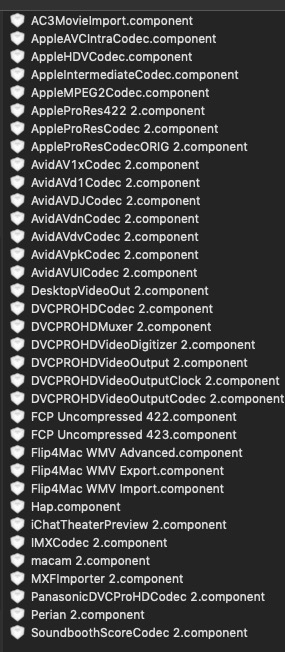
Or proRes, or h.264, or mpeg, or... I mean look at the components list!
All "quick" as it should be, and priceless.
Viva QT7!!!!!