Become a MacRumors Supporter for $50/year with no ads, ability to filter front page stories, and private forums.

solidshane

macrumors newbie
Original poster
Has anyone else noticed the new way that quicktime minimizes HD movies to the dock? It's a nice new kind of scale/genie effect. Is there any way to make this the default way all windows minimize?

 
solidshane said:
Has anyone else noticed the new way that quicktime minimizes HD movies to the dock? It's a nice new kind of scale/genie effect. Is there any way to make this the default way all windows minimize?
As far as I knew, it was the same genie effect for all programs. I know that Quicktime will keep playing the movie while its in the dock, motion and all, but I haven't notice a difference in the genie effect. Hold down the shift keep when you do the genie, then try to take a screen shot of it, so we know what you are talking about.
 
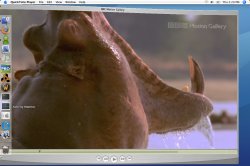
Here is what I am talking about. It isn't scale, it isn't genie, and it isn't suck in from tinkertool.
 

Attachments

  • Figure 1.jpg
    Figure 1.jpg
    221 KB · Views: 124
  • Figure 2.jpg
    Figure 2.jpg
    147.6 KB · Views: 118
Huh... does sort of look different in that picture, but on my Mac minimizing an HD window looks identical to anything else. Weird--you sure it's not just a side-effect of having a very large window? Have you tried minimizing a fullscreen window and seeing if it looks the same?
 
there was a period where it was minimizing normally, just like everything. it seems to sporatically do this, usually after it's open for a minute or so. also, it doesnt like to slow down with a shift click, it takes like 25 tries to make it do that (to take a screenie).
 
Looks like the genie affect is backwards. Try moving your dock to the right side and see if it is still backwards. Then move it back tot the left. It might be a bug, let apple know of it.
 
Register on MacRumors! This sidebar will go away, and you'll see fewer ads.