Become a MacRumors Supporter for $50/year with no ads, ability to filter front page stories, and private forums.

BetraySoul

macrumors newbie
Original poster
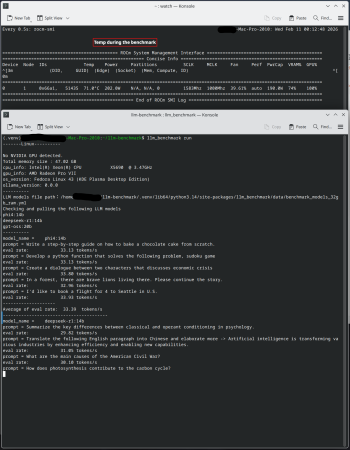
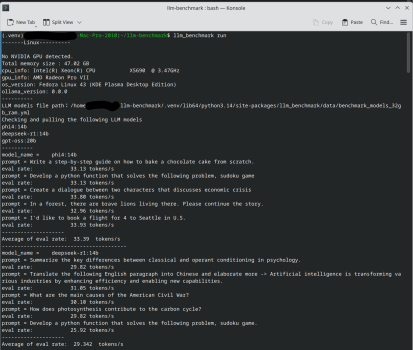
I recently got a brand-new, unused Radeon Pro VII for $165. This GPU has 16GB of HBM2 VRAM, providing a massive 1TB/s memory bandwidth. I have a spare Mac Pro 5,1 that dual-boots macOS Monterey and Fedora Linux. I threw this GPU in it and ran a quick LLM benchmark on Linux with default settings. The performance with 14B models is great! I think it performs close to an NVIDIA RTX 4080. It's an incredible value for the price.

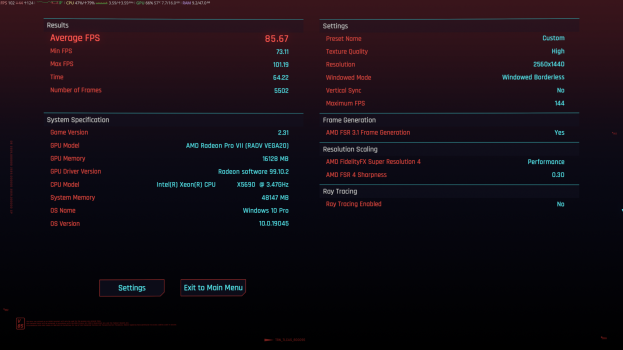
I also ran a quick Cyberpunk benchmark using GE Proton at 1440p with ultra settings, FSR4 INT8 performance upscaling, and FSR3.1 frame generation, and I got a decent 85 FPS. I'm quite surprised that FSR4 INT8 works so well on this older Vega card. The image quality looks great. I thought the minimum requirement for FSR4 INT8 would be an RDNA2 card.
 

Attachments

  • Screenshot_20260211_002418.png
    Screenshot_20260211_002418.png
    6.6 MB · Views: 194
  • Screenshot_20260211_001516.png
    Screenshot_20260211_001516.png
    367.6 KB · Views: 135
  • Screenshot_20260211_001249.png
    Screenshot_20260211_001249.png
    502.6 KB · Views: 142
It's also a heater
Used to have this GPU on my Hackintosh, memory was pretty crazy such a shame HBM is so expensive and no one is using it anymore (unless it's for AI workloads)
 
I recently got a brand-new, unused Radeon Pro VII for $165. This GPU has 16GB of HBM2 VRAM, providing a massive 1TB/s memory bandwidth. I have a spare Mac Pro 5,1 that dual-boots macOS Monterey and Fedora Linux. I threw this GPU in it and ran a quick LLM benchmark on Linux with default settings. The performance with 14B models is great! I think it performs close to an NVIDIA RTX 4080. It's an incredible value for the price.

I also ran a quick Cyberpunk benchmark using GE Proton at 1440p with ultra settings, FSR4 INT8 performance upscaling, and FSR3.1 frame generation, and I got a decent 85 FPS. I'm quite surprised that FSR4 INT8 works so well on this older Vega card. The image quality looks great. I thought the minimum requirement for FSR4 INT8 would be an RDNA2 card.
I googled and it seems that AMD dropped support for Radeon VII and Radeon VII Pro in later ROCM versions, is that correct?
 
I have an AMD Radeon Pro Vega II with 32 gb HBM2, do you think it is possible to use it for local LLM and how ?
Both Ollama and LM Studio require Apple Silicon for macOS, so you'll need to install Windows or Linux. I've never run a local LLM on Windows before. Personally, I prefer Linux due to better GPU driver support. You'll probably need to do some research if you've never installed Linux on a Mac Pro 2019 before. The T2 chip can be a headache. CachyOS has built-in T2 support based on T2 Linux.
My W6800's 14B performance is slightly worse than my Pro VII's, but its 32GB of VRAM allows it to run larger models with decent performance. I think your Pro Vega II MPX should perform similarly to the Pro VII, and its 32GB of VRAM can handle larger models with probably better performance than the W6800. Ollama's official "Hardware Support" explicitly lists Vega II as supported.
 
You're always telling people to run Linux. @Mac3Duser , plenty of folks on reddit running LLMs on MacOS and getting results. Check there.
Dude, @Mac3Duser explicitly asked whether he could use the AMD Radeon Pro Vega II to run a local LLM. Ollama and LM Studio just do not support macOS on Intel Macs, so he would need to install either Windows or Linux on his Mac Pro. For running a local LLM, Linux obviously has better support.
 
  • Like
Reactions: keksikuningas
Register on MacRumors! This sidebar will go away, and you'll see fewer ads.