Become a MacRumors Supporter for $50/year with no ads, ability to filter front page stories, and private forums.

mschafft1

macrumors newbie
Original poster
Hi everyone,

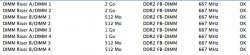
I've just added 2x2Go of RAM to my 1.1 Mac Pro.

As you can see in the pciture, I've put all modules in pairs.
Can I improve performance by changing their order ?

Thanks

Manny
 

Attachments

  • Screenshot_ 5.jpg
    Screenshot_ 5.jpg
    40.9 KB · Views: 197
Hi everyone,

I've just added 2x2Go of RAM to my 1.1 Mac Pro.

As you can see in the pciture, I've put all modules in pairs.
Can I improve performance by changing their order ?

Thanks

Manny

IIRC you get the best performance when you put the biggest DIMMs into socket 1 and 2 of each riser card. In your case, swap the 1GB modules from riser A, socket 3 and 4 with the 512MB modules in riser B, socket 1 and 2.
 
I have a question similar to this one. sorry to jack.

I have just installed 2 gb of ram into my early 2008 mac pro.

The new ram was not recognised in slot 2. But work in Slot 3.

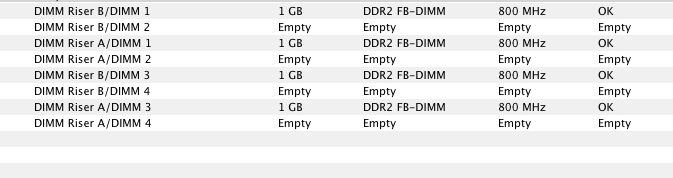
So now i have 1gb x 2 in slot 1. and 1 gb x 2 in slot 3.

Will this effect speed in anyway if they are not placed in sequentially?

The weird thing is . when i tried the new ram on its own in slots 1. one of the sticks shown a red light. but now they are both working in slot 3. Is this a common thing? is it worth me trying them again in slot 2?

All good things

Craig

this is it in the current set up.
rAAGz.png
 
Last edited:
Register on MacRumors! This sidebar will go away, and you'll see fewer ads.