Become a MacRumors Supporter for $50/year with no ads, ability to filter front page stories, and private forums.

newbreednet

macrumors newbie
Original poster
I have a 500Gb external USB HD. It is currently formatted into two equal HFS partitions using Apple Partition Map.

Can I reformat the second of these partitions as FAT32 *and* keep all the data on the first HFS partition? I know there are ways to do this if the drive was empty but I don't have a spare 230Gb elsewhere to shunt off the stuff on the first HFS partition.

Neither of the partitions (HFS or FAT32) need to be bootable.

Thanks all 🙂
 
have you tried using the disk utility application, it probably won't let you if you have large files or the drive is almost full. the problem with switching filesystems is that they write data to the drive in very different ways so converting would require a lot of free disk space.
 
Well you didn't indicate what version of the OS you are using, but I can say that with Leopard (and if I remember it works the same in Tiger) you can indeed erase/format one partition on a disk without disturbing the other one.

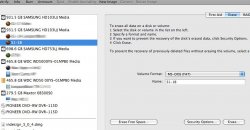
As long as you have the individual partition highlighted on the left rather than the volume name as illustrated below, you can use the Erase tab to reformat that partition as MS-DOS (FAT) which is the Apple name for FAT32.

One thing to consider though- because of the Apple Partition Map that you mentioned that the disk carries, the new FAT32 partition will not be recognizable by all the things that would recognize it if it had a Master Boot Record partition table as it would on a PC.
 

Attachments

  • DU.jpg
    DU.jpg
    59.6 KB · Views: 87
Thanks for the replies.

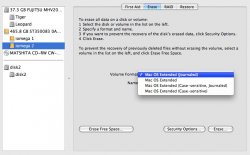
As you can (hopefully) see this is what I get in my Disk Utility - there is no option to format as FAT. This is in Leopard but I have also tried it in Tiger and get the same.

However the point of this operation was to be able to use the disk in Windows - if the partition scheme is gonna prevent this then I'm screwed anyway 🙁
 

Attachments

  • Disk Utility Screenshot.jpg
    Disk Utility Screenshot.jpg
    80.6 KB · Views: 68
Register on MacRumors! This sidebar will go away, and you'll see fewer ads.