
Become a MacRumors Supporter for $50/year with no ads, ability to filter front page stories, and private forums.

EugW

macrumors P6
Original poster
Hi.

I did a full erase of my iPhone 12 Pro Max to give to my kid, and then signed it into the appropriate iCloud account. However, during this process I had left my old inactive physical SIM card in it.

I recently installed a travel eSIM for the card, but noticed that there are two SIM entries. One is the new travel eSIM, but another with my old phone number, but with "No SIM" beside it. How do I get rid of that? That SIM card hasn't been active for months.

Here is what it looks like. (I blanked out my phone number.)
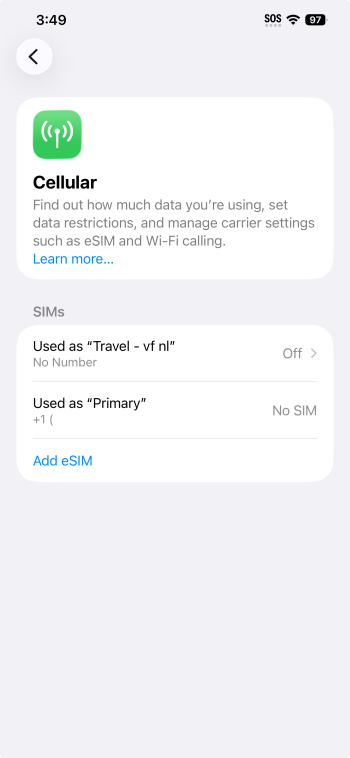
Screenshot 2026-03-12 at 3.49.40 PM.png
 
Is there a reason why you must delete that entry?

You can do a full reset to clear it off, but it's an empty entry that doesn't do anything since its SIM is gone.

EDIT: I have some inactive numbers myself, and when I tap them it asks me to move any contacts (if any stored on the iPhone) to an active number. Once you do that, the inactive number removes itself.
 
  • Like
Reactions: EugW
Is there a reason why you must delete that entry?
Not sure about physical SIMs, but I've noticed that when you have an inactive eSIM, occasionally it interferes with other eSIMs. One recent case is I had a Telus eSIM but then ported over to Freedom Mobile. The port didn't work because the Freedom Mobile eSIM then for some strange reason adopted the APN settings of the Telus eSIM, and I couldn't change it manually either. Because of that, nothing worked. In the end I had to delete the Freedom eSIM and get a new one. The agent in the store says he sees this happen from time to time. He said usually what he does for customers that encounter such problems is to ask what eSIMs on the phone are still necessary and which ones will never be used again, and then deletes all the unnecessary eSIMs to prevent any weird problems like this from happening.

You can do a full reset to clear it off, but it's an empty entry that doesn't do anything since its SIM is gone.

EDIT: I have some inactive numbers myself, and when I tap them it asks me to move any contacts (if any stored on the iPhone) to an active number. Once you do that, the inactive number removes itself.
Interesting. Maybe once I activate the travel eSIM, it will give me the option to update everything and then allow me to delete the old SIM entry. But right now the travel eSIM is off (since we haven't travelled yet), and it won't let me touch the old SIM entry. Also, I don't think Vodafone travel data eSIMs even have a phone number, if that matters. You can see from the screen grab that there is no phone number listed for the Vodafone ("vf") travel eSIM.
 
Last edited:
I have some inactive numbers myself, and when I tap them it asks me to move any contacts (if any stored on the iPhone) to an active number. Once you do that, the inactive number removes itself.
Interesting. Maybe once I activate the travel eSIM, it will give me the option to update everything and then allow me to delete the old SIM entry. But right now the travel eSIM is off (since we haven't travelled yet), and it won't let me touch the old SIM entry.
Turned on travel eSIM and the physical SIM entry was deleted once I updated the Contacts to use the travel eSIM.
 
Register on MacRumors! This sidebar will go away, and you'll see fewer ads.