Become a MacRumors Supporter for $50/year with no ads, ability to filter front page stories, and private forums.

SDAVE

macrumors 601
Original poster
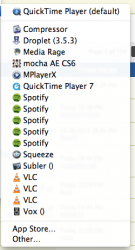
Anyone know how?
 

Attachments

  • Screen Shot 2013-01-11 at 4.49.31 PM.png
    Screen Shot 2013-01-11 at 4.49.31 PM.png
    66.2 KB · Views: 298
You can fix this via the following Terminal command (copy and paste):
Code:
/System/Library/Frameworks/CoreServices.framework/Frameworks/LaunchServices.framework/Support/lsregister -kill -r -all s,l,u; killall Finder
 
I was looking for this too - I had multiple entries for Evernote and one other program and this was bugging me.

Thanks!
 
Unfortunately, while the command fixes the problem, the issue re-appears after a few days or so. I just learned to ignore it.
 
What's worked for me (because of connected clones) I just ran the Terminal code:

Code:
/System/Library/Frameworks/CoreServices.framework/Versions/A/Frameworks/LaunchServices.framework/Versions/A/Support/lsregister -kill -r -domain local -domain system -domain user

This seems to fix the problem for me at least but YMMV.
 
Register on MacRumors! This sidebar will go away, and you'll see fewer ads.