Become a MacRumors Supporter for $50/year with no ads, ability to filter front page stories, and private forums.

MoniWill

macrumors newbie
Original poster
A couple of months ago I had forgotten my admin password for my iMac & came to the mac forum for a little help, actually I was amazed at how many different suggestions I found, but the one that I used and found to be the easiest and best solution (and free too) was to add a new admin with a new password, then I changed the password to the old admin and deleted the new admin....funny thing is...now that my mother is having the same problem with her Dell, I can't remember how to do that and as usual I didn't save the instructions that I found that day. Anyone with suggestions? 😕

 
The easy way is to boot from the OS install dvd. Don't think that'll work with your mom's Dell, though.
 
It works only with a Mac though.
You need to find a Windows forum for that Dell issue or use MRoogle (my sig) to look for relevant threads or change your thread title if you mean Windows.

Reset Administrator password with the Restore DVD

Resetting the original administrator account password

Follow these steps to reset a password when there is only one administrator account on the computer, or if the original administrator account needs a password reset. "Original" administrator account refers to the one that was created immediately after installing Mac OS X. If the original administrator password is known, that administrator account may be used to reset the passwords of other administrator accounts using the steps described above. These steps require an optical drive; if your Mac does not have an optical drive and you have a Mac OS X v10.6 Install disc, see below.

Start up from a Mac OS X Install disc (one whose version is closest to the version of Mac OS X installed). Usually, you can start from the disc by putting it in your computer, restarting, and holding the C key. Or, put it in the computer and click the Install or Restore icon you see in the disc's main window (after which the computer will start from the disc without you needing to hold C). Or, you can use Startup Manager or the Startup Disk preference pane to select the Install disc.

Choose a language, click the arrow button to continue,
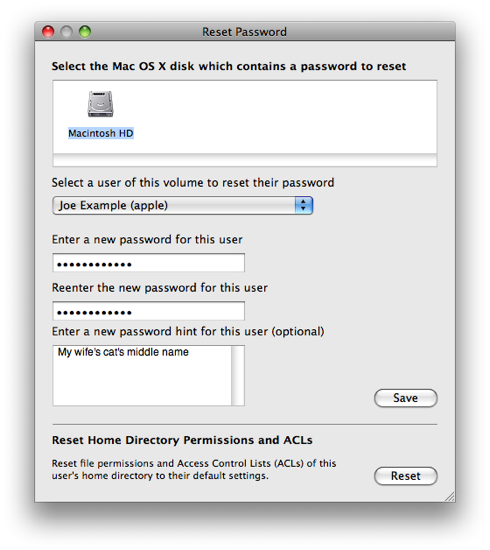
Mac OS X v10.6 or later: Choose Password Reset from the Utilities menu.
Mac OS X v10.5 or v10.4: Choose Reset Password from the Utilities menu.
Mac OS X v10.3: Choose Reset Password from the Installer menu.

Tip: If you don't see this menu or menu choice, you're probably not started from the disc yet.

Note: The default keyboard layout is U.S. English while started from the installation disc. If you use a keyboard layout other than U.S English, use the Input menu (the flag icon on the right side of the menu bar) to select the desired layout before typing a new password.

Select your Mac OS X hard disk volume.
Select the user name of your original administrator account.

Important: Do not select "System Administrator (root)". This is actually the root user. You should not confuse it with a normal administrator account.

HT1274_Leopard.png


Enter a new password.
Click Save.
Click the red button in the upper left corner to quit the application.
Choose Quit Mac OS X Installer... from the Mac OS X Installer menu.
Click Restart.


from http://support.apple.com/kb/HT1274
 
Hmmmm.....Didn't need a cd to add a new admin the last time

Right... that's why I said it was the easy way... didn't say it was the only way.

You'll still need other instructions for your Dell, though.

edit: you would use the install dvd to reset the password, not create a new account.
 
You repeat yourself.

But of what system are you talking about?

Mac OS X, and if what, which version?

You can add an admin account via System Preferences > Accounts and the little plus on the bottom left.
system-preferences.png


But if that pane is locked, you need to reset your current's account password, therefore the need of some kind of Mac OS X DVD.


If you're inquiring help about your Dell, be more specific in your communication.
 
admin password

OK so more specifically, if I can't remember my admin psswrd then I can't very well log in to use system preferences, sooooo...what I did was add a new admin so that I could actually have access to my computer and all of its fantastic functions, just can't remember how I was told to do that.
 
If anyone can reset an admin password by just using an OSX install disk then what is the point of having a password at all other than for preventing unauthorised software installing?

Am I correct in assuming that basically anyone could come along, take my mac and then get access to my actual account through this method?
 
Register on MacRumors! This sidebar will go away, and you'll see fewer ads.