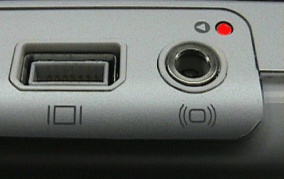
iBook (Dual USB), iBook (Late 2001) and iBook (14.1 LCD)
If the computer is on, turn it off.
Disconnect the AC power adapter.
Remove the battery.
Press and release the reset button (shown here) located above the Audio/Video port on the left side of the iBook (Dual USB) computer by inserting the end of a paper clip into the small hole and gently pressing the switch once.
Wait 5 seconds.
Reconnect the AC power adapter.
Put the battery back in the computer.
Press the Power button to restart the iBook computer.