Become a MacRumors Supporter for $50/year with no ads, ability to filter front page stories, and private forums.

d82k

macrumors member
Original poster
Dear all,

By mistake some days ago I deleted some folders and now they appears in my bin.

I open the bin and I see my files and my folders. How do I restore them in the same exact position they were originally???

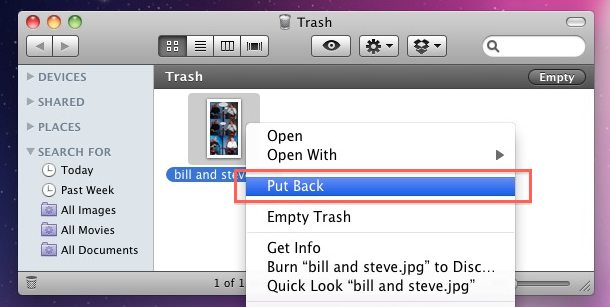
Where is the right click and than restore option?

Thank you for your help and support,
dk

ps: i don't remember the original file path that's why i need "restore where they originally were" option.

pps: Mac OS X 10.7.2
 
Make sure you are not selecting multiple files in the Trash, or sub-items of folders in the Trash.

Select one item at a time, and if a whole folder is in the Trash, you must select the whole folder and not anything inside it.
 
Last edited:
AFAIK Mac OS X has never had a "Put Back" option. You can either drag them manually out of the Trash, or look for a third-party program that adds the option (I'm not sure if there are any).

Arrived with Snow Leopard IIRC.

-----

OP I don't know why it's not there for you...
 

Attachments

  • Screen shot 2011-12-22 at 08.24.18 PM.png
    Screen shot 2011-12-22 at 08.24.18 PM.png
    25.7 KB · Views: 155
Thank you all for your replies.

I just tired, with some files and it works, but it does not with the files i have to recover.

Furthermore i discovered that these files has been put in the trash using iMovie app.

any idea?

Thank you
dk
 

Attachments

  • Screen.png
    Screen.png
    169.8 KB · Views: 99
But you can do copy that files, right?
just do it.

----------

As far as i know trash/finder can't put back files from/into Temporary folder.
 
Thank you for your answers, yes i will try to move them manually in some iMovie folder and see what happen.

Thank you
dk
 
Register on MacRumors! This sidebar will go away, and you'll see fewer ads.