Become a MacRumors Supporter for $50/year with no ads, ability to filter front page stories, and private forums.

octav

macrumors newbie
Original poster
Hello!
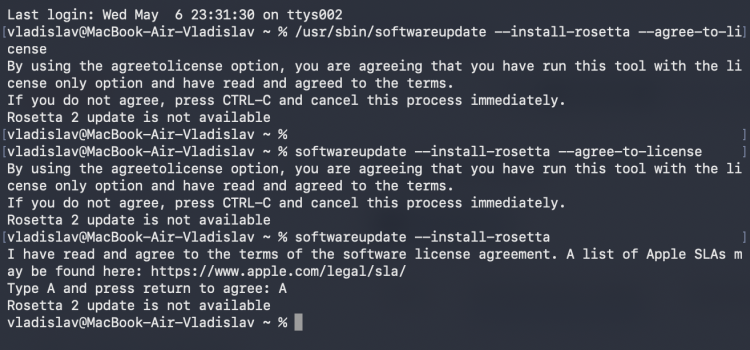
I'm trying to install Rosetta on Tahoe 26.4.1 using Terminal. Always answer "Rosetta 2 update is not available".
Macbook Air M5.
Please help!
 

Attachments

  • ros.png
    ros.png
    782.8 KB · Views: 100
Maybe no update is available, because it's already installed?

What happens if you just launch an Intel app? (Or check the box to use Rosetta on a Universal binary.)
 
Maybe no update is available, because it's already installed?

What happens if you just launch an Intel app? (Or check the box to use Rosetta on a Universal binary.)
No, it can't find it using search, and there's no checkbox. I open the old program—it prompts me to install it, then says "no connection"
 
Weird. Are you signed into Beta Updates? It may be some temporary issue with Apple's servers, or the software update catalog.

Apple is not permanently dropping support for Rosetta until MacOS 28.
 
Get Rosetta pkg links directly from Apple, in Terminal
- for all macOS builds
Code:
curl -sfL "https://swscan.apple.com/content/catalogs/others/index-rosettaupdateauto-1.sucatalog" | plutil -p - | awk -F'"' '/"BuildVersion" =>/ {build=$4} /"URL" => ".*RosettaUpdateAuto[.]pkg"/ && build != "" {print build; print $4 ORS; build=""}'

- for the macOS version you are running
Code:
curl -sfL "https://swscan.apple.com/content/catalogs/others/index-rosettaupdateauto-1.sucatalog" | plutil -p - | awk -F'"' '/"BuildVersion" =>/ {build=$4} /"URL" => ".*RosettaUpdateAuto[.]pkg"/ && build != "" {print build; print $4 ORS; build=""}' | grep -A 1 "$(sw_vers -buildVersion)"

https://gist.github.com/b0gdanw/07e78df8c6be60c379a5f7816d1d353b
 
  • Like
Reactions: Alameda
macOS Tahoe 26.4 has introduced a nagging message about "Support ending for Intel-based apps". The message appears when starting x86_64 apps on macOS Tahoe 26.4 and above and can be disabled with a configuration profile.
Details about the profile
Der Flounder "Disabling Rosetta awareness messages on macOS Tahoe"
https://derflounder.wordpress.com/2026/03/25/disabling-rosetta-awareness-messages-on-macos-tahoe/
DisableRosettaUsageAwareness.mobileconfig
https://raw.githubusercontent.com/r...ess/DisableRosettaUsageAwareness.mobileconfig

Apple's support article and documentation
Using Intel-based apps on a Mac with Apple silicon
https://support.apple.com/en-us/102527
macOS Tahoe 26.4 Release Notes
"Starting in macOS Tahoe 26.4, users will be notified when they launch apps that use Rosetta of the upcoming incompatibility."
https://developer.apple.com/documentation/macos-release-notes/macos-26_4-release-notes
Apple Developer Documentation - Restrictions
https://developer.apple.com/documentation/devicemanagement/restrictions
"allowRosettaUsageAwareness
boolean
If false, disables Rosetta usage awareness. When Rosetta usage awareness is active, a pop-up dialog is displayed to the user when an app that is using Rosetta is launched. The pop-up dialog indicates that Rosetta will be removed in a future version of the operating system so that the user can contact the app vendor regarding a replacement for the current app.
Available in macOS 26.4 and later."
 
Register on MacRumors! This sidebar will go away, and you'll see fewer ads.