Become a MacRumors Supporter for $50/year with no ads, ability to filter front page stories, and private forums.

dazzer21-2

macrumors 6502
Original poster
I've upgraded to Sequoia 15.7.5. Safari is version 26.4. Mac mini M2 Pro. Since upgrading, probably 1 in 2 sessions in Safari will result in the need to force quit. Doesn't seem to be any particular sites that cause it, and no particular time frame. Could be 10 seconds after opening, or it could be a couple of hours. Previously, no issues whatsoever. Is this an issue? Is there a workaround? Can be quite irritating when collating data. Thanks.

 
Deleting caches might help.
Safari > Settings > Advanced > Show features for web developers, then from the Develop menu - Empty caches or directly with the shortcut ⌥⌘E
 
FYI Safari was crashing multiple times a day with the 26.4 update under Tahoe also. Hence why I am back on Sequoia and Safari 18.6, among other Tahoe reasons.
 
I have no issues with Safari 26.4 (20624.1.16.18.2) on Sequoia 15.7.5 (24G624). I don't use iCloud & Private Relay.
 
  • Like
Reactions: katbel
For me Safari (20624.1.16.18.2) and macOS 15.7.5 (24G624) becomes unusable (with CPU at 300 to 400%) and needs to be force quit and restarted. Maybe every 3-4 days. I do use iCloud and Private Relay. I am more suspicious of Safari extensions (like AdGuard).
 
  • Like
Reactions: SketchyClown
Can you update to 15.7.5 and stay with Safari 18.6?

I'm on MBA M2 8/512 running 15.7.3 & 18.6 thinking of updating to 15.7.5 but would like to stay on Safari 18.6. I do use iCloud.
 
  • Like
Reactions: frou
Can you update to 15.7.5 and stay with Safari 18.6?

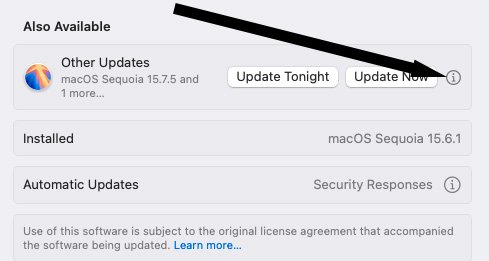
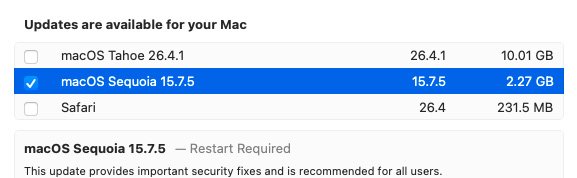
Safari 26 is provided as a separate update from macOS Sonoma and macOS Sequoia updates.
Make sure you click on the i and deselect Tahoe and Safari.

SelectUpdates.jpg
SelectSequoia.jpg
 
I update Safari and the OS together. It seems you've updated Safari but not the OS?

I'm on Sequoia macOS 15.7.5 (24G624) and using Safari Version 26.4 (20624.1.16.18.2). I had over 1200 tabs open, and currently 398, and not seen Safari crash at all across multiple versions in the Sequoia series.

Have you run a memory diagnostic?
 
You can actually downgrade safari back to 18.x. Unfortunately I didn’t remember the links to download Safari 18.x for Sequoia.
 
I update Safari and the OS together. It seems you've updated Safari but not the OS?
I'm on Sequoia macOS 15.7.5 (24G624) and using Safari Version 26.4 (20624.1.16.18.2).
Who are you addressing?
The first post says:
I've upgraded to Sequoia 15.7.5. Safari is version 26.4.
The user hasn't been back on this thread since then.

You can actually downgrade safari back to 18.x. Unfortunately I didn’t remember the links to download Safari 18.x for Sequoia.
It doesn't seem to be working for everyone. https://forums.macrumors.com/threads/macos-15-7-safari-26-laggy-garbage.2466489/post-34538315

Safari links https://mrmacintosh.com/macos-safari-full-installer-database-download-directly-from-apple/
 
Register on MacRumors! This sidebar will go away, and you'll see fewer ads.