Anyone else not able to scroll on certain websites in latest Tahoe/Safari?
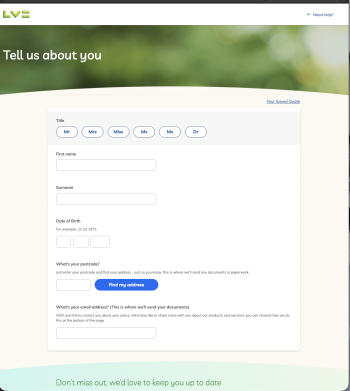
I've been trying to get car insurance quotes these last few days and noticed the pages load but I cannot scroll at all. Not even using keyboard arrows?!
Not sure if I can post links but if you go to www.lv.com website and click on 'Start Car Insurance quote', you get a form to start a quote but you cannot scroll on the page. There's loads like this on LV website (I've informed them) and I've noticed other sites too since Tahoe dropped and only now realised there's a bit of a pattern. I can't remember the other sites as I just assumed they were having an off day at the time but it's clear there's a pattern of sites that don't allow scrolling since I've upgraded. I also recall this has been an issue in the past when Apple updates (breaks) MacOS. In the past it was Banks that had an issue if I recall. I can't remember if Apple had to fix something or the banks had to adjust their sites to suit Apples whims again. Probably the latter.
I tried to do it on iOS and the page says 'we are having issues with the site' so something weird is going on. LV tell me they are not aware of any issues but their website is saying the opposite. Very strange.
UPDATE: Also the back arrow doesn't work on these particular pages?!
Firefox works fine.
I've been trying to get car insurance quotes these last few days and noticed the pages load but I cannot scroll at all. Not even using keyboard arrows?!
Not sure if I can post links but if you go to www.lv.com website and click on 'Start Car Insurance quote', you get a form to start a quote but you cannot scroll on the page. There's loads like this on LV website (I've informed them) and I've noticed other sites too since Tahoe dropped and only now realised there's a bit of a pattern. I can't remember the other sites as I just assumed they were having an off day at the time but it's clear there's a pattern of sites that don't allow scrolling since I've upgraded. I also recall this has been an issue in the past when Apple updates (breaks) MacOS. In the past it was Banks that had an issue if I recall. I can't remember if Apple had to fix something or the banks had to adjust their sites to suit Apples whims again. Probably the latter.
I tried to do it on iOS and the page says 'we are having issues with the site' so something weird is going on. LV tell me they are not aware of any issues but their website is saying the opposite. Very strange.
UPDATE: Also the back arrow doesn't work on these particular pages?!
Firefox works fine.