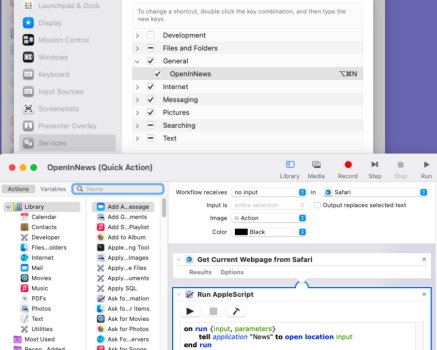
For Firefox I was able to make a keyboard shortcut to open a webpage in the News app. This is for the paywall stuff I run across while browsing. If the story is available in the News app it opens just fine.
However, I can't get a keyboard shortcut to work for Safari and I think it's because the "Share…" menu item makes a separate little selection window pop in the top center of the screen. In Firefox it's just a submenu that pops up.
Does anyone know how to get a keyboard shortcut to work on this in Safari or is this just another reason to not switch over to Safari on all of my devices?
However, I can't get a keyboard shortcut to work for Safari and I think it's because the "Share…" menu item makes a separate little selection window pop in the top center of the screen. In Firefox it's just a submenu that pops up.
Does anyone know how to get a keyboard shortcut to work on this in Safari or is this just another reason to not switch over to Safari on all of my devices?