Become a MacRumors Supporter for $50/year with no ads, ability to filter front page stories, and private forums.

trlyka

macrumors 6502a
Original poster
I'm sure this is an easy fix…I recently rebooted and all the sudden Safari was hiding menus, shortcuts, tabs…Anyway, I think I fixed that, but now when I click a link (say an item to view on Amazon), it opens a new tab. I don't want a new tab, I want it to stay within that same tab. What do I need to do?

Version 6.1.6
OSX 10.7.5

Thanks 🙂
 
Last edited:
Click: Safari/ Preferences/ Tabs/ uncheck "click opens link in new tab"

Thanks, but that doesn't seem to make a difference. I believe that is for using the command key in conjunction with other keys to perform specific actions.
 
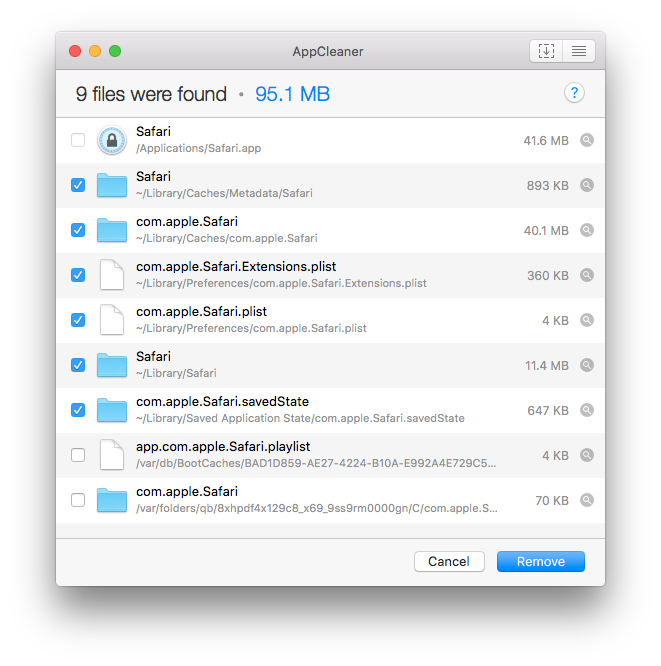
When an app is being completely stupid, I just clear all out the preference files and whatnot. To do so, back up your bookmarks, download AppCleaner, and delete everything from Safari (except Safari, obviously): https://freemacsoft.net/appcleaner/

N3JxH6J.png

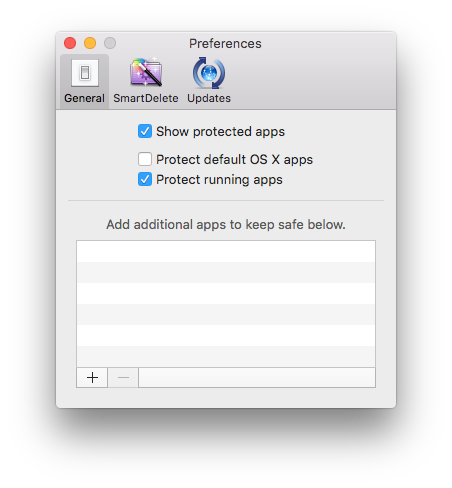
Also, make sure to uncheck "Protect default OS X apps" in the preferences.

uKxqB6L.png
 
Register on MacRumors! This sidebar will go away, and you'll see fewer ads.