
Become a MacRumors Supporter for $50/year with no ads, ability to filter front page stories, and private forums.

srp

macrumors regular
Original poster
More new stuff for your PowerPC Mac!

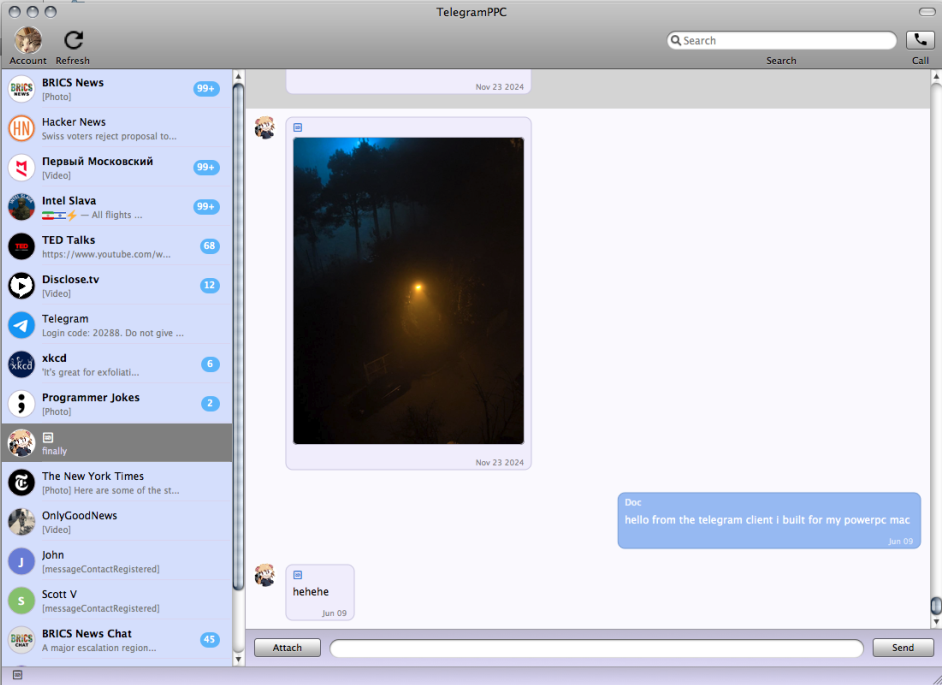
Here's a Telegram client, very creatively named TelegramPPC, powered by a port of tdlib. tdlib is the official Telegram library used for building third-party clients - tdlib is now available on PPCPorts too!

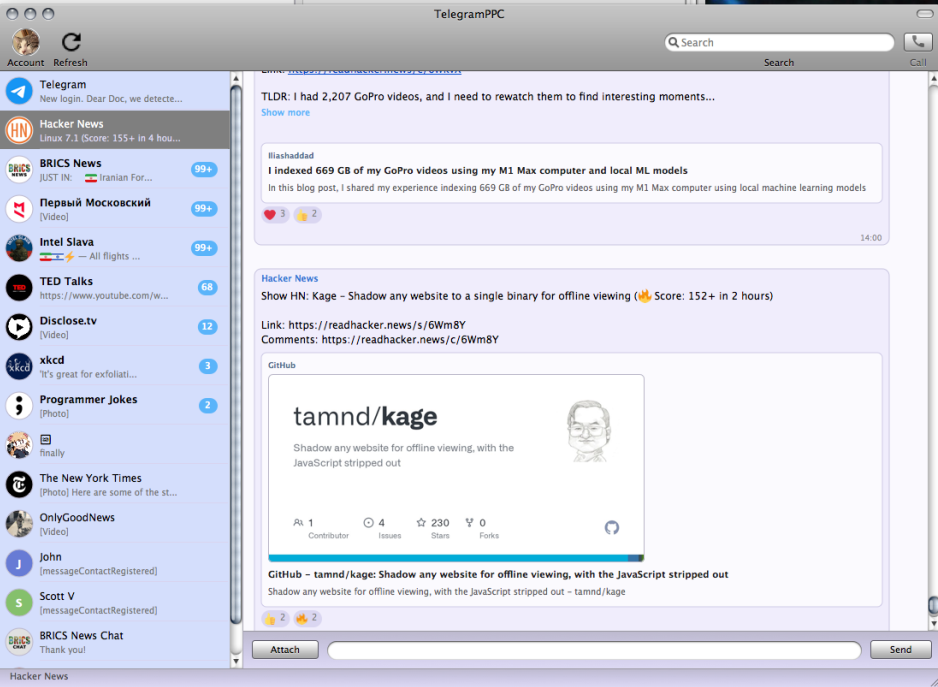
TelegramPPC offers a native, feature-rich UI designed and optimized for G4 and G5 Macs running Leopard. Watch videos, react to messages and more! Upload files, participate in group chats, even make voice calls (video chat support planned). You can even participate in end-to-end encrypted Secret Chats.

To login, just provide the phone number associated with your Telegram account. A code will be sent to the app on your phone.
1781466306445.png


This client features a full messaging experience with your contacts and followed channels:
1781469704545.png

All of the requests are handled directly on your Mac with no relay or man-in-the-middle needed. Telegram's official tdlib handles all of the request processing, encrypting your traffic in transit, and Keychain Access is utilized for storing credentials and other sensitive data. It works great on my G5 and pretty well on my G4 - although I'm still working to optimize media playback and large group chats in particular.

You can view the source code here: https://github.com/doctashay/telegram-ppc

You can download it for your G4 or G5 Mac here: https://github.com/doctashay/telegram-ppc/releases/tag/v0.1.0

Direct Download (G4)
Direct Download (G5)

More updates are planned in the future - if you have any issues, feel free to open a bug report on my GitHub!
 
Last edited:
Not quite as relevant for PowerPC users, but I pushed another update today that provides build compatibility for Intel (i386 and x86_64) and now supports up to macOS Tahoe (26.5.1).
1781993234995.png


You can download a fat universal build with all 3 architectures included, or choose a smaller build for your specific platform: https://github.com/doctashay/telegram-ppc/releases/tag/v0.2.1

Universal Build (Direct Download)
PowerPC Build (Direct Download)

I am still making some changes to the new CI/CD pipeline and I haven't fully tested the i386 build yet - maybe somebody with an 32-bit Intel Mac (or 32-bit capable) can test for me?

I'm gonna have to find a new name now...
 
Last edited:
Thanks to your earlier patches for tdlib, I have fixed now the build of nchat (only telegram support enabled, obviously, since for whatsapp we need golang):

View attachment 2644225

Sweet! Meanwhile, I have an update coming out today that will allow you to set proxy settings before logging in - useful for those with government censorship in their country!
 
Seems it got quite quiet around this project for a month now or so ... I just discovered telegram_ppc today.
It works on Leopard (PPC), but on El Capitan the App starts, it shows the "About" dialog, it let me check for updates (which are none of course), but the Login does not show up.
Most chats miss the last few messages. All in all it seems to run fast and the native interface is a welcome change to all the foreign-looking software on modern systems these days.
 
Seems it got quite quiet around this project for a month now or so ... I just discovered telegram_ppc today.
It works on Leopard (PPC), but on El Capitan the App starts, it shows the "About" dialog, it let me check for updates (which are none of course), but the Login does not show up.
Most chats miss the last few messages. All in all it seems to run fast and the native interface is a welcome change to all the foreign-looking software on modern systems these days.
Hey, thanks for the reply.

If you're open to testing a fix for some of those issues, you can download this dev build: https://github.com/doctashay/telegram-ppc/actions/runs/30767919174/artifacts/8839640329

This build also includes configurable proxy options for connecting in locations where Telegram is censored.
 
at the moment I am busy with family vacation. tonight I might find some time to test the builds on several systems. I am interested in Snow Leopard 32 Bit (64 Bit as well but not as urgent), 64 Bit Lion and may be Mountain Lion, Leopard PowerPC G4/G5, Tiger G3/G4/i386. One of my Macs has Leopard x86_64, and an hella old Hackintosh still runs Leopard x86.

The build you send me starts up with the "verification key"-window on a MacBook Air 3,1 running High Sierra. The part to enter the phone number in the first place is missing.
 
Last edited:
Ok, the sad news is: only the PowerPC version works at all. Also on Snow Leopard, only the PowerPC version of SailPlane works at all. But on Snow Leopard, clicking the Chat-View makes the App crash while on real PowerPC the chat view works particularly.
Unfortunately, the i386 version shows no signs of life even after I logged in successfully into my Telegram-Account using Rosetta.
The Dev-version you linked me in your post still just shows the Authorization window, both with Rosetta, as well as native i386.
 
Not quite as relevant for PowerPC users, but I pushed another update today that provides build compatibility for Intel (i386 and x86_64) and now supports up to macOS Tahoe (26.5.1).
View attachment 2639782


I am still making some changes to the new CI/CD pipeline and I haven't fully tested the i386 build yet - maybe somebody with an 32-bit Intel Mac (or 32-bit capable) can test for me?

According to screenshots, you speak Russian... поэтому позволю себе по-русски.
If I'm wrong, I'll translate.

Итак! Попробовал на 10.7/Intel. При запуске программы появляется меню, но не открывается никакого окна.
Что делать? Как быть?
 
According to screenshots, you speak Russian... поэтому позволю себе по-русски.
If I'm wrong, I'll translate.

Итак! Попробовал на 10.7/Intel. При запуске программы появляется меню, но не открывается никакого окна.
Что делать? Как быть?
Hi, I am primarily an English speaker, hope this is okay, I can translate if needed.

Sorry to hear about your issue with 10.7 Intel. There is a known issue with 10.7-10.10 and I am working on a fix. I will let you know when it is ready!
 
  • Like
Reactions: Renco
According to screenshots, you speak Russian... поэтому позволю себе по-русски.
If I'm wrong, I'll translate.

Итак! Попробовал на 10.7/Intel. При запуске программы появляется меню, но не открывается никакого окна.
Что делать? Как быть?

Мы так зафлудим тред странными буквами 🙂
 
  • Haha
Reactions: Renco and srp
Register on MacRumors! This sidebar will go away, and you'll see fewer ads.