
Become a MacRumors Supporter for $50/year with no ads, ability to filter front page stories, and private forums.

turtlebud

macrumors 6502a
Original poster
Seems like something happened recently that cause my scanner + mac to go on the fritz whenever I try to scan a document as a PDF.

Scanner: Brother MFC-L3770CDW
Macbook Pro (2019) running 10.14.6

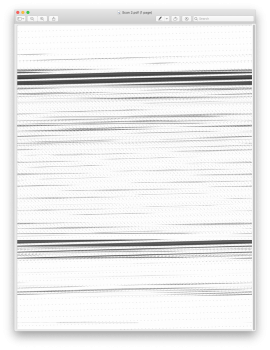
When I scan a document from either the flatbed or document feeder and select PDF as the format, I get this garbled mess (see attachment) in the documents. However, when I scan to JPEG it scans with no problems.

Any ideas on what might be causing this and what I can do to fix it? I primarily like to scan to PDF because I can scan a whole set of papers into a single document and it tends to be smaller than jpg. I can do it with jpg, but it requires opened all the pages and then merging them into a PDF.

Thanks!
 

Attachments

  • Screen Shot 2020-04-10 at 12.30.36 PM.png
    Screen Shot 2020-04-10 at 12.30.36 PM.png
    956.7 KB · Views: 1,133
OK. I was going to suggest Image Capture if you were using any Brother software.
Never knew you could use Preview though. 👍
 
Preview and Image Capture are one and the same when it comes to scanning. Preview simply uses the Image Capture engine to scan, as do many other applications out there.

@turtlebud what are your settings when you scan? Do you have any image correction settings enabled? I have seen something like this before many years ago but don't recall what had to be done for this to get fixed. You could try one thing: create a new account on your Mac, login with that new account, and try scanning as PDF again to see if this is a user issues or a system-wide issue.
 
  • Like
Reactions: chabig
I am now having problems with Image Capture.
Samsung M2070 Laser printer/scanner.
Brand new Mac mini with Catalina 10.15.4
It will scan as a photo image but not as a pdf.
Samsung sold their printer devision to HP. HP web site implies they know of problems with scanning and provide a new driver. Guess what - it doesn't work
Anyone have any brain waves for an alternative scanner software? I am using my iPhone to scan at the moment, which is OK but not really very professional.
 
Seems like something happened recently that cause my scanner + mac to go on the fritz whenever I try to scan a document as a PDF.

Scanner: Brother MFC-L3770CDW
Macbook Pro (2019) running 10.14.6

When I scan a document from either the flatbed or document feeder and select PDF as the format, I get this garbled mess (see attachment) in the documents. However, when I scan to JPEG it scans with no problems.

Any ideas on what might be causing this and what I can do to fix it? I primarily like to scan to PDF because I can scan a whole set of papers into a single document and it tends to be smaller than jpg. I can do it with jpg, but it requires opened all the pages and then merging them into a PDF.

Thanks!
Exactly my problem. Did you ever get a good answer? JPG, PNG, etc. work fine with our 2750DW, but PDFs are just as you show.
 
Updating: No printer driver to download. Brother says: “We recommend using AirPrint. If your machine does not support AirPrint, download Brother iPrint&Scan from the App Store.” And AirPrint produces the garble seen in the original post. Thanks.
 
I have a different Brother printer. I didn't install the printer driver because I use AirPrint. But I did have a specific scanner driver to install. Yours doesn't seem to have that. I wonder if that is why you aren't getting good results.
 
Register on MacRumors! This sidebar will go away, and you'll see fewer ads.